
April 8, 2026
A Salesforce Implementation Partner is a certified consulting firm that helps you deploy, customize, and tune Salesforce to fit your workflows and goals. Choosing the wrong one is the single biggest reason projects fail - and industry data shows nearly half of implementations miss expectations. This guide gives you a practical, step-by-step way to pick a partner that actually delivers.
Here's what you walk away with: a clear view of what implementation partners do, nine criteria to score each one, red flags that signal trouble, and real 2026 cost and timeline benchmarks.
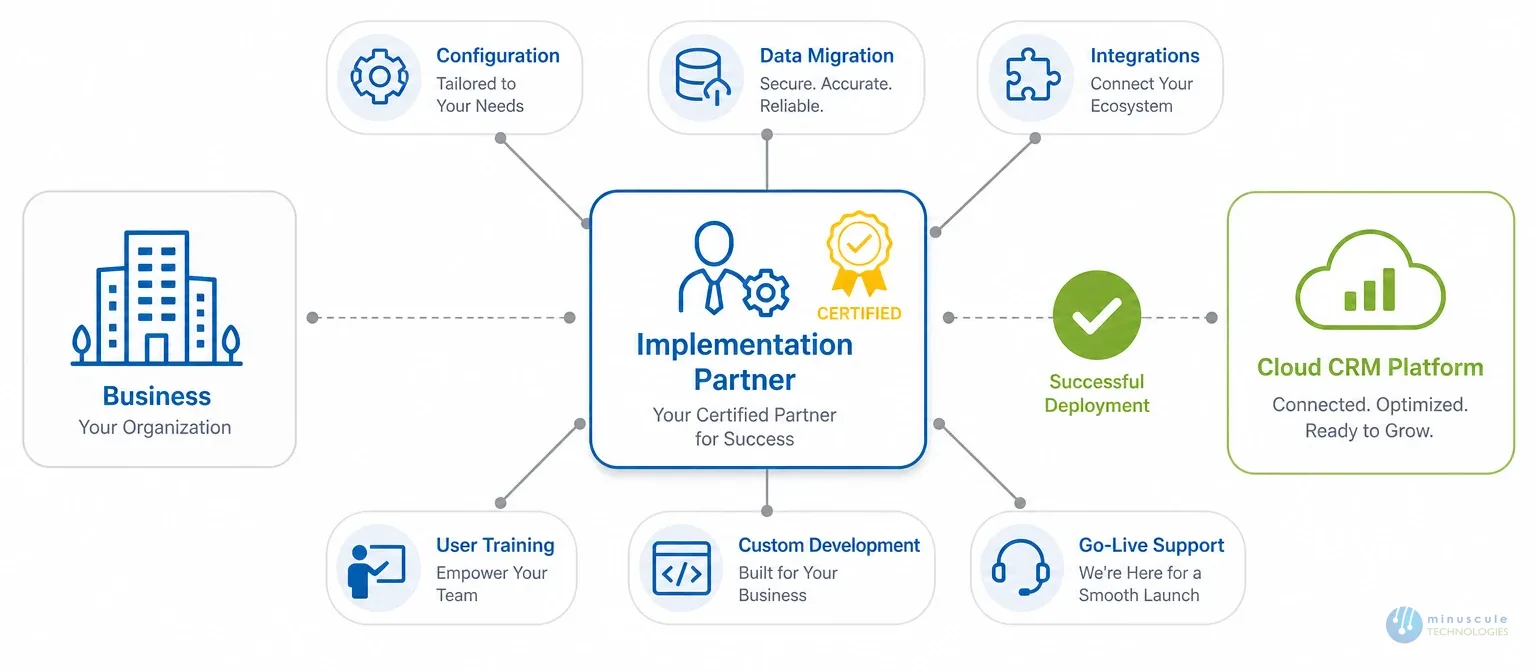
A Salesforce implementation partner is an independent consulting firm, certified through Salesforce's partner program, that handles the full process of deploying Salesforce in your org. Their work spans requirements, configuration, custom development, data migration, integrations, user training, and post-launch support.
Here's where buyers get confused. The terms implementation partner, consulting partner, and managed services provider get used as if they mean the same thing. They don't.
| Type | What They Do | Best For | Engagement Length |
|---|---|---|---|
| Implementation Partner | Builds and deploys your org, or migrates from legacy. | New deployments, major overhauls. | 3–12 months (project). |
| Consulting Partner | Advises on strategy, roadmap, and best practices. | Planning, org assessments. | Weeks to months. |
| Managed Services Provider | Runs day-to-day admin, tuning, and support after go-live. | Ongoing upkeep and support. | 12+ months (retainer). |
Knowing which type you need before you shop saves weeks of mismatched talks. If you're rolling out Salesforce for the first time or rebuilding a messy org, you need an implementation partner. If your org is live and you need steady improvements, you're looking at managed services. For a wider checklist, review these factors for choosing a Salesforce IT solutions provider.
"Can we just handle this in-house?" It's the first question most IT leaders ask. The honest answer is: maybe, but probably not well.
Here's why. Salesforce has over 3,000 config options across its core clouds alone. Add custom Apex, Lightning Web Components, ERP or marketing integrations, and legacy data migration, and you have a project that needs deep, special skill.
The numbers tell the story. Firms that work with certified partners see 26% faster time-to-value than those that go solo, per Salesforce's own data. Failed rollouts cost 1.5 to 3 times the original budget to fix.
The companies that regret hiring a partner are rare. The ones that regret not hiring one early enough? That's a pattern we see often at Minuscule Technologies.
Salesforce sorts its certified partners into four tiers on the Salesforce AppExchange partner directory: Base, Ridge, Crest, and Summit. Most buyers have heard of these but don't know what they mean, or whether a higher tier is a better fit.
Here's the part nobody tells you. A Summit partner isn't always the best choice. A Ridge or Crest partner that focuses on your industry and project type will often beat a generalist Summit firm that assigns junior staff to your account.
What matters more than tier: do they have certified experts in the exact clouds you're deploying, have they done projects like yours in size and complexity, and will senior architects work on your project - not just junior consultants? The tier gives you a baseline check. Your review should go deeper.
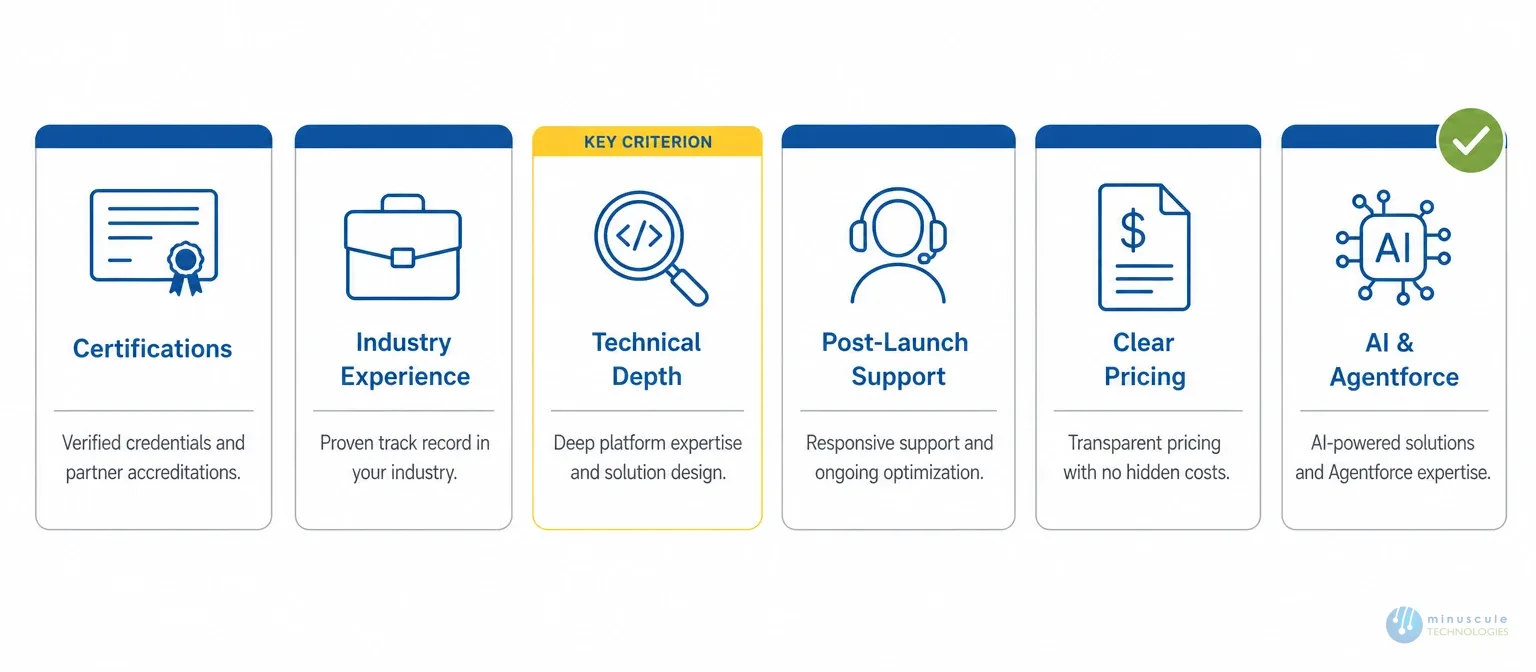
Most guides give generic advice like "check their experience." Here's a framework you can actually score partners against.
1. Relevant certifications mapped to your project. Not all certs are equal. A partner with 50 Marketing Cloud certs won't help if you need Sales Cloud and CPQ. Ask which certs the people on your project hold, not just totals. You can verify any credential against the official Salesforce certifications list.
| Your Project | Certifications That Matter |
|---|---|
| Sales Cloud | Sales Cloud Consultant, Platform App Builder |
| Service Cloud | Service Cloud Consultant |
| Custom development | Platform Developer I & II |
| Architecture-level work | System Architect, Application Architect |
2. Industry experience. A partner who has built for healthcare knows HIPAA limits. One who has worked in manufacturing knows dealer management and complex quoting. Ask for references in your industry. If they can't give two or three, they'd be learning on your dime.
3. Technical depth beyond configuration. Many partners lean on clicks-not-code setup. That works for simple cases. But if you need custom Apex, complex Lightning Web Components, or deep integrations, you need real engineering skill. Ask what percentage of their team are developers versus admins versus consultants. At Minuscule Technologies, our team of 160+ Salesforce experts includes architects, developers, and DevOps specialists - not just consultants.
4. Post-launch support model. Go-live isn't the finish line. It's when the real work begins, as adoption issues and edge cases surface. Before you sign, clarify their support hours, response times, and how they handle fixes and enhancements. A partner that vanishes after go-live wasn't invested in your success.
5. Communication style and fit. This sounds soft, but it's the top complaint in post-project surveys. Watch for: do they listen more than they pitch, do they push back when needed, and can they explain tech in plain terms your business team gets?
6. Clear pricing and engagement models. Vague pricing is one of the fastest ways to blow a budget. Get clarity on the pricing model (fixed vs. time-and-materials), what's included, and what counts as extra.
7. Change management and training. Technical setup is maybe 60% of a win. The other 40% is getting people to use the system. Look for role-based training, workflow-specific docs, and train-the-trainer programs so your team can sustain adoption.
8. Data migration and security skill. Moving data from a legacy CRM or spreadsheets is where many projects stumble. Your partner should have a documented method with data cleansing, field mapping, test runs, validation, and rollback plans. They should also understand your compliance needs - Salesforce Trust Layer alignment, GDPR, HIPAA, or SOX.
9. AI and Agentforce readiness (the 2026 factor). Salesforce has invested heavily in Agentforce, its AI agent platform. A future-ready partner should know Data Cloud, Einstein, and Agentforce. If they haven't worked with these yet, they're already behind.
After reviewing dozens of partners over our years in the field, these warning signs consistently predict trouble:
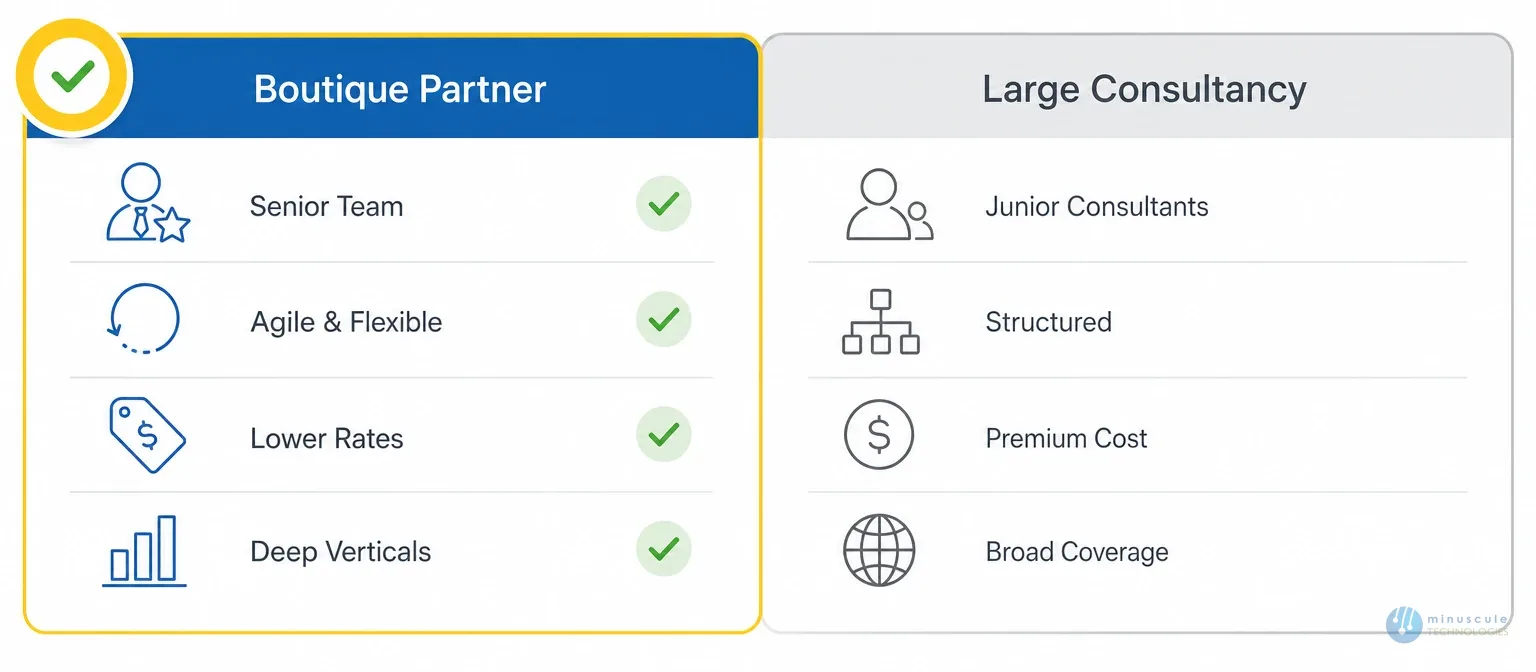
Both models have real strengths - the right choice depends on your situation.
| Factor | Boutique / Mid-Size Partner | Large Consultancy (Big 4, Global SIs) |
|---|---|---|
| Attention | Senior team on your project | May assign junior consultants |
| Flexibility | Agile, adaptable | Structured, less ad-hoc |
| Cost | 30–50% lower rates | Premium, $200–400+/hour |
| Industry depth | Deep in a few verticals | Broad but sometimes shallow |
| Scalability | Best for small to mid-size | Suited to large, multi-country |
| Speed | Faster ramp-up | Longer onboarding |
| Relationship | Direct access to leadership | Account-management layers |
For enterprises running multi-country rollouts with 1,000+ users, a large consultancy makes sense. For mid-market firms deploying one or two clouds with under 500 users, a specialized boutique partner often delivers better results at a lower cost.
One of the biggest gaps in every rival guide is concrete numbers. Here are benchmarks from 75+ Salesforce projects.
Timelines by Complexity
| Project Type | Typical Timeline | Key Variables |
|---|---|---|
| Basic Sales Cloud (under 50 users) | 6–10 weeks | Data migration scope, integrations |
| Sales + Service (50–200 users) | 3–5 months | Workflow complexity, reporting |
| Multi-cloud (200+ users) | 6–12 months | Number of clouds, legacy integrations |
| Full enterprise transformation (500+ users) | 9–18 months | ERP, data warehouse, change management |
Cost Ranges by Company Size
| Company Size | Typical Budget | What's Usually Included |
|---|---|---|
| Small (10–50 users) | $15,000 – $50,000 | Single cloud, basic migration, admin training |
| Mid-market (50–200 users) | $50,000 – $200,000 | Multi-cloud, custom development, integrations, training |
| Enterprise (200–1,000 users) | $200,000 – $500,000+ | Complex integrations, change management |
| Large global (1,000+ users) | $500,000 – $2M+ | Full transformation, phased rollout |
These ranges don't include Salesforce license costs only partner fees. Budget an extra 15–20% buffer for scope changes, which are normal.
When you compare Salesforce implementation companies, this framework keeps your review structured rather than gut-driven. Strong Salesforce implementation services cover the full journey - from strategy and data migration to training and long-term managed services.
Partner fees run from $15,000 for a basic single-cloud setup to over $1M for large enterprise work. The main drivers are complexity, user count, customization, and integrations. Most mid-market firms spend $75,000 to $200,000. Always check if the price includes data migration, training, and post-launch support, since these are often billed separately.
A basic Sales Cloud rollout can go live in 6–10 weeks. Multi-cloud projects take 3–6 months. Complex enterprise work with ERP integrations and global rollouts can take 9–18 months. Data quality, integration complexity, and stakeholder availability drive the timeline.
The right certs depend on your project. For Sales Cloud, look for Sales Cloud Consultant and Platform App Builder. For custom work, Platform Developer I and II. For architecture, System Architect and Application Architect. Check that the people on your project hold the right certs.
Yes, for simple cases. A team under 20 users on out-of-the-box Sales Cloud, with a certified admin, can handle the basics. But once you need custom work, complex migration, or integrations, the risk of going solo rises fast. Many self-implementers hire a partner later to fix tech debt, which costs more.
A consulting partner mainly advises on strategy and roadmap. An implementation partner builds and deploys. Many firms offer both. The key is to confirm whether the partner will do the hands-on work or just hand you a strategy document. For more, see our guide on why you need consultants for your Salesforce implementation.
Picking the right partner comes down to alignment: do they understand your industry, your tech needs, and your growth goals? Use the nine criteria in this guide to make your review structured, not gut-driven.
If you want a Salesforce Implementation Partner with deep engineering expertise, industry knowledge across manufacturing, BFSI, real estate, and healthcare, and a team of 160+ certified Salesforce professionals, Minuscule Technologies fits the brief. We've delivered 75+ Salesforce projects globally, and we'd rather tell you honestly whether we're the right fit than oversell.
Schedule a free consultation and let's find the partner that fits.
You've seen what's possible. Now, let's make it happen for your business. Whether you need an end-to-end Salesforce solution, a complex integration, or ongoing managed services, our team is ready to deliver.

Schedule a Free Strategic Call


Plot No. 4, Sridevi Amman Street, Perumal Nagar Extension, Old Pallavaram, Chennai, Tamil Nadu 600117, India.
