

May 20, 2026
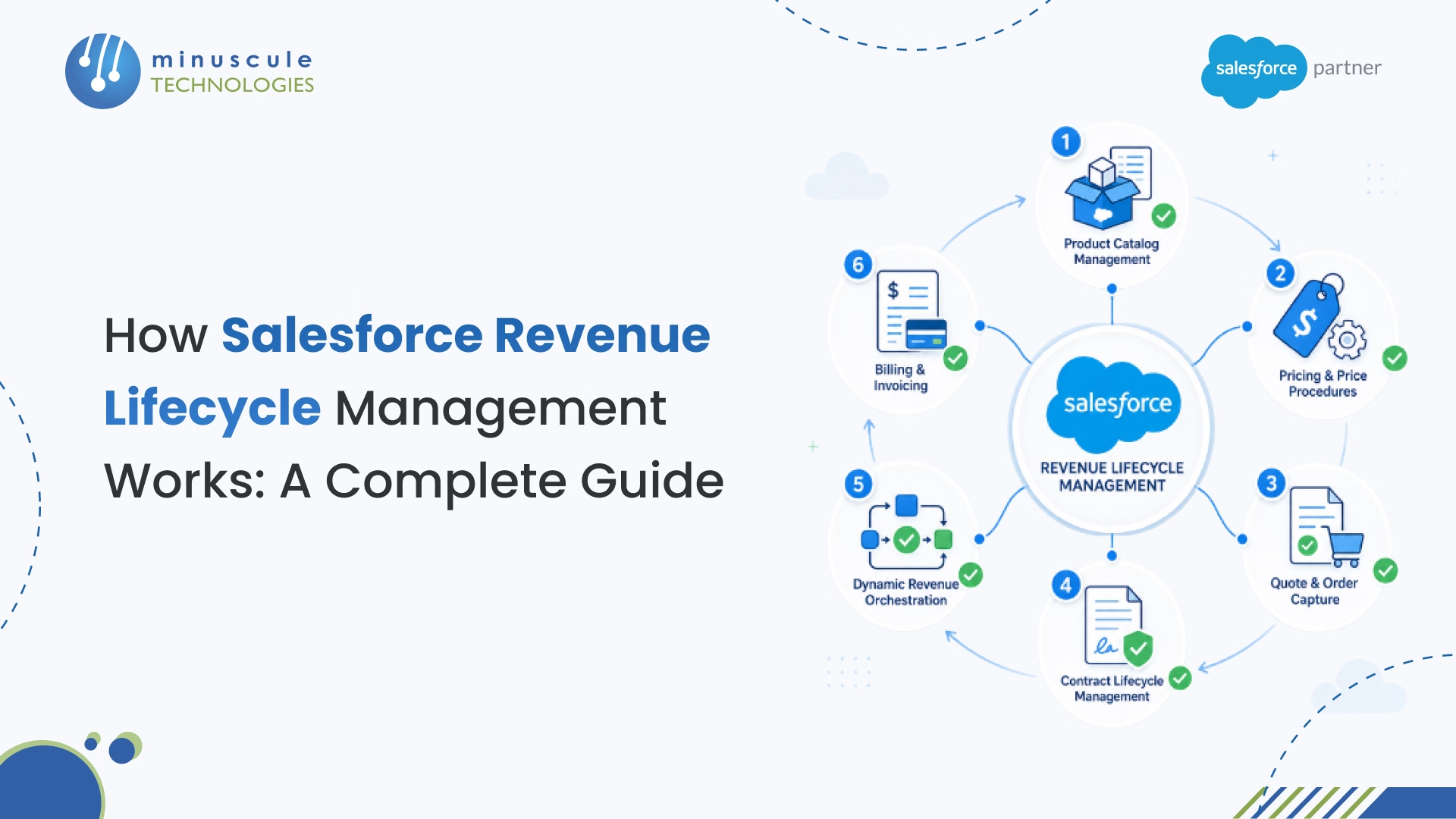
Salesforce Revenue Lifecycle Management (RLM) is a native, API-first platform that unifies the entire product-to-cash process - from product catalog setup and pricing to quoting, contracts, order fulfillment, and billing - inside a single Salesforce environment. Unlike the older CPQ tool it replaces, RLM runs on core Salesforce objects, supports subscription, usage-based, and one-time revenue models out of the box, and connects directly with Data Cloud and Agentforce AI.
If your org still runs Salesforce CPQ, here's the headline: Salesforce officially ended new CPQ sales in March 2025. RLM is the path forward, and this guide covers exactly how it works, what it costs, and how to tell if your org is ready to make the switch.
At its core, Salesforce Revenue Lifecycle Management is the platform Salesforce built to replace CPQ, Salesforce Billing, and several other point tools with one connected system. It handles the full revenue cycle: you set up products in a central catalog, define pricing rules, generate quotes, convert those quotes into orders, manage contracts, orchestrate fulfillment, and send invoices - all without leaving the Salesforce platform.
The practical difference from CPQ? RLM sits on standard Salesforce objects (like Product2, Order, and Asset), so it works natively with your existing flows, reports, and automations. CPQ, by contrast, lived on its own managed package with custom objects that often created data silos and integration headaches.
RLM also supports modern revenue models that CPQ struggled with. Subscription billing with mid-term changes, consumption-based pricing where charges depend on actual usage, milestone-based billing for services - RLM handles these natively instead of requiring workarounds or third-party add-ons.
If you've tried searching for this product over the last two years, you've probably noticed the branding keeps shifting. Here's the full timeline so you know exactly what's what:
Bottom line: RLM, Revenue Cloud Advanced, and Agentforce Revenue Management all refer to the same underlying product. In this guide, we'll stick with "RLM" because that's still what most teams search for.
RLM isn't a single feature - it's a set of six interconnected modules that cover every stage of the revenue cycle. Here's how each one works and why it matters.
Product Catalog Management is where everything starts. PCM lets you define your entire product and service lineup - including bundles, add-ons, and configurable options — in one centralized catalog.
What makes PCM different from standard Salesforce product records is the configurator. You can build rules that control which products can be sold together, which options are required or exclusive, and how product attributes (like storage tier or user count) affect the final offering. For a SaaS company selling a platform with multiple tiers, add-on modules, and professional services, PCM turns what used to be a messy spreadsheet exercise into a guided, rule-based flow.
PCM also ties directly into Salesforce's metadata framework, so your catalog stays consistent whether a rep is quoting in Lightning, a customer is self-serving through Experience Cloud, or an API call is coming from a partner portal.
Pricing in RLM goes well beyond simple price books. The platform introduces "pricing procedures" - essentially configurable pricing waterfalls that apply discounts, markups, tiered rates, and conditional rules in a specific order.
Say you're a manufacturer selling to distributors. Your pricing procedure might start with the list price, apply a distributor-tier discount (say 15% for Gold partners), add a volume discount for orders above 500 units, apply a regional adjustment for APAC markets, then calculate a final net price. Each step in the waterfall is configurable without code.
RLM also supports usage-based and consumption pricing natively. You can define rating schedules that calculate charges based on actual consumption data flowing in from Data Cloud — think API calls, storage used, or minutes consumed. This is a big deal for telecom, SaaS, and IoT companies that couldn't make CPQ work for metered billing without heavy customization.
This module handles the actual quoting process - building the quote, configuring line items, applying pricing, and converting accepted quotes into orders.
The quoting experience in RLM runs on a headless, composable architecture. That means it works through Lightning Web Components in the standard Salesforce UI, but it can also be embedded in custom portals, mobile apps, or partner channels through APIs. The quote-to-order conversion happens on standard Order objects, not custom managed-package objects like in CPQ.
For teams that need approval workflows, RLM supports multi-level approvals with conditional routing - so a 30% discount triggers a VP review, while anything above 40% goes to the CFO. These approvals integrate with Salesforce's standard approval process, which means you don't need to learn a separate system.
CLM in RLM handles contract creation, negotiation, amendments, and renewals. This is where RLM starts to shine compared to CPQ, which had minimal native contract management capabilities.
You can generate contracts directly from accepted quotes, with clause libraries and templates that pull in the right terms based on deal attributes. Need different payment terms for enterprise vs. SMB deals? Different compliance clauses for healthcare vs. financial services? CLM handles this through conditional clause logic.
Mid-contract changes - the bane of every CPQ admin's existence - work much more smoothly here. When a customer wants to add seats, upgrade a tier, or swap a product midway through a contract, RLM's amendment flow automatically recalculates pricing, adjusts the contract, and creates the appropriate order modifications. The MACD (Move, Add, Change, Delete) process that used to require custom Apex in CPQ is now a built-in workflow.
The 2025-2026 releases also added AI-powered clause generation through Agentforce, which can suggest contract language based on deal context, customer history, and compliance requirements.
DRO is probably the most underappreciated module in RLM - and the one that solves a problem CPQ never touched. Once an order is placed, DRO manages what happens next: provisioning, activation, delivery, installation, and any other post-sale steps your business requires.
DRO has two main components:
DRO connects the quote-to-cash gap that most organizations fill with manual handoffs, Slack messages, and spreadsheets. It's especially valuable for businesses with complex post-sale operations - think telecommunications, managed services, or enterprise software deployments.
RLM's billing module (now being built on Salesforce core, replacing the older Salesforce Billing managed package) handles invoice generation, payment tracking, revenue recognition, and financial reporting.
The billing engine supports multiple models simultaneously - you can bill one customer monthly for a subscription, quarterly for professional services, and on-demand for usage overages, all from the same contract. It also handles the accounting complexities that finance teams care about: proration for mid-cycle changes, coterminous renewals (aligning end dates across multiple subscriptions), and revenue recognition compliant with ASC 606 and IFRS 15 standards.
For companies currently using third-party billing tools like Zuora or Chargebee alongside Salesforce, RLM's native billing means one less integration to maintain and one less data silo between sales and finance. Our team has helped organizations streamline billing with Revenue Cloud, and the reduction in reconciliation time alone typically justifies the migration.
One of the most confusing aspects of Salesforce's revenue tools is understanding how RLM compares to the two CPQ products it replaces. Here's a direct comparison across the dimensions that matter most.
The biggest takeaway? RLM isn't just "CPQ with a new name." It's a fundamentally different architecture - built on standard objects, designed for composability, and backed by Salesforce's full AI and Data Cloud investment. If you're evaluating options for a new implementation, there's really no reason to start with CPQ today. If you're already on CPQ, the migration decision depends on your org's complexity, customization depth, and timeline.
On March 19, 2025, Salesforce officially stopped selling new CPQ licenses. Existing customers can keep using CPQ, and Salesforce has committed to maintenance and security patches — but no new features are coming. The estimated end-of-life date is somewhere around 2029-2030, though Salesforce hasn't confirmed an exact date.
This affects roughly 6,000+ organizations currently running Salesforce CPQ. If you're one of them, here's what the timeline looks like in practice.
That gives most teams a 3-5 year migration window. But waiting until the last minute is risky - migration projects for complex CPQ orgs typically take 9-12 months, and you'll want buffer time for testing and user training.
There's no one-size-fits-all answer. In our experience working with Salesforce orgs across industries, the decision usually comes down to three factors:
Migrate now if: Your CPQ org is relatively simple (under 500 products, few custom Apex triggers), you're already planning a major Salesforce initiative, or you need capabilities that CPQ can't deliver (usage billing, DRO, AI-powered quoting).
Wait and plan if: Your CPQ implementation is heavily customized, you're mid-contract on a multi-year Salesforce deal, or your team is already stretched thin with other projects. Use the next 6-12 months to audit your current CPQ setup and document customizations.
Consider a hybrid approach if: You want to start new product lines on RLM while keeping legacy products on CPQ during a phased transition. This layered approach reduces risk but requires careful data architecture planning.
RLM works differently depending on your industry and revenue model. Here's how it applies to four verticals where we see the most demand.
For SaaS businesses, RLM handles the full subscription lifecycle natively. You can set up tiered plans (Starter, Professional, Enterprise) in the product catalog, define per-seat and platform pricing, and automate renewals and expansion quotes.
The real value for SaaS companies is consumption-based pricing. If you charge based on API calls, storage, or active users, RLM connects with Data Cloud to pull real-time usage data and calculate charges automatically. No more CSV imports or manual reconciliation at month-end.
Mid-term upgrades and downgrades - which are constant in SaaS - trigger automatic proration calculations and contract amendments without manual intervention.
Manufacturers typically deal with complex product configurations, distributor-tier pricing, and long fulfillment cycles. RLM's product configurator handles multi-level BOMs (Bill of Materials) with dependency rules, and pricing procedures manage the distributor discount waterfalls that are common in this space.
DRO is especially useful here. When a manufacturer receives an order for custom equipment, DRO can orchestrate the full process: engineering review → procurement → production scheduling → quality check → shipping → installation. Each step routes to the right team and tracks progress on the Order record.
Telecom companies were early adopters of Industries CPQ (Vlocity) because of the complex bundling and provisioning requirements in that industry. RLM now offers a comparable approach on the core platform: bundle a mobile plan with a device, add insurance, apply promotional pricing for the first 12 months, then orchestrate SIM provisioning and device shipping through DRO.
The consumption billing capabilities are a natural fit here too. Telecom companies can rate calls, data usage, and roaming charges through RLM's rating engine, connected to usage records flowing in from network systems via Data Cloud.
Healthcare organizations use RLM to manage complex service agreements, equipment leases, and recurring supply orders. A medical device company, for example, might sell a capital device with an attached service contract, consumable supply subscriptions, and usage-based charges for cloud-connected diagnostics - all manageable in a single RLM contract.
Compliance is critical in this space, and RLM's CLM module helps by enforcing mandatory clauses (BAA requirements, HIPAA language) through conditional clause logic. The audit trail that RLM maintains on contract changes is also important for regulated industries.
Before starting an RLM project, run through this checklist. If you can check most of these boxes, you're in good shape. If not, you know where to focus your prep work.
If you're checking fewer than half of these boxes, consider spending 2-3 months on a readiness assessment before kicking off the project. Getting the foundation right upfront avoids costly rework later - something our Salesforce engineering team has learned across dozens of Revenue Cloud engagements.
No platform is perfect, and RLM has its share of rough edges - especially since it's still a relatively young product. Here's what to watch out for:
Salesforce Revenue Lifecycle Management (RLM) is a platform built into Salesforce that manages the entire process from setting up products and pricing to generating quotes, creating contracts, orchestrating fulfillment, and sending invoices. Think of it as the system that connects everything between "a customer wants to buy something" and "we collected the payment."
CPQ was a managed package that ran on custom objects inside Salesforce. RLM is built natively on standard Salesforce objects. RLM also includes capabilities that CPQ never had: built-in billing, contract lifecycle management, Dynamic Revenue Orchestration for post-sale fulfillment, and native AI integration through Agentforce. CPQ reached end-of-sale in March 2025 and won't get new features going forward.
The list price for Salesforce Revenue Cloud (which includes RLM) is approximately $200 per user per month. Actual pricing depends on your contract terms, org size, and negotiation. While this is higher than legacy CPQ per-user costs, RLM bundles capabilities (billing, CLM, orchestration) that previously required separate licenses and tools.
As of mid-2026, Salesforce doesn't offer a dedicated RLM certification. The closest credential is the Salesforce Revenue Cloud Consultant certification, which covers revenue management concepts on the platform. Salesforce has also added Revenue Cloud modules on Trailhead for hands-on learning. Given Salesforce's track record of creating certifications for strategic products, a dedicated RLM certification is likely coming.
Yes. RLM works with Salesforce's standard multi-currency framework, including advanced currency management with dated exchange rates. You can define prices in multiple currencies, generate quotes and invoices in the customer's currency, and manage exchange rate conversions through pricing procedures.
A greenfield RLM implementation typically takes 4-8 months. Migrating from CPQ to RLM takes 9-12 months for most organizations, and complex enterprises with deep ERP integrations may need 12-18 months. The biggest factor is the complexity of your existing customizations and integrations, not the RLM setup itself.
Salesforce stopped selling new CPQ licenses on March 19, 2025. Existing customers can continue using and renewing CPQ, and Salesforce will provide security and maintenance patches. However, no new features are in development. Full end-of-life is estimated around 2029-2030. Salesforce is directing all new customers to Revenue Lifecycle Management as the replacement.
Yes. RLM's API-first, headless architecture makes it straightforward to integrate with ERPs like SAP, Oracle, NetSuite, and Microsoft Dynamics. Common integration patterns include syncing orders to ERP for financial processing, pulling inventory data for fulfillment, and sending invoice data for accounts receivable. MuleSoft is Salesforce's recommended middleware for complex ERP integrations, though direct API integrations work for simpler scenarios.
If your team is evaluating RLM, planning a CPQ migration, or just trying to figure out where to start - having an experienced Salesforce engineering partner makes a measurable difference. At Minuscule Technologies, we've worked across the Revenue Cloud platform since its early days, helping organizations design, build, and optimize their revenue operations on Salesforce.
Whether you need a readiness assessment, a migration roadmap, or a full greenfield implementation, our 160+ Salesforce experts can help you move forward with confidence. Talk to our team to discuss your specific situation.
You've seen what's possible. Now, let's make it happen for your business. Whether you need an end-to-end Salesforce solution, a complex integration, or ongoing managed services, our team is ready to deliver.

Schedule a Free Strategic Call


