

May 18, 2026
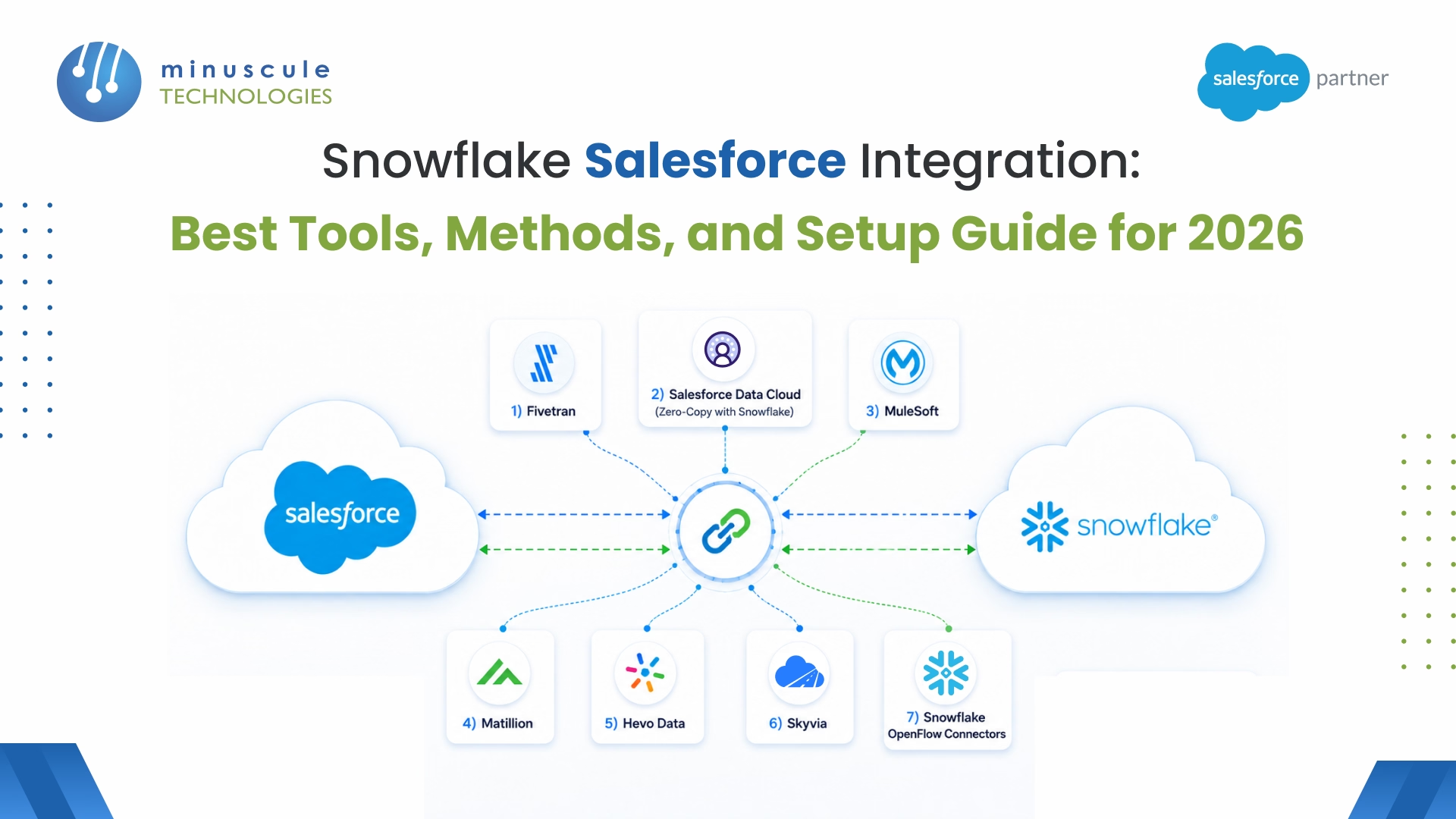
Snowflake Salesforce integration is the process of connecting your Salesforce CRM data with Snowflake’s cloud data warehouse so teams can run analytics, build reports, and feed AI models from a single source of truth. According to Salesforce’s 2025 State of Data report, organizations that unify CRM and warehouse data see up to 35% faster decision-making across sales and service teams.
Here’s what the right integration approach gives you:
This guide breaks down the best tools for connecting Snowflake and Salesforce in 2026, compares native connectors against third-party options, walks through setup steps, and shares real-world use cases from industries like manufacturing, financial services, and healthcare.
At its core, Snowflake Salesforce integration moves data between your CRM (where reps log deals, cases, and contacts) and your data warehouse (where analysts query, transform, and model that data). The goal? Get CRM data into Snowflake for deep analytics, or push warehouse insights back into Salesforce so reps can act on them.
This matters more now than it did two years ago for a few reasons.
First, Salesforce native reporting hits walls fast. SOQL query limits, governor limits on reports, and the inability to join Salesforce data with external datasets (ERP records, marketing attribution, product usage logs) mean that serious analytics work needs to happen outside Salesforce. Snowflake handles that workload without breaking a sweat.
Second, AI changes the equation. If you are building predictive lead scoring, churn models, or using Agentforce for autonomous service workflows, those models need clean, centralized data. Snowflake gives you the SQL-accessible, governed data layer that Salesforce AI features pull from.
Third, the cost math works differently now. Salesforce storage costs roughly $125 per GB per year for additional data storage. Snowflake charges around $23 to $40 per TB per month depending on your plan. For organizations sitting on 500 GB or more of historical CRM data, moving cold data to Snowflake while keeping active records in Salesforce can cut storage costs by 60 to 80 percent.
And here is what has changed recently: Salesforce Data Cloud now supports zero-copy data sharing with Snowflake, which means you can query Snowflake tables directly from within Salesforce without moving the data at all. That is a fundamentally different approach from traditional ETL pipelines.
Before picking a tool, it helps to understand the three main data flow patterns between these platforms.
Pattern 1: Salesforce to Snowflake (ETL/ELT)
This is the most common pattern. You extract data from Salesforce objects (Accounts, Contacts, Opportunities, Cases, custom objects), transform it if needed, and load it into Snowflake tables. Tools like Fivetran, Hevo Data, and Matillion handle this. The data flows on a schedule - every 5 minutes, hourly, or daily depending on your needs.
Pattern 2: Snowflake to Salesforce (Reverse ETL)
Less common but increasingly important. You run models or aggregations in Snowflake and push the results back into Salesforce. Think: calculated lead scores, customer health scores, or product usage summaries that sales reps see directly in their account records. Tools like Census, Hightouch, and Salesforce own Data Cloud handle reverse ETL.
Pattern 3: Zero-Copy / Live Query
The newest approach. With Salesforce Data Cloud zero-copy partner network (launched in 2024), you can connect Snowflake as an external data source and query it live from within Salesforce. No data moves. No ETL pipeline to maintain. Snowflake data stays in Snowflake, but Salesforce users see and use it as if it were native. This pattern works best for large datasets where replication is expensive or where real-time freshness matters.
Most organizations end up using a combination. For example: ETL for nightly bulk sync of historical data, plus zero-copy for real-time access to product analytics stored in Snowflake.
Here are the tools that handle Snowflake-Salesforce integration well in 2026, ranked by how well they balance ease of setup, reliability, and cost.
Fiveran is the go-to ELT tool for teams that want zero-maintenance data pipelines. You connect your Salesforce org, pick the objects you want to sync, and Fivetran handles schema detection, incremental loading, and API limit management automatically.
Best for: Mid-to-large teams that need reliable, hands-off Salesforce-to-Snowflake replication.
Key strengths:
Limitation: It is one-directional - Salesforce to Snowflake only. You will need a separate reverse ETL tool to push data back.
Salesforce Data Cloud is not a traditional integration tool - it is a platform feature. With the zero-copy partner network, Data Cloud connects directly to your Snowflake account and lets Salesforce users query warehouse data without replication.
Best for: Organizations already on Salesforce Enterprise or Unlimited editions that want to eliminate data movement entirely.
Key strengths:
Limitation: Requires Salesforce Data Cloud license, which is not cheap. Query performance depends on your Snowflake warehouse size and configuration.
MuleSoft is Salesforce own integration platform, built for enterprise-grade, API-led connectivity. It handles complex, multi-system integrations where Snowflake is just one of several destinations.
Best for: Enterprises connecting Salesforce + Snowflake + ERP + other systems in a unified integration layer.
Key strengths:
Limitation: Complex to set up and maintain. Overkill if you only need Salesforce-to-Snowflake sync.
Matillion is a cloud-native ETL/ELT tool built specifically for cloud data warehouses like Snowflake. It runs directly inside your Snowflake environment, which means transformations happen where the data lives.
Best for: Data engineering teams that want visual, low-code ETL with strong Snowflake-native performance.
Key strengths:
Limitation: Steeper learning curve than Fivetran. Better suited for teams with dedicated data engineers.
Hevo Data is a no-code data pipeline platform that has become popular with smaller Salesforce teams and startups. It offers a clean UI, automatic schema mapping, and pre-built transformations.
Best for: Small-to-mid-sized teams that want affordable, no-code Salesforce-to-Snowflake pipelines.
Key strengths:
Limitation: Limited transformation capabilities compared to Matillion or dbt. Not ideal for complex data modeling needs.
Skyvia is a cloud-based integration platform that stands out for its Salesforce-specific features, including backup, data import/export, and bi-directional sync.
Best for: Salesforce admins who need simple data sync without involving the data engineering team.
Key strengths:
Limitation: Performance can lag with very large datasets (50M+ records). Less suited for real-time streaming use cases.
Snowflake own OpenFlow connectors (GA in 2025) let you pull data from Salesforce directly into Snowflake without a third-party tool. It is Snowflake answer to native ingestion.
Best for: Snowflake-first teams that want to reduce their tool stack.
Key strengths:
Limitation: Newer offering with a smaller feature set than mature tools like Fivetran. Limited transformation capabilities.
Choosing between native and third-party options comes down to your team skills, budget, and how many systems you are connecting. Here is how they stack up:
The decision framework is straightforward: If you are already paying for Salesforce Data Cloud, start with zero-copy — it is the lowest-friction option. If you need reliable batch sync and your team is not deeply technical, Fivetran or Hevo Data gets you there fast. If you are connecting Salesforce, Snowflake, an ERP, and three other systems, MuleSoft or Matillion makes more sense as a centralized integration layer.
Here is a practical walkthrough using Fivetran (the most common choice), but the general flow applies to most ETL tools.
Create a dedicated database and schema for your Salesforce data. Set up a service account with the right permissions:
In Salesforce Setup, create a Connected App for your integration tool. You will need the Consumer Key, Consumer Secret, and your Salesforce security token. Make sure the integration user has API Enabled permission and read access to the objects you want to sync.
In Fivetran dashboard, add Snowflake as your destination (enter your account URL, database, schema, and service account credentials). Then add Salesforce as a source — authenticate via OAuth and select the objects you want to replicate: Accounts, Contacts, Opportunities, Cases, Leads, and any custom objects.
Pick between full sync (replicate everything on each run) or incremental sync (only new and changed records). For most teams, incremental sync with a 15-minute interval is the sweet spot - it keeps data fresh without burning through API calls.
Run your first sync and check the row counts in Snowflake against Salesforce. Set up alerts for sync failures and schema changes. Most tools send notifications automatically, but it is worth setting up a Slack or email alert for pipeline breaks.
The whole process typically takes 30-60 minutes for a basic setup. More complex configurations (custom objects, field-level transformations, multiple Salesforce orgs) can take a few hours.
Manufacturing and Automotive: A global manufacturer syncs dealer sales data from Salesforce to Snowflake nightly, joins it with SAP production data, and builds forecasting models that predict demand 90 days out. The Salesforce consulting team set up the integration using Fivetran with custom field mappings for dealer incentive calculations.
Banking and Financial Services: A mid-sized bank uses Salesforce Data Cloud zero-copy feature to query Snowflake loan analytics directly from within their Service Cloud console. When a customer calls, the service rep sees real-time loan performance data without switching screens. The data stays in Snowflake - governed, audited, and compliant with banking regulations.
Healthcare: A healthcare network pushes patient engagement scores (calculated in Snowflake from multiple clinical systems) back into Salesforce Health Cloud using reverse ETL via Census. Care coordinators see which patients need outreach without logging into analytics tools.
Retail and E-Commerce: A direct-to-consumer brand pipes Salesforce Commerce Cloud order data into Snowflake, combines it with ad spend data from Google and Meta, and calculates true customer acquisition cost (CAC) by channel. The insight feeds back into Salesforce Marketing Cloud to adjust campaign targeting.
Syncing everything by default. Most Salesforce orgs have hundreds of objects. Syncing all of them wastes API calls and storage. Start with 5-10 core objects (Account, Contact, Opportunity, Lead, Case) and add more as your analytics needs grow.
Ignoring API limits. Salesforce enforces daily API call limits based on your edition and license count. A poorly configured integration tool can burn through your limit before noon. Use bulk API where possible, and schedule heavy syncs during off-hours.
Skipping data quality checks. Salesforce data is messy - duplicate records, inconsistent formatting, missing fields. If you load it into Snowflake without cleaning it first, your analytics will be wrong. Build validation checks into your pipeline or use a tool like Salesforce managed services to clean your org before integration.
Choosing the wrong tool for your team skill level. MuleSoft and Matillion are powerful, but they need dedicated engineers. If your team is Salesforce admins and business analysts, Fivetran or Hevo Data will get you to value faster.
Not planning for reverse ETL from the start. Many teams set up Salesforce-to-Snowflake sync and then realize six months later that they need data flowing back. Plan for bi-directional data flow early, even if you do not implement it right away.
Yes. There are two native options. Salesforce Data Cloud zero-copy feature lets you query Snowflake data from within Salesforce without moving it. And Snowflake OpenFlow connectors can pull Salesforce data into Snowflake natively. Both reduce the need for third-party ETL tools, though they have different strengths.
Hevo Data free tier (up to 1 million events/month) is the lowest-cost starting point. Skyvia also offers a free tier for basic sync. If you already have a Salesforce Data Cloud license, zero-copy integration with Snowflake is included at no additional tool cost - you only pay for Snowflake compute.
With a managed ELT tool like Fivetran or Hevo Data, you can have data flowing in 30-60 minutes. Native options like Data Cloud zero-copy take 30 minutes to a few hours depending on your Snowflake configuration. Enterprise-grade setups with MuleSoft typically take 1-4 weeks including testing.
Yes. Salesforce Data Cloud zero-copy approach gives you live query access to Snowflake data. For real-time data streaming (event-driven), tools like Confluent (Apache Kafka) and MuleSoft support event-driven architectures. Most ELT tools offer near-real-time sync at 5-minute intervals, which is sufficient for the majority of use cases.
ELT (Extract, Load, Transform) is the recommended approach for Snowflake. Since Snowflake compute engine is built for transformations, it is more efficient to load raw Salesforce data first and transform it inside Snowflake using dbt or Matillion. Traditional ETL (transform before loading) adds latency and complexity without a clear benefit in a Snowflake-centric architecture.
Connecting Snowflake and Salesforce is not just a data project - it is the foundation for every AI and analytics initiative your organization will run in the next few years. Whether you start with a simple Fivetran pipeline or go all-in with Data Cloud zero-copy approach, the important thing is to get your CRM data into a queryable, governed warehouse where your team can actually use it. If you need help picking the right approach or setting up the integration for your specific Salesforce org, Minuscule Technologies Salesforce engineering team has done this for manufacturing, banking, healthcare, and retail organizations - and we can help you get it right the first time.
You've seen what's possible. Now, let's make it happen for your business. Whether you need an end-to-end Salesforce solution, a complex integration, or ongoing managed services, our team is ready to deliver.

Schedule a Free Strategic Call


