We are at Dreamforce 2026, Industry Pavilion at San Francisco


June 16, 2026
An industrial equipment maker ran its sales on Microsoft Dynamics for eleven years. Eleven years of accounts, contact histories, pipelines, dealer territories, and service cases. All of it built layer by layer, by a team that knew where everything lived.
Then they moved to Salesforce. The plan was three lines long: "export from Dynamics, clean it up, import to Salesforce." This is where Salesforce data migration goes wrong for most teams. The system went live. The data arrived. Then the calls started.
Half the dealer network lost its territory assignments. The parent-child account tree had loaded as flat records, with no relationship mapping. Thousands of contacts sat orphaned from their accounts. Service cases pointed to accounts that no longer existed. The sales team spent three weeks fixing records by hand while live deals stalled.
The data was "migrated." But the relationships that made it useful were gone. That's the most common failure mode - not missing records, but missing context. And it comes from treating migration as an export-import task, instead of a phased service with data integrity at the center.
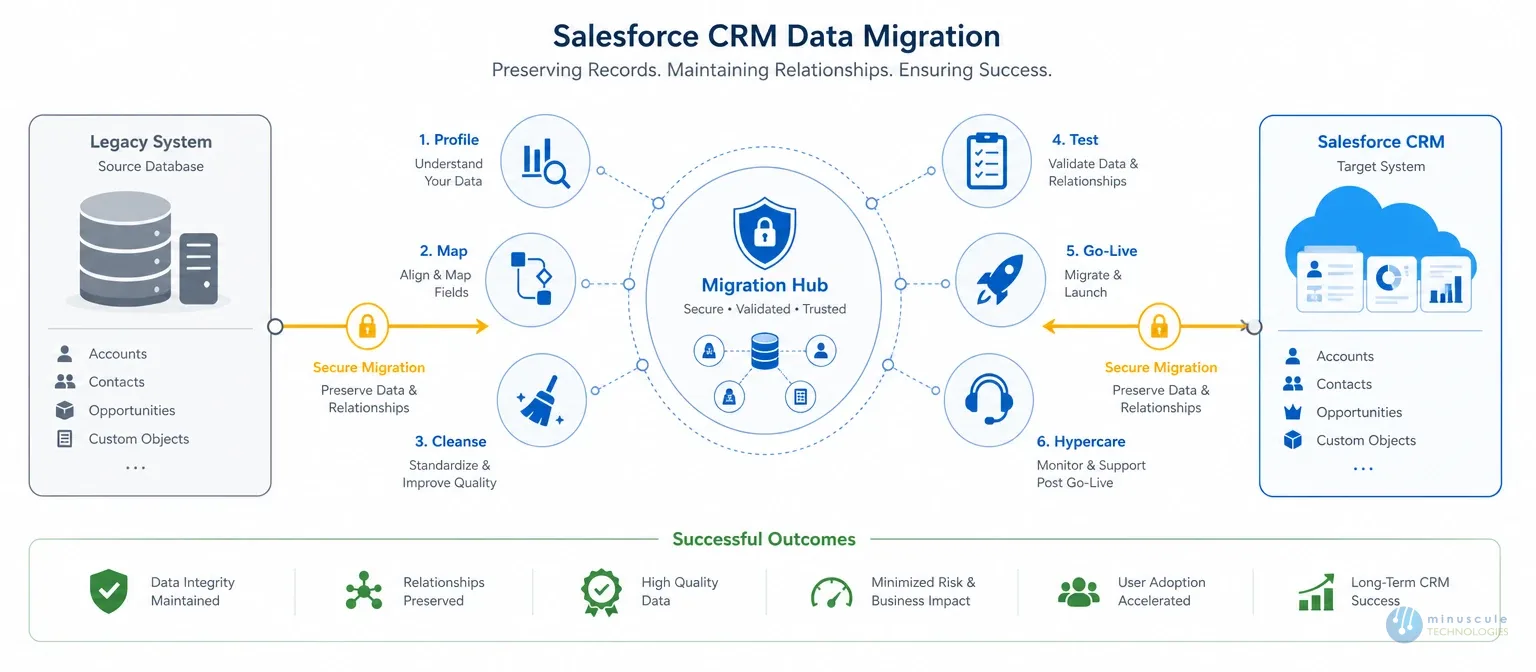
Salesforce Data Migration Services are not a single step. They form a structured engagement: source data profiling, field mapping, cleansing, test loads, the go-live load, post-move validation, and hypercare support. All of it runs against your go-live timeline and business continuity needs.
The line between a clean move and a damaging one is the work done before any record loads. The import is the last step -not the only step. Minuscule's Salesforce Data Migration service is built around this order. And it's delivered by the same team handling your Salesforce Implementation, not handed to a separate vendor.
Before any data moves, the engagement starts with a full audit of the source system. This is the work most DIY migrations skip.
The audit answers the questions that shape everything after it. How many records exist per object? How complete and consistent is each field? How widespread are duplicates? And how do the record relationships in the source compare to how Salesforce needs them structured?
Old CRMs like Siebel, Oracle CX, and Microsoft Dynamics rarely map straight to Salesforce. ERP sources like SAP and PeopleSoft are harder still. Their data wraps around financial or manufacturing objects, and it needs reshaping before it fits CRM objects. The audit scopes that work up front — not after a failed load reveals it.
Mapping matches every source field to its Salesforce home. It's also where future failures get caught early.
Every field needs a destination. Some map straight across: contact name to contact name. Others need transformation: a status code of "1" might mean "Active Customer" in Salesforce. Lookup fields — the links between records — need parent records loaded first. Get the order wrong, and thousands of orphaned records land in your org.
Cleansing runs alongside mapping. Duplicate contacts get merged or flagged. Invalid emails get fixed or dropped. Dates and phone numbers get one standard format. Dead records leave the scope. As Apex Hours notes in its migration guidance, the target org's validation rules, required fields, and picklists will reject records that don't comply. So cleanse against those rules before any load. Skipping this step saves days at the start and costs weeks at the end.
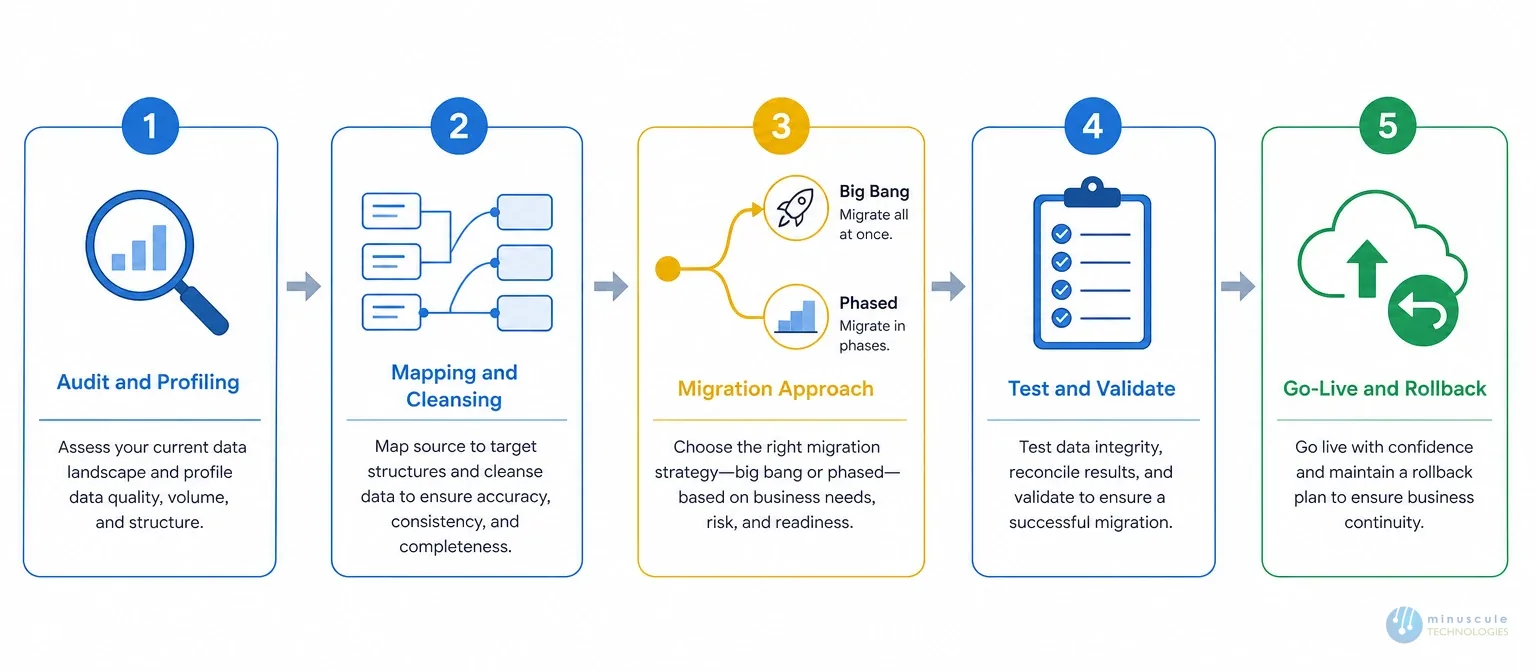
One decision shapes the whole salesforce migration: move everything at once, or in stages?
Big bang moves all data in one cutover window — usually a weekend. The source system retires at cutover. It's simpler to run, avoids parallel systems, and suits smaller datasets or teams that can take a clean break.
Phased migration moves data in stages — by object, business unit, or region — with both systems running in parallel for a time. It costs more coordination but cuts risk for large or complex estates. Manufacturers moving dealer and territory data next to an ERP layer usually phase it. So do BFSI firms moving loan data with compliance strings attached.
Minuscule's Salesforce Consulting team picks the approach based on volume, system complexity, team readiness, and go-live limits — then designs the plan around it.
No data reaches production without at least two sandbox test loads.
The first is a partial load — a sample of each object type. It surfaces mapping errors, validation clashes, and sequence problems before they touch the full set. Every error log gets analyzed and fixed before the next round.
The second is a full-volume sandbox load. It proves the data transfer fits the cutover window. It confirms record counts match the source. And it gives business users a real look at their data before go-live. UAT here is not optional. This is where stakeholders confirm account histories are intact, territories are right, and relationships hold. Salesforce's developer guidance recommends full reconciliation reports at this stage — source versus target, object by object.
The go-live load runs in the sequence the test rounds proved out. Before it starts, automations that fire on record creation — flows, email alerts, integration callouts — get switched off. Otherwise the load triggers thousands of unwanted actions. After the load, they come back on in a controlled order.
And every professional go-live has a rollback plan. Nobody wants to use it. But if a critical failure appears mid-cutover, the plan defines how to restore the source state, what to clean out of Salesforce, and how to re-run. A tested rollback plan is what lets a migration fail safely instead of failing your business.
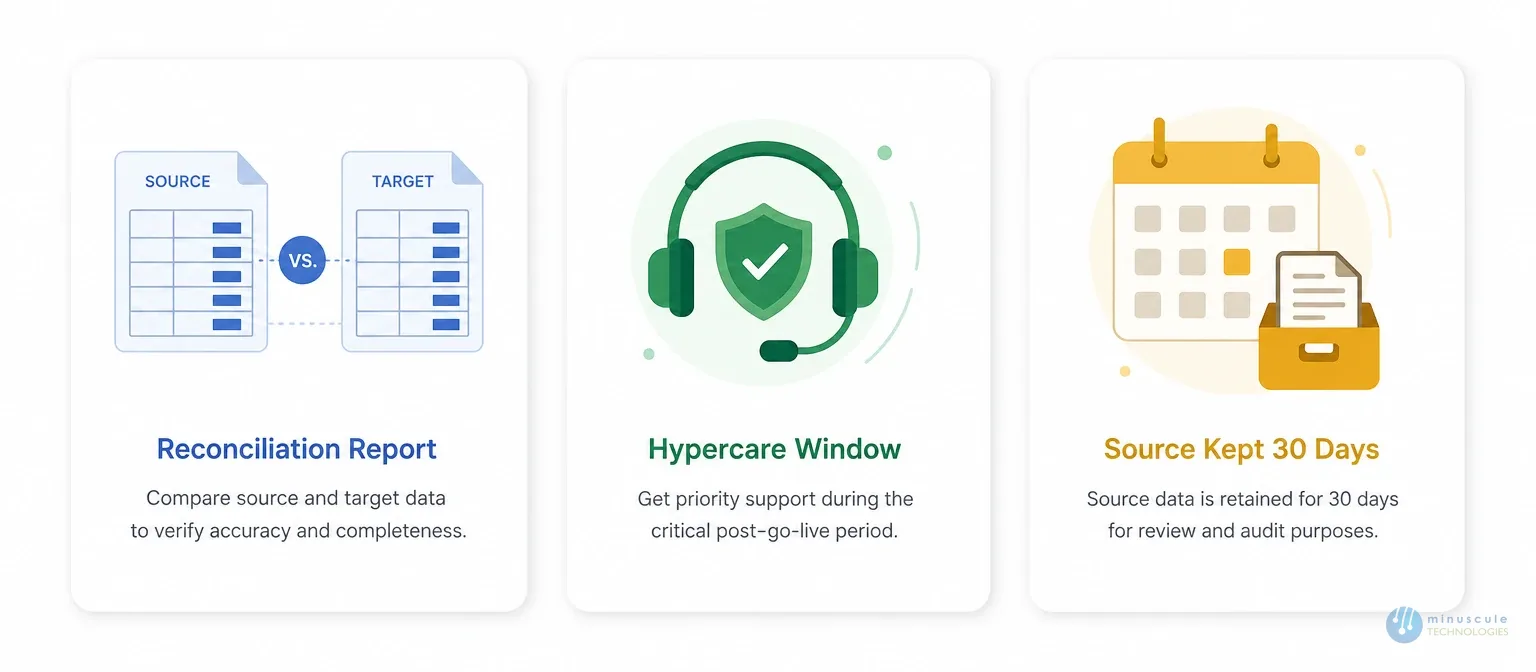
The job doesn't end when the load completes. Post-migration work covers reconciliation reports — source versus target counts by object, relationship checks, and report verification — plus a hypercare window where the team stands by to fix issues in the first days of live use.
For ERP-linked moves involving SAP or PeopleSoft, reconciliation also checks the live sync. The integration layer must read the new Salesforce IDs correctly, with no duplicated or missed records. Minuscule runs this as one engagement, because our Integration and Data Migration practices work as one team.
Salesforce's admin best practices also recommend keeping the source system readable for at least 30 days post-move — so any gaps found in live use can be checked against the originals.
Nearly any source. Legacy CRMs like Microsoft Dynamics, Siebel, Oracle CX, Zoho, and HubSpot. ERP systems like SAP, PeopleSoft, and Oracle EBS. Spreadsheets, flat files, and custom databases. Complexity depends on the source schema, the volume, and how many relationships must survive the move.
Yes, in one key way. A database migration from a custom system moves raw tables with no built-in CRM meaning. The engagement must first design the object model — deciding what becomes an Account, a Contact, or a custom object — before any mapping starts. CRM-to-CRM moves start with that model already half-built.
A simple move of a few objects from a modern CRM: a few weeks. A complex move from SAP or a legacy system with years of buildup: several months, covering audit, cleansing, test loads, and validation. The audit phase gives you an accurate timeline for your data.
The source stays fully live. Data leaves as read-only exports. Nothing gets deleted or changed at the source until go-live validation completes. Most teams keep the source readable for 30 days after the move.
Reconciliation reports compare source and target counts by object, before and after every load. Sandbox test loads catch errors before production. Every failed record gets logged, analyzed, and fixed before a re-run. And the final load ends with a full reconciliation that accounts for every record.
Cleansing works best inside the engagement, not before it. Profiling shows exactly which records have problems and which fixes matter most. Cleaning before the audit means working blind - and often fixing things the pipeline would have handled anyway.
Data migration is where Salesforce projects take quiet, lasting damage. A bad configuration can be redone. A broken flow can be fixed. But corrupted account trees, orphaned contacts, and missing histories leave a team running on bad data for months. Some businesses never recover the lost context.
The teams that migrate well are not the fastest ones. They audit before they map. They test before they load. They validate before they cut over. And they write the rollback plan before they need it.
With 160+ certified Salesforce experts and 75+ enterprise projects delivered, Minuscule Technologies has run salesforce migration services from MS Dynamics, Siebel, Oracle CX, SAP, and PeopleSoft - across manufacturing, automotive, BFSI, and health care. We treat migration as an engineering discipline, not an export job. Every record enters your org with its relationships intact, its history preserved, and its owner correctly assigned.
Talk to us before your next move.
You've seen what's possible. Now, let's make it happen for your business. Whether you need an end-to-end Salesforce solution, a complex integration, or ongoing managed services, our team is ready to deliver.

Schedule a Free Strategic Call


