
April 24, 2026
More than 70% of enterprise CRM implementations need at least some custom code before they fit. That's the gap Salesforce customization services exist to close. These are professional engagements where certified developers write code — Apex, Lightning Web Components, APIs — to reshape the Salesforce platform around your business. Not configuration. Not drag-and-drop. Real development work that builds what the platform doesn't work with.
We've done this work since 2014. Manufacturing floors. BFSI boardrooms. Real estate firms juggle hundreds of leases. This guide reflects what we've learned — sometimes the hard way. By the end, you'll know what these services include, whether your org needs them (it might not), what the bill looks like in 2026, and how to avoid the partners who leave you worse off.
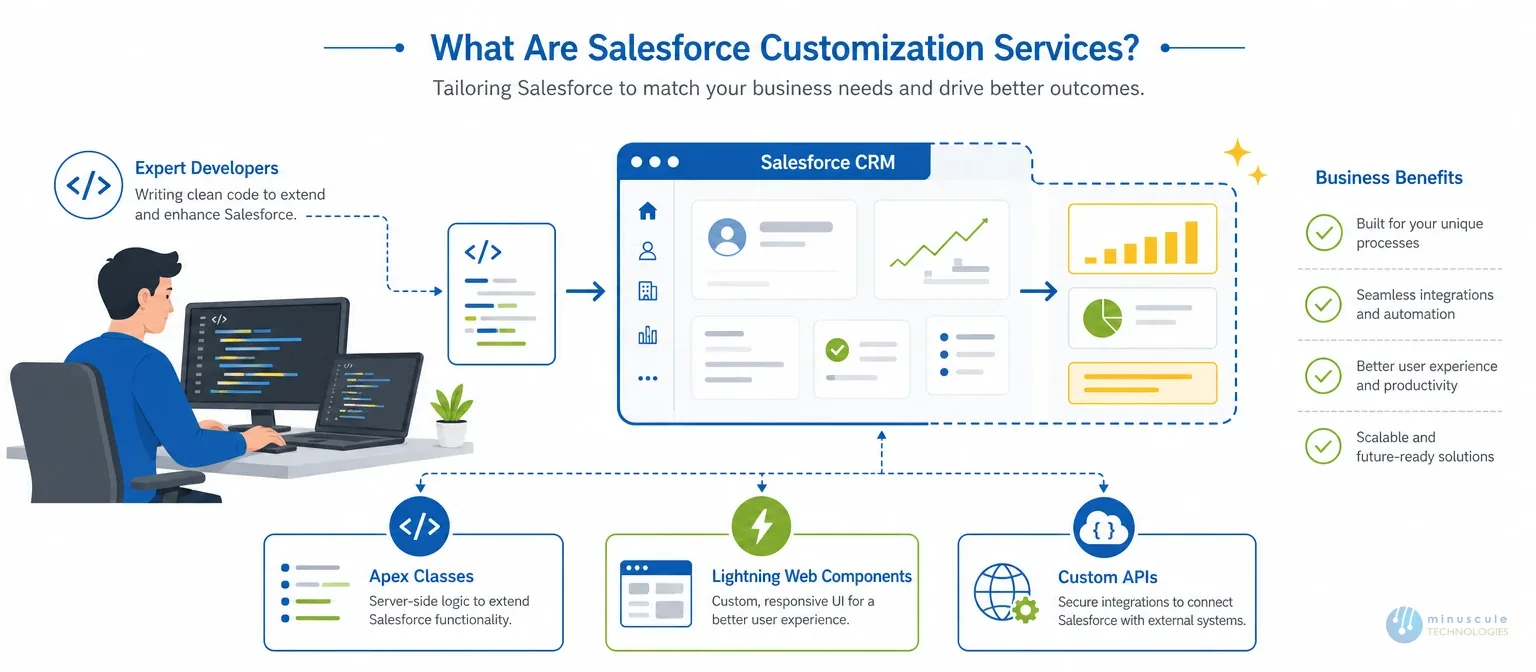
The shortest version: a Salesforce consulting partner writes code, so the CRM works the way your business runs. Apex classes. Lightning Web Components. Custom API endpoints. The stuff you can't reach through the Setup menu. You'll also see this called SFDC customization — same discipline, older short form for Salesforce.com.
Things get messy when people confuse three different ways to extend Salesforce. We watch it happen all the time. And it costs real money when someone builds custom Apex for something a $20/month AppExchange app already handles.
| Approach | What It Involves | Best For | Typical Cost |
|---|---|---|---|
| Configuration | Point-and-click setup: page layouts, validation rules, record types, Flow Builder automations | Standard business logic, simple workflows, field-level changes | Low — usually part of admin work |
| Customization | Code-based: Apex classes, triggers, LWC, custom APIs | Complex business logic, unique UI needs, advanced integrations | Medium to high — needs developers |
| AppExchange Apps | Pre-built third-party solutions from Salesforce's marketplace | Solved problems (e-signature, project management, mass email) | Free to $100+/user/month |
Here's what we tell clients on day one: try clicks before code. Always. Check if an AppExchange app already solves the problem — odds are decent ones. Bring in developers only when the first two options fall short. A Salesforce implementation partner worth hiring will push back on needless custom work. Even though it means fewer billable hours for them.
We wrote a whole piece on this exact call: Salesforce Configuration vs. Customization: Key Differences. Worth reading if you're on the fence.
No two projects look the same. But custom Salesforce solutions draw from the same set of building blocks.
Accounts, Contacts, Opportunities — Salesforce ships with these. They work well for many companies. But try running an auto dealership on them. You need Makes, Models, Lot Locations, Trade-In Values, and the links tying all four together. Standard objects won't cut it.
The hard part isn't creating objects. It's designed for a schema that will be held up eighteen months later. That's when your VP of sales asks for a report nobody planned. Or a new automation needs a junction object that doesn't exist yet.
Your reps live in Salesforce eight hours a day. If the screens feel clunky — five pages of clicks for a two-click task — they stop using it. Period.
Lightning Web Components let developers build screens that match how your team works. We've seen it firsthand with auto clients. Custom LWC parts for rep location tracking and trip summaries cut data entry time by about 40%. That's the gap between "we have Salesforce" and "Salesforce makes us faster."
Apex triggers. Classes. Complex Flows. This is Salesforce custom development at its core — the heavy lifting.
Picture led scoring that pulls from three objects. Approval flows that branch by deal size and region. Dealer incentive math that recalculates the second a rep closes. Flow Builder handles plenty. But cross-object transactions, bulk jobs, or branching logic across 50,000+ records? That's Apex territory.
Show me a company running only Salesforce, and I'll show you a company that hasn't grown yet. SAP handles inventory. HubSpot or Pardot run campaigns. Slack carries the internal chatter. Custom integrations — MuleSoft, REST APIs, middleware — make data flow on its own. No more Tuesday mornings spent copy-pasting between tabs.
From our project history: a real estate firm syncing Yardi lease data into Salesforce in real time. An auto maker whose dealer ordering system talks to SAP with no human in the loop. And a DocuSign setup that generates contracts in three languages without anyone opening a template.
Out-of-the-box reports cover maybe 80% of what a team needs. Then your CFO walks in: "I want Net Operating Income trending against occupancy rates, on one screen, from three systems." Good luck with a standard report type. Tableau CRM dashboards, custom calculated fields, and cross-object report types turn raw CRM data into something leadership uses.
Switching CRMs? Merging two orgs after a buyout? That's not a data loader job. Custom migration scripts handle the ugly work. Field mapping across systems built five years apart. Date transforms. Deduping. Relationship checks across millions of records. In banking, loan records must carry their full approval history into the new org. No import wizard does that.
The Salesforce mobile works out of the box. Sort of. Field reps and service techs need more — offline forms, GPS check-ins, layouts stripped to what matters in the field. The Salesforce Mobile SDK opens these doors. But it takes real dev work to build a mobile app people choose to use.
Not everything needs code. Many problems vanish with one well-built Flow. But certain patterns keep showing up in orgs that have outgrown their setup:
Two or more hits close to home? It's time for a Salesforce consulting conversation.

No code yet. Not one line. A decent partner spends the first week or two listening. They sit in on sales calls. They shadow service reps. They grill your admin about every workaround. Skip this phase, and you'll spend three times the budget fixing wrong guesses later.
Discovery output becomes a plan. What gets clicks. What gets Apex. Which integration pattern fits your ERP — live API or overnight batch. You should walk away with a document covering scope, timeline, cost, and assumptions. If a partner says, "we'll figure it out as we go," run. That's not agile. That's chaos with a trendy label. Before you sign, check what Salesforce development services cost today.
All development happens in sandboxes. Never in production. Full stop. Solid teams follow Salesforce development best practices: code reviews, unit tests (75%+ coverage minimum; good teams aim higher), and Git version control. A DevOps setup with CI/CD pipelines and automated testing cuts deploy risk by a wide margin.
Real users run their real Monday morning scenarios. Service reps try to break it. (They will.) Nothing ships until the people using it daily say it works.
And the part everyone forgets, we once built a flawless custom quoting tool. Adoption flatlined at 15% in week one. Why? Nobody trained the sales team. Change management isn't an afterthought. It's the line between success and expensive shelfware.
Salesforce pushes three releases a year. Each one can break custom Apex that worked yesterday — in silence. One client's approval of routing failed after Winter '25 because a governor limit changed. Without pre-release sandbox testing, you're gambling every four months.
A client last year had 47 custom Apex triggers. Half duplicated what Flow could do. The other half clashed with each other. Every needless Apex class is a future maintenance burden. One question stops most over-engineering: "Can we do this with clicks?" If yes, close the IDE.
We once got a Saturday emergency call. A logistics firm's approval workflow died Friday evening — right after the Spring release. Nobody had tested pre-release. Nobody had read the notes. Sign up for Salesforce release notes. Test in a pre-release sandbox 4–6 weeks ahead. And give one real human ownership of release readiness.
Three admins and two developers, all changing the same org with no coordination. Triggers firing against triggers. The whole thing held together by knowledge that walks out when a senior admin quits. Naming rules, docs, and quarterly reviews to retire dead parts are janitorial work. But that janitorial work keeps your org from becoming a haunted house nobody wants to touch.
Agentforce gets attention. AI agents that route cases, qualify leads, and draft replies. Sounds like less custom work. In practice, the opposite. Making Agentforce behave in your org means custom actions, topic limits, and guardrails — so the agent doesn't go rogue on a VIP account. Different customizations. Still customization.
Einstein with Data Cloud helps analytics for real. But wiring Data Cloud to your custom objects without breaking your integration layer still needs a developer who knows the ground.
Prompt Builder looks no-code on paper. Designing prompts that give steady output across record types, without grabbing the wrong field? That takes someone who knows both the architecture and the business.
Short version: AI hasn't ended salesforce customization. It changed what gets customized and added new kinds of work. The best partners in 2026 speak both Apex and AI.
Picking the wrong salesforce customization company compounds. You lose the budget. You lose months. Your team loses trust in the platform. And you inherit a codebase the next partner must untangle first.
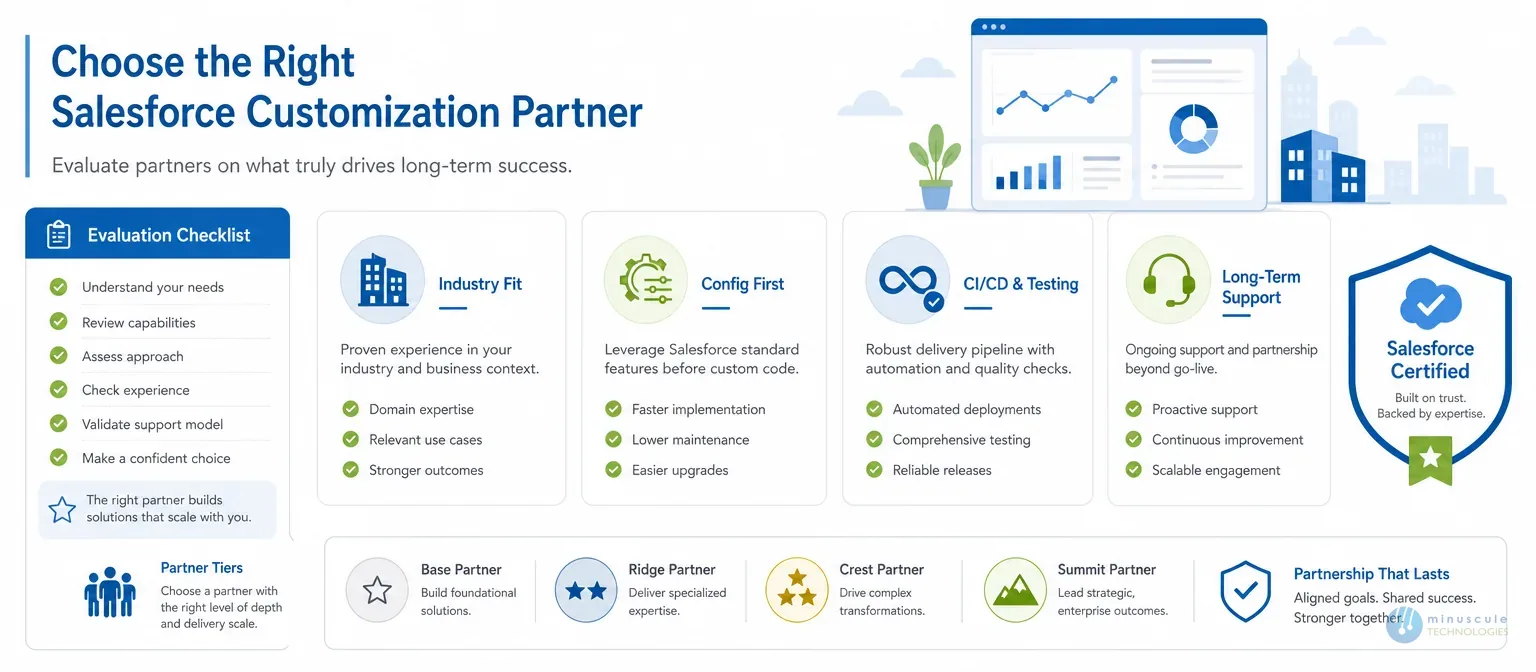
Salesforce ranks partners into tiers — Base, Ridge, Crest, Summit — by certifications and project volume. Higher is better, but it's not the whole picture. A Summit partner with 500 certs and zero health care experience loses to a Ridge partner with five years in medical experience. Fit matters more. Platform Developer I/II for Apex work. Application Architect for multi-Cloud builds. Cloud-specific consultant certs for the products you're customizing.
Configuration is point-and-click layouts, validation rules, Flow automations. Customization is when a developer writes Apex, builds Lightning Web Components, or codes custom API endpoints. Configuration is cheaper and faster. Customization handles what configuration can't — with ongoing upkeep as the trade-off.
A few custom objects: a week or two. Mid-range - two integrations plus a custom Lightning screen: six to twelve weeks. A full transformation with migration, three Clouds, and fifteen user roles: three to nine months minimum. The biggest timeline factor is how well you define requirements up front.
That's a top reason companies hire partners. We've built HIPAA-compliant patient tracking. Automated loan origination end to end. Dealer portals with live inventory feeds. Lease management with automatic KPI math. The platform flexes almost any industry. The question is whether your partner knows that industry's rules and quirks.
From about $2,000 for a few custom objects to past $200,000 for enterprise overhauls. Most mid-sized projects land between $15,000 and $60,000. The drivers: number of outside systems, data messiness, and how many user types need tailored screens.
Everyone. Sales Cloud, Service Cloud, Experience Cloud, Marketing Cloud, Financial Services Cloud, Revenue Cloud (CPQ), Field Service, and the base Salesforce Platform itself. Multi-Cloud stacks carry far more moving parts. Pick a partner who's crossed those lines before.
Here's the truth this whole guide points to. Anyone can sell you customization. Few partners can make it survive three Salesforce releases a year, an admin change, and your next growth spurt. 47-trigger org. Saturday emergency call. The 15% adoption quoting tool. Every one of those stories started with a partner who wrote code first and asked questions later.
Minuscule Technologies works the other way around. We bring 125+ Salesforce-certified team members and 75+ completed projects across manufacturing, BFSI, real estate, and health care — since 2014, spanning Sales Cloud, Service Cloud, Financial Services Cloud, Revenue Cloud (CPQ), and Field Service. We push back on code that clicks could replace. We ship with test coverage, docs, and CI/CD as standard. And our DevOps and AI practices exist for one reason: we got tired of cleaning up messes that better process would have prevented.
If your org needs custom work — or a second opinion on custom work you've already bought — book a free strategic Salesforce call. No slide deck. No sales pitch. Just a frank read on what your org needs, and what it doesn't.
You've seen what's possible. Now, let's make it happen for your business. Whether you need an end-to-end Salesforce solution, a complex integration, or ongoing managed services, our team is ready to deliver.

Schedule a Free Strategic Call


Plot No. 4, Sridevi Amman Street, Perumal Nagar Extension, Old Pallavaram, Chennai, Tamil Nadu 600117, India.
