
June 6, 2026
Salesforce Managed Services is an ongoing, subscription-based partnership where an outside team runs, maintains, and improves your Salesforce org so your internal staff doesn't have to carry it alone. Instead of hiring, training, and retaining a full in-house team, you pay a fixed monthly fee for a pool of certified admins, developers, and architects who handle daily support, release updates, bug fixes, and new build requests. In short: it turns Salesforce upkeep from a scramble into a predictable, planned service.
A typical Salesforce managed services engagement covers four things:
Here's the trap most teams fall into. You launch Salesforce, everyone's excited, and then six months later the org is full of half-finished automations, a backlog of user requests, and one overworked admin who's the only person who understands how it all fits together. When that admin takes a vacation, work stops. These are common signs of Salesforce technical debt. Salesforce managed services exist to fix exactly that fragility. This guide breaks down what these services actually include, how the pricing works, and a clear checklist for choosing a Salesforce managed services provider you won't regret signing with.
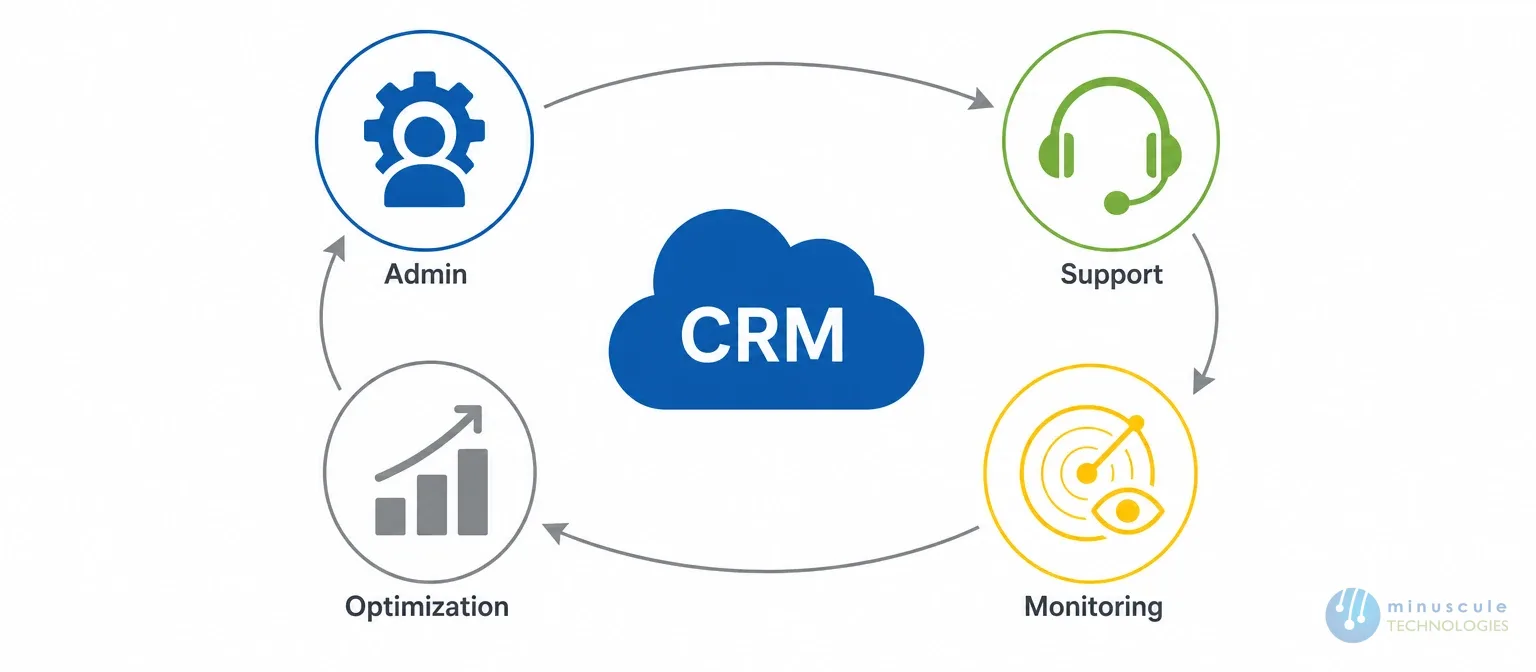
Salesforce Managed Services is a model where a specialized partner takes over the continuous administration, support, and enhancement of your Salesforce platform under a defined service agreement. You get a team, not a single person, and that team works to an SLA (service-level agreement) that spells out response times, coverage hours, and what gets delivered each month.
Think of it as the difference between owning a car and having a full-service lease. You still drive the car and decide where it goes. But someone else handles the maintenance schedule, the repairs, and the upgrades, so you're never stranded because one mechanic quit.
A good managed services engagement usually covers three buckets of work at once:
Salesforce support services vary by provider, but a complete engagement covers the full lifecycle of your org, from the help-desk ticket a sales rep files on a Monday morning to the architecture decisions that shape next year's roadmap. Here's what a strong scope of work typically includes.
This is the daily backbone: adding users, adjusting permissions, building reports and dashboards, and answering the "how do I do this?" questions that flood in from the field. Reliable Salesforce admin support keeps adoption high because users know someone will actually respond when they're stuck. Minuscule's managed services and platform readiness team handles this tier with SLA-based coverage so tickets don't pile up.
Good providers don't wait for things to break. Salesforce maintenance services include watching org limits, cleaning duplicate and stale data, checking automation health, and flagging security gaps before they become incidents. This is the quiet work that keeps a platform from slowly rotting.
Salesforce pushes Spring, Summer, and Winter releases every year, and each one can change how your automations and integrations behave. A managed services team reviews each release in a sandbox, tests what matters to you, and rolls out the useful features while heading off the breaking changes.
Beyond admin work, most orgs need real engineering: custom Lightning Web Components, Apex logic, and connections to ERP, billing, or marketing systems. Mature partners run this through a proper CI/CD pipeline with version control and rollback, which is where AI-powered DevOps and automation earns its keep by making deployments boring and safe.
The last tier is making the platform smarter: better reports, dashboards leadership actually uses, license right-sizing, and technical-debt cleanup. Salesforce Ben has a strong library of practitioner guidance on org optimization worth bookmarking - see Salesforce Ben for real-world best practices.
People often confuse these four models, and picking the wrong one is how budgets get wasted. Managed services give you a full team on a retainer. An in-house hire gives you one person you fully control. Staff augmentation rents you extra hands for a project. Break-fix support only shows up after something's already broken. Here's how they compare on the factors that matter.
| Factor | Managed Services | In-House Admin | Staff Augmentation | Break-Fix Support |
|---|---|---|---|---|
| Coverage | A full team (admin, dev, architect) under one SLA | One or two people, limited skill range | Extra hands for a fixed project window | Only when something breaks |
| Cost model | Predictable monthly fee | Salary, benefits, hiring cost | Hourly or daily rate per person | Pay per incident, hard to budget |
| Best for | Ongoing run, maintain, and improve needs | Simple, stable orgs with steady workload | A defined build with a clear end date | Very small orgs with rare issues |
| Roadmap ownership | Shared; partner drives continuous improvement | Depends entirely on that hire | None; they execute your plan | None |
| Key risk | Choosing a partner who's spread too thin | Single point of failure if they leave | Knowledge walks out when the contract ends | Problems compound while you wait |
The move to a Salesforce managed service provider almost always starts with pain, not strategy. A key admin resigns. A release breaks a critical flow. Costs creep up and nobody can explain why. Here's what pushes teams to make the switch, and what they get out of it.
In our experience, the teams that get the most value treat their provider as a long-term Salesforce support partner rather than a vendor they call in a panic. That relationship is where the real ROI shows up.
Salesforce MSP pricing is where a lot of buyers get confused, because providers structure it in very different ways. Most fall into one of three models. The right one depends on how predictable your workload is and how much control you want over the hours.
| Pricing Model | How It Works | Best For | Typical Range (USD) |
|---|---|---|---|
| Hourly / on-demand | You pay only for hours worked, tracked per ticket | Light, unpredictable needs | $50–$150 per hour |
| Monthly retainer (block of hours) | A set number of hours each month at a fixed fee | Steady support plus small enhancements | $2,000–$10,000+ per month |
| Tiered / dedicated team | A named team with SLA tiers (L1/L2/L3 support) | Complex orgs needing continuous work | $8,000–$25,000+ per month |
These ranges are directional, not quotes. Region, org complexity, and required coverage hours all move the number. What matters more than the sticker price is what's inside the scope: a cheap retainer that only covers reactive tickets can cost you more than a richer plan that also prevents problems. The Salesforce Admins resource hub is a good place to understand the depth of admin work a retainer should realistically cover.
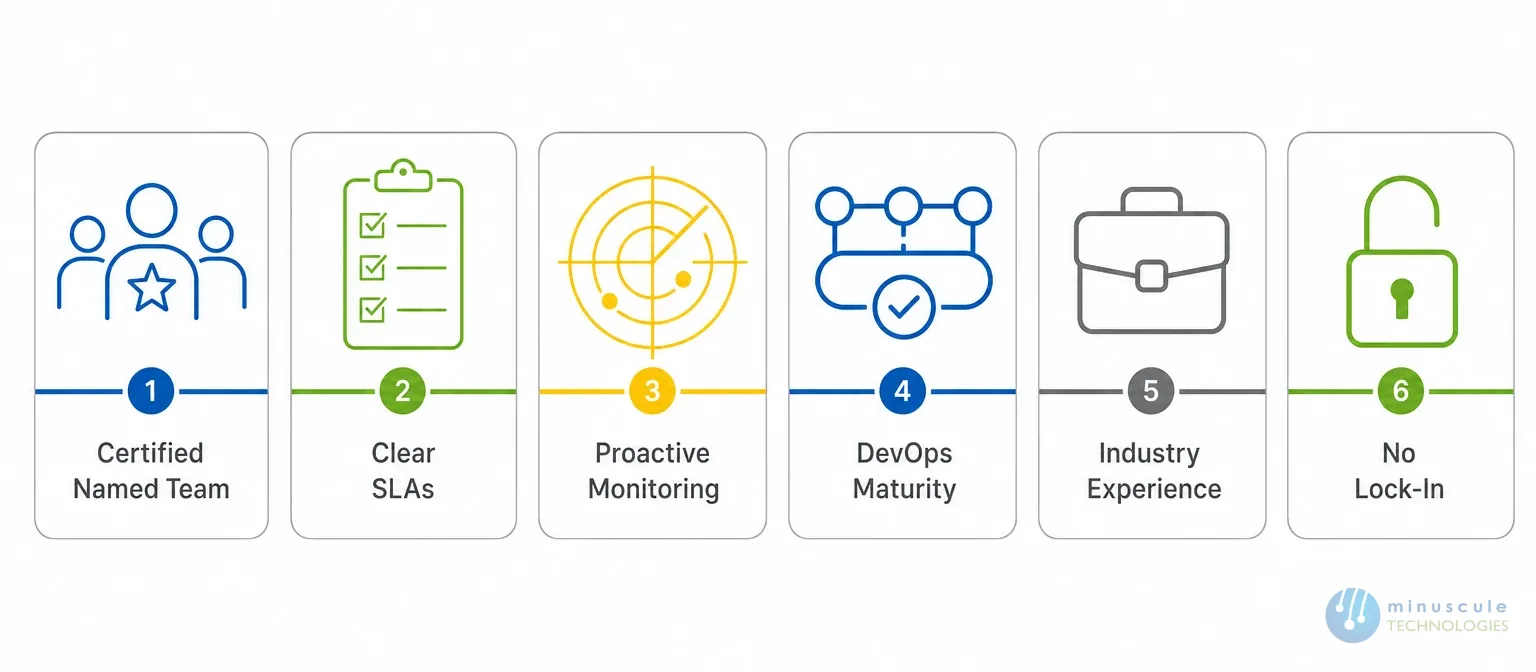
Choosing among Salesforce managed service providers comes down to a handful of questions that separate a true engineering partner from a body shop. Work through this checklist before you sign anything. If you're open to offshore support, compare the top Salesforce managed services providers in India.
Ask who will actually work on your org. You want certified admins, developers, and at least one architect you can name, not an anonymous queue. A serious Salesforce managed support arrangement tells you exactly who's on your account.
The contract should define response and resolution times by severity, coverage hours, and what happens when an SLA is missed. Vague promises like "fast support" mean nothing when a production flow is down.
The best providers monitor org health, review every seasonal release, and bring you improvement ideas. If the whole pitch is "file a ticket and we'll fix it," you've found a break-fix shop wearing a managed services label.
Real change management needs source control, sandboxes, and automated deployments with rollback. Ask how they ship changes. If the answer is "we edit production directly," walk away. For a sense of the tooling a mature team uses, Salesforce Developers documents the modern deployment stack.
A partner who has solved problems in your vertical - say lending workflows in BFSI or dealer networks in manufacturing - ramps faster and spots risks you'd miss. Look for a provider who talks about your business outcomes, not just their certifications.
You should always own your org, your documentation, and your data. Good providers document as they go and train your team along the way, so you're never held hostage. Ongoing enablement through resources like Trailhead is a healthy sign a partner wants your team to grow, not stay dependent.
A few warning signs tend to show up early with the wrong Salesforce support partner. Spot them during the sales process and you'll save yourself a painful exit later.
You rarely wake up one morning and decide to hire a managed services partner. It builds up. If a few of these sound familiar, your org has probably outgrown a solo-admin setup.
None of these mean you did anything wrong. They're the natural growing pains of a platform that's become central to how you run the business. They're also the exact point where structured Salesforce managed support pays for itself.
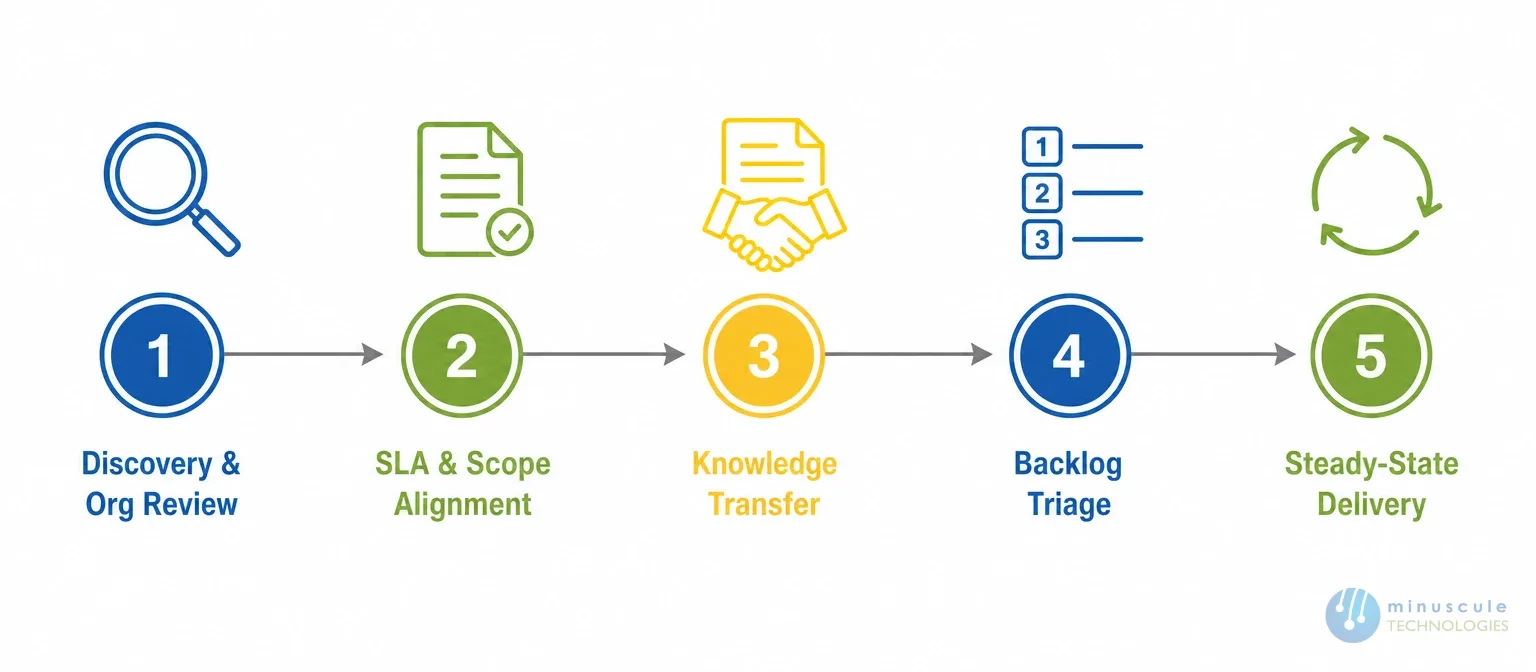
A good provider doesn't just start closing tickets on day one. The first few weeks set up everything that follows, and knowing the sequence helps you hold a provider accountable. Here's the typical path.
The whole point is a smooth handoff. If a prospective partner can't walk you through a plan like this in the sales conversation, that tells you something about how the actual work will go.
Salesforce Managed Services is a subscription model where an external partner continuously administers, supports, and improves your Salesforce org under a defined SLA. It replaces the scramble of one overloaded admin with a certified team that handles daily support, releases, and new development for a predictable monthly fee.
Plain support is usually reactive — you file a ticket, they fix the issue. Managed services are broader and proactive: they include support but also cover monitoring, release management, maintenance, and ongoing development to keep improving the platform, not just repair it.
Most engagements run on an hourly rate, a monthly retainer, or a dedicated-team model. Retainers commonly start around USD $2,000 per month and scale with org complexity and coverage hours. The real cost driver is scope — what's actually included matters more than the headline rate.
Not necessarily. Many companies replace a single admin with a managed services team to remove the single-point-of-failure risk. Others keep a business-side admin for internal coordination while the partner handles the technical depth. Both models work.
Often yes, because small teams feel an admin's absence the hardest. An hourly or light-retainer plan gives a small org access to certified expertise without the cost of a full-time hire who may be underused most of the month.
Salesforce rewards the companies that keep investing in their org and quietly punishes the ones that let it drift. The choice isn't really whether to get help - it's whether that help is a reliable team with an SLA or a single stretched admin holding it all together. Get the partner right and Salesforce stays an asset instead of turning into a maintenance headache.
This is where Minuscule Technologies fits in. As a Salesforce engineering partner, we run managed services as more than a help desk - we pair SLA-based support with AI-powered DevOps and pre-built accelerators that get you live faster. Industry starter packs like the B2B Marketplace accelerator for manufacturing and distribution or the WhatsApp Salesforce accelerator for customer engagement give your team a running start instead of a blank org.
If your Salesforce is starting to feel fragile, don't wait for the next release to break something. Book a free strategic Salesforce call and we'll review your org's health and map out exactly what a managed services engagement would cover for your team.
You've seen what's possible. Now, let's make it happen for your business. Whether you need an end-to-end Salesforce solution, a complex integration, or ongoing managed services, our team is ready to deliver.

Schedule a Free Strategic Call


Plot No. 4, Sridevi Amman Street, Perumal Nagar Extension, Old Pallavaram, Chennai, Tamil Nadu 600117, India.
