
June 4, 2026
Salesforce integration services are specialized offerings that connect your Salesforce CRM to the other systems your business runs on - ERP, marketing platforms, billing, support tools, and data warehouses - so information moves between them automatically instead of by hand. The result is one trusted view of every customer, fewer manual errors, and faster decisions. For US businesses, the right integration turns Salesforce from a standalone contact list into the operating hub of the whole revenue engine.
Picture a mid-size US manufacturer whose sales team lives in Salesforce while finance works in a separate ERP. A quote gets approved, but the order details are keyed in twice, a digit slips, and the shipment goes to the wrong dock. Multiply that by a few hundred orders a month and you have lost revenue, frustrated customers, and a sales team that stops trusting the CRM. Connected systems make that failure quietly disappear.
This guide breaks down the top 10 Salesforce integration services driving growth in 2026, how the architecture actually works, the tools and best practices that keep it stable, and how to pick the right partner - written for the IT head or Salesforce manager who needs a clear plan, not a sales pitch.
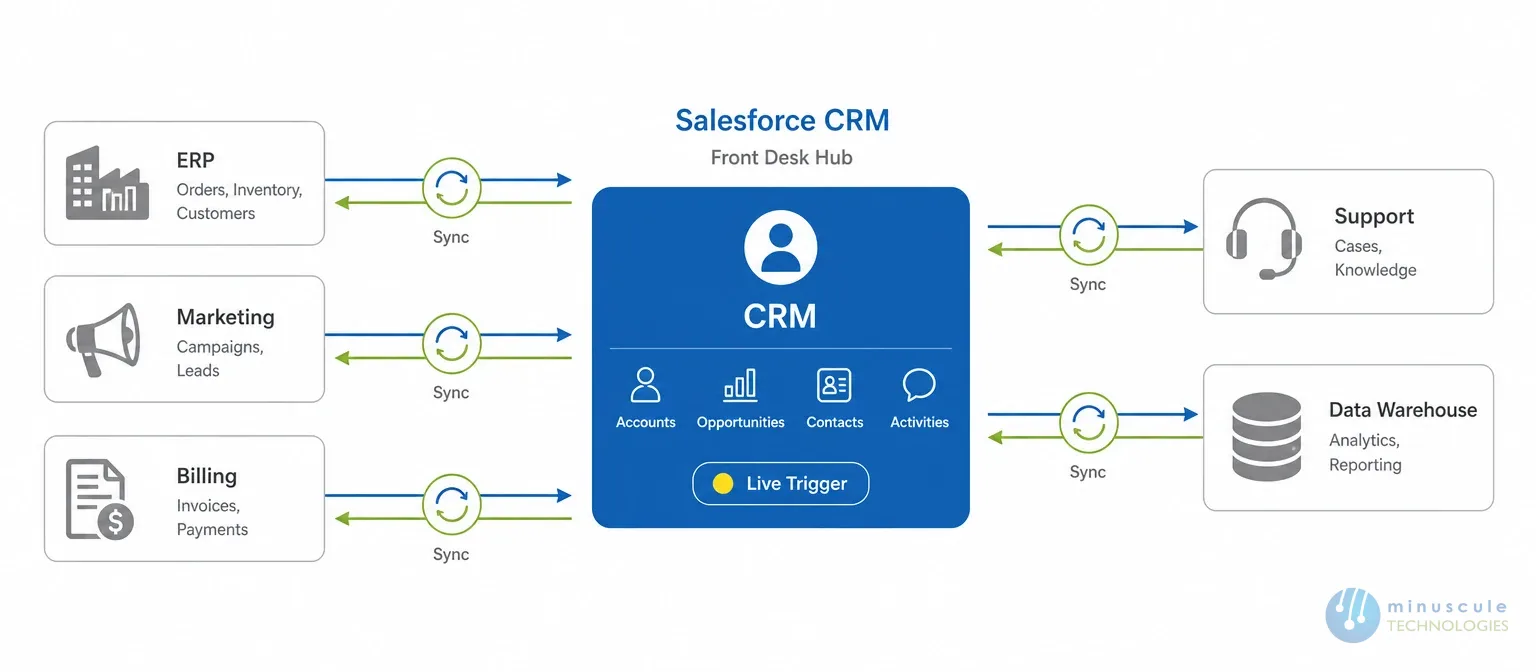
Salesforce integration services are the design, engineering, and support work that links Salesforce with your other applications so they share data and trigger actions across each other in near real time. Think of Salesforce as the front desk and your ERP, marketing, finance, and support tools as the back offices. Integration is the hallway that lets them talk without a person carrying notes back and forth.
A good integration covers three things: the data that moves (accounts, orders, invoices, cases), the direction it moves (one-way sync or two-way sync), and the trigger that starts it (a schedule, a record change, or a live event). Done right, a Salesforce integration company builds all three so your teams see the same numbers no matter which screen they open.
These services range from a single Salesforce API integration between two apps to a full data-and-process backbone connecting a dozen systems. Salesforce’s own integration patterns and practices group these into data, process, and user-interface integration - a useful way to scope any project before a line of code is written.
Most companies don’t buy Salesforce integration because they love plumbing. They buy it because disconnected systems quietly cost money. When your CRM and ERP don’t match, sales promises dates that operations can’t hit, finance chases numbers that already changed, and leadership makes calls on stale data.
A clean salesforce crm integration removes the copy-paste tax. Reps stop re-keying orders, service agents see the full account history on the first call, and marketing knows within minutes when a deal closes. That speed compounds. Faster handoffs mean shorter sales cycles, and shorter sales cycles mean more revenue from the same team.
There’s also a risk angle US leaders care about. Manual data transfers are where mistakes and compliance gaps hide. Connected systems create an audit trail, enforce one version of the truth, and make it far easier to prove where a number came from when a regulator or auditor asks.
The payoff from a well-built salesforce crm integration shows up fast and across departments. Here are the gains US teams report most often:
Put simply, integration takes the friction out of the handoffs between teams. That’s where most deals stall and most revenue leaks, so fixing it tends to pay for the project quickly.
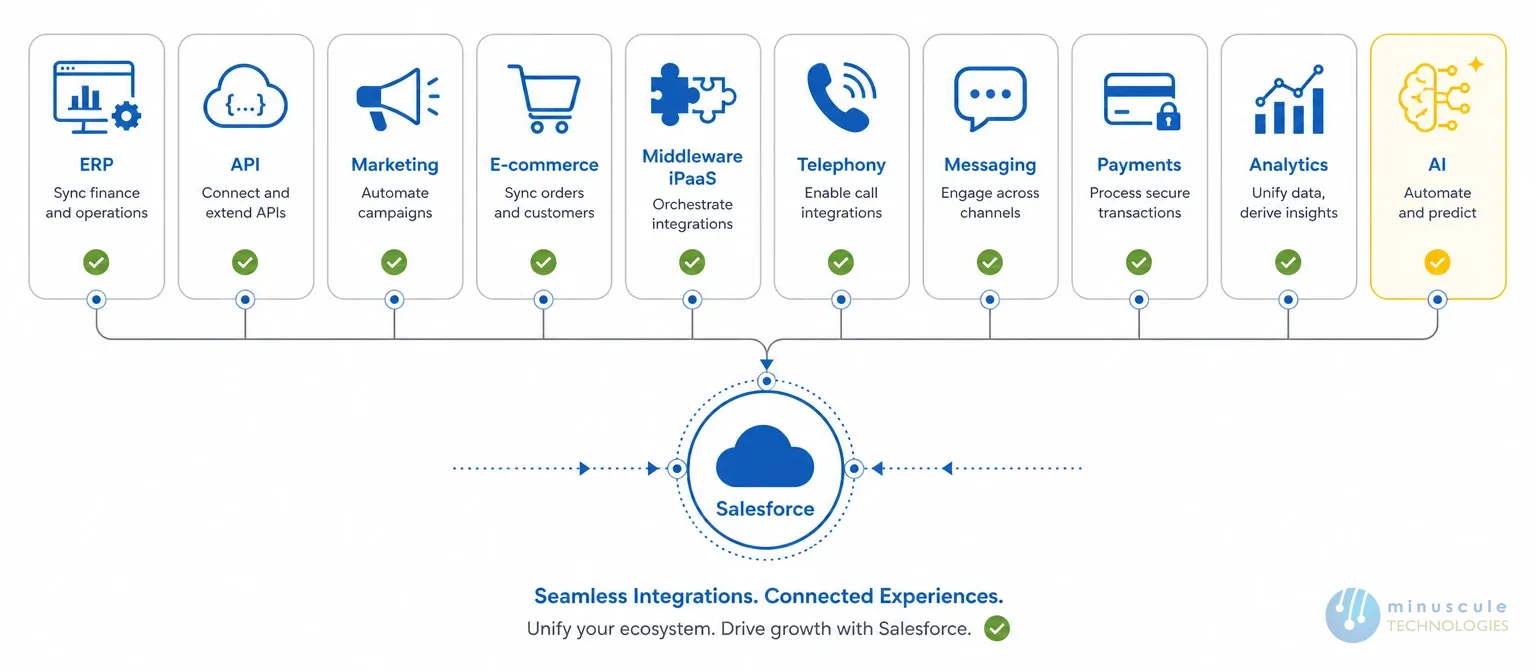
Not every integration matters equally. These are the ten Salesforce integration services US businesses invest in most because each one removes a specific bottleneck between teams. Use the table as a quick map, then read the notes below it.
| # | Integration Service | What It Connects | Growth Impact |
|---|---|---|---|
| 1 | Salesforce ERP Integration | SAP, Oracle, NetSuite, Microsoft Dynamics | Orders, inventory, and invoices sync end to end |
| 2 | Salesforce API Integration | Custom apps and third-party services | Real-time, tailored data exchange on demand |
| 3 | Marketing Automation Integration | Marketing Cloud, HubSpot, Marketo, Pardot | Warmer leads and full campaign-to-close tracking |
| 4 | E-commerce Integration | Shopify, Commerce Cloud, Amazon | Storefront orders land as CRM records instantly |
| 5 | Middleware / iPaaS Integration | MuleSoft, Boomi, Zapier, Workato | One backbone links many systems at once |
| 6 | Telephony & CTI Integration | Amazon Connect, Five9, RingCentral | Click-to-call and logged conversations in Salesforce |
| 7 | Collaboration & Messaging Integration | Slack, Microsoft Teams, WhatsApp, Zoom | Deal updates and approvals where teams already work |
| 8 | Accounting & Payments Integration | QuickBooks, Stripe, Xero | Faster billing and clean revenue reporting |
| 9 | Analytics & BI Integration | Tableau, Data Cloud, Power BI | Live dashboards leaders actually trust |
| 10 | AI & Agent Integration | Einstein, Agentforce, external AI models | Automated actions and smarter next-step guidance |
Across the list, ERP, payments, and messaging integrations tend to deliver the fastest wins. If you’re in manufacturing or financial services, those are usually the smartest first projects, with analytics and AI integrations close behind once your data is unified.
The tool you choose shapes cost, speed, and how much custom code you’ll maintain later. There’s no single best option — it depends on how many systems you connect and how much control you need.
A common mistake is picking the heaviest platform for a light job, or hand-coding a connection that a low-code tool could maintain for you. A good integration partner matches the tool to the problem instead of defaulting to whatever they know best.
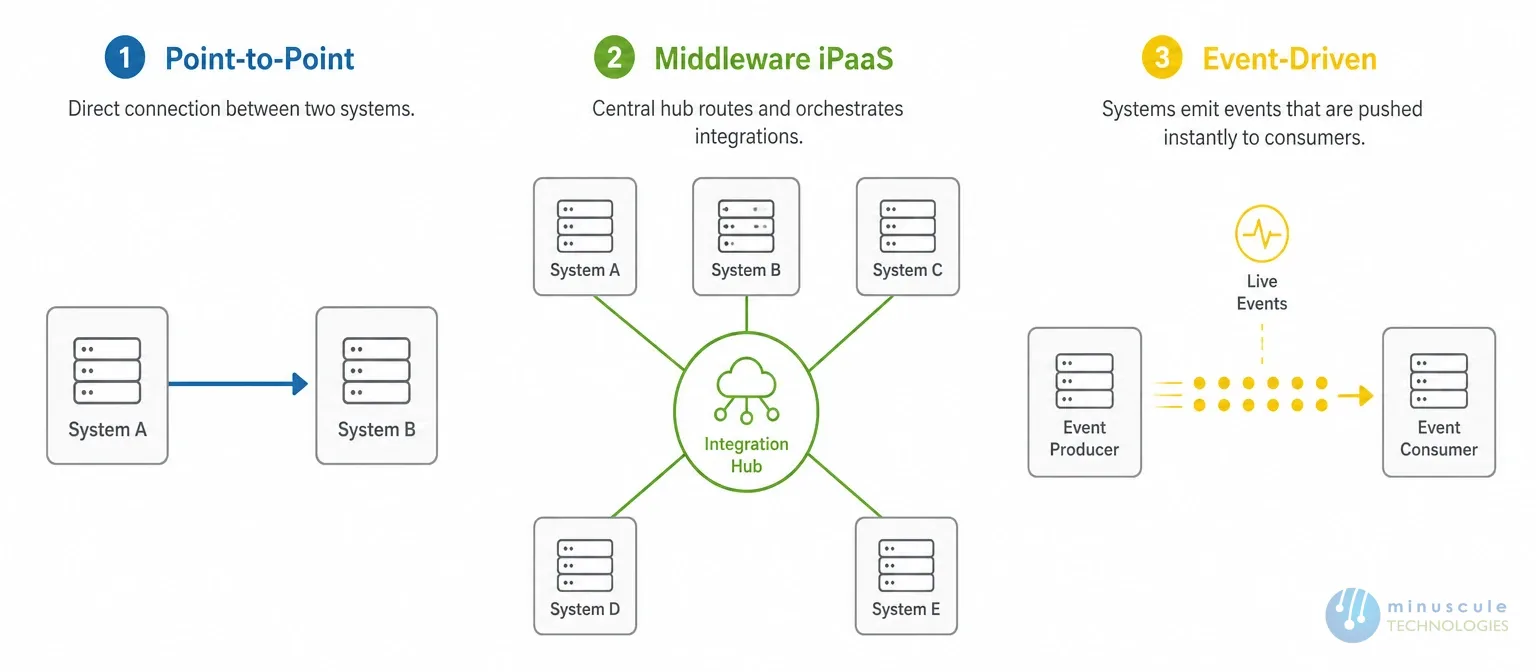
Under the hood, most Salesforce integrations use one of three patterns. Knowing the difference helps you ask the right questions and avoid a design that buckles as volume grows.
| Pattern | How It Works | Best For |
|---|---|---|
| API / Point-to-Point | Two systems talk directly through Salesforce REST, SOAP, or Bulk APIs | A few well-defined connections |
| Middleware / iPaaS | A hub like MuleSoft routes data between many systems | Complex, multi-system environments |
| Event-Driven / Real-Time | Platform Events push changes the moment they happen | Live updates and instant automation |
Salesforce API integration is the direct route: your app calls Salesforce’s REST or SOAP APIs to read and write records, or Bulk API to move large data sets. It gives you the most control and the tightest data mapping, which is why custom builds and developer-heavy projects favor it. The trade-off is that each connection is one you own and maintain.
When you’re connecting five or ten systems, wiring each pair directly gets fragile fast. Middleware solves this by acting as a central hub - every system connects once to the platform, and the platform handles routing, mapping, and error handling. It costs more up front but saves you from a tangle of one-off connections later.
Some processes can’t wait for a scheduled sync. Event-driven integration uses Platform Events and change data capture to push updates the instant a record changes, so a closed deal can trigger an invoice or a service alert in real time. This is the pattern behind the fastest customer experiences.
Integration projects rarely fail on the code - they fail on planning, data quality, and security shortcuts. These practices keep a project on track:
When teams hit a snag, community resources like the Salesforce Stack Exchange integration threads are worth a look before reinventing a fix. In our experience, projects that invest in data cleanup and clear field ownership up front finish faster and break far less often after go-live.
The tools matter less than the team wiring them together. Strong salesforce integration consulting starts with your business goals, not a rush to write code. When you evaluate a Salesforce integration company, look past the certification count and ask how they’ve solved problems like yours.
A few questions separate a real partner from a resume: Can they show integration work in your industry without naming names they shouldn’t? Do they plan for data quality, security, and long-term support - not just the initial build? Will they hand you clean documentation, or leave you dependent on them forever? The right answers point to a team that builds for your growth, not their retainer. To compare your options, browse our list of top Salesforce integration partners in the USA.
This is where Minuscule Technologies works differently. As a trusted Salesforce engineering partner with 125+ certified experts and integration work spanning SAP, Yardi, DocuSign, WhatsApp, Zoom, and more, we design connections that fit your systems and your roadmap - then support them long after launch.
Integration is moving from “move the data” to “act on the data.” A few shifts are worth planning for now:
The through-line is simple: clean, connected data is the prerequisite for every AI feature Salesforce is shipping, a point echoed across Salesforce Ben’s coverage of the platform’s roadmap. Companies that get their integration foundation right in 2026 will be the ones that actually benefit from the AI wave, rather than watching it from the sidelines.
The value of integration gets clearer when you see it by industry. Here’s how US businesses put these connections to work, drawn from real solution patterns (no client names).
The pattern repeats across verticals: connect the system where the work happens to the CRM where the customer lives, and the busywork between them disappears. That’s the quiet engine behind faster cycles and cleaner reporting.
Salesforce integration services are professional offerings that connect Salesforce with your other business systems — such as ERP, marketing, finance, and support tools — so data and processes flow between them automatically. They cover the strategy, engineering, and ongoing support needed to keep those connections stable and secure.
The most common are ERP integration (SAP, NetSuite, Oracle), marketing automation (Marketing Cloud, HubSpot), collaboration tools (Slack, Teams, WhatsApp), telephony and CTI systems, and accounting platforms like QuickBooks. API and middleware integrations sit underneath most of these as the delivery method.
They remove manual data entry, give every team one accurate view of the customer, and speed up handoffs between sales, service, and finance. That means fewer errors, shorter sales cycles, and cleaner data for reporting and AI.
Yes. Salesforce integrates with major ERP systems like SAP, Oracle, NetSuite, and Microsoft Dynamics through APIs, middleware platforms such as MuleSoft, or prebuilt connectors. This keeps orders, inventory, and invoices in sync between your CRM and back office.
They can be very secure when built correctly - using OAuth authentication, encryption in transit and at rest, least-privilege access, and Salesforce’s Trust Layer standards. Security depends on the design, which is why an experienced integration partner matters.
A simple two-system connection can take a few weeks, while a multi-system enterprise integration often runs a few months. The timeline depends on data quality, the number of systems, and how much custom logic is involved. A clear scope and clean data up front are the biggest accelerators.
Salesforce integration isn’t a plumbing project - it’s the difference between a CRM that stores contacts and one that runs your revenue engine. Get the connections right, and every team downstream moves faster on data they finally trust.
You don’t have to build it from zero. Minuscule’s prebuilt B2B Marketplace accelerator gets distribution and dealer commerce live faster, while the WhatsApp Salesforce accelerator connects customer messaging straight into your CRM. These industry-customized starter packs cut the time from idea to working integration - and our team tailors each one to your systems.
Ready to connect your stack? Book a Salesforce integration readiness review with Minuscule Technologies and get a clear, prioritized plan for the integrations that will move your numbers first.
You've seen what's possible. Now, let's make it happen for your business. Whether you need an end-to-end Salesforce solution, a complex integration, or ongoing managed services, our team is ready to deliver.

Schedule a Free Strategic Call


Plot No. 4, Sridevi Amman Street, Perumal Nagar Extension, Old Pallavaram, Chennai, Tamil Nadu 600117, India.
