We are at Dreamforce 2026, Industry Pavilion at San Francisco


May 4, 2026
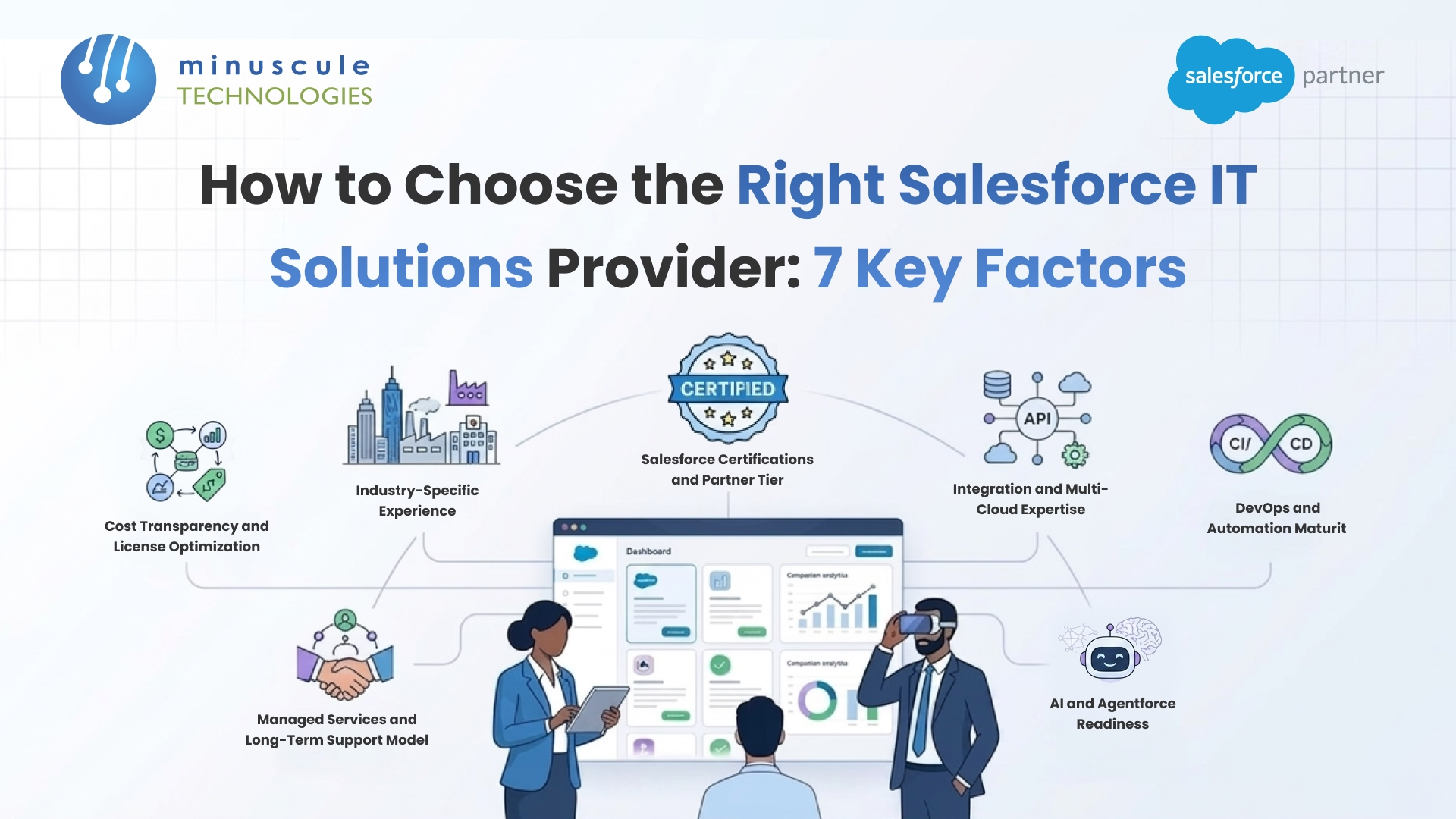
A Salesforce IT solutions provider handles your entire Salesforce environment - implementation, custom development, DevOps, integrations, managed services, ongoing optimization. All of it. They're not the firm that builds your org and disappears. They stick around after go-live, keep your org healthy, control costs, and make sure the platform actually grows with your business.
Here's the problem, though. Salesforce's ecosystem includes over 200,000 certified professionals. That's a lot of options. And yet, roughly 30–40% of CRM implementations still miss the mark. Why? Almost always, it comes down to who you picked as a partner. This guide breaks down 7 factors to evaluate before you sign anything with a Salesforce IT solutions provider. By the end, you'll know exactly what separates a provider who builds for today from one who engineers for where your business is headed.
If you've been Googling "Salesforce partner" for more than 10 minutes, you've noticed something annoying: everyone uses the terms consulting partner, implementation partner, and IT solutions provider like they mean the same thing. They don't. And mixing them up is how companies end up with the wrong type of partner for what they actually need.
A Salesforce consulting partner is your strategy firm. They figure out which Salesforce products make sense for your business, lay out the roadmap, advise on best practices. Solid for the planning phase. But once they hand over that PowerPoint, many are done.
Implementation partners take the plan and build it. Org configuration, custom features, data migration, go-live -that's their sweet spot. Good ones run tight projects with clear milestones. The catch? A lot of them step back the moment the project closes out.
A Salesforce IT solutions provider does both - and then stays. Strategy, implementation, custom dev, DevOps, integrations, managed services, optimization. The whole lifecycle. Think of them less as a vendor and more as a long-term engineering arm of your team.
Here's a quick comparison:
You probably need an IT solutions provider (not just a consultant or implementer) if any of these sound familiar:
If even two of those apply, you're past the point where a consulting-only or implementation-only partner can serve you well.
Skip the "certifications don't matter" crowd. They absolutely do. A cert means someone sat for a proctored exam and proved they know the platform. That's baseline verification, and it's the fastest filter you've got.
Salesforce ranks its partners into four tiers: Base, Ridge, Crest, and Summit. The ranking factors in customer success scores, certified headcount, and total expertise points. Summit sits at the top - it signals the highest verified expertise and client outcomes. Check out how Salesforce organizes its partner ecosystem and admin resources for more background.
But here's what trips people up: tier alone doesn't tell you everything. We've seen Ridge-tier partners with razor-sharp Financial Services Cloud specialization deliver better results than Summit partners who spread themselves across 15 clouds. Depth beats breadth, especially for complex projects.
When you're evaluating a provider, ask for a breakdown of their certification portfolio — not just the total count. Here's what to look for based on your needs:
In our experience, a team with a mix of admin, developer, and architect certifications delivers more balanced results than a team stacked with only one type. Ask to see their AppExchange partner profile - it shows verified certification counts and customer reviews in one place.
Salesforce can be configured for practically any industry. That doesn't mean every partner can do it well. Setting up dealer management for a manufacturing company is a completely different animal from building loan origination for a bank. Hire a generalist, get a generic result.
A provider who's done 12 manufacturing projects already knows your headaches — dealer incentive calculations, SAP inventory sync, field visit tracking, automated post-sale surveys. They've built frameworks for these. They don't need a two-week crash course in your terminology.
Now compare that to a team that's never touched your vertical. They'll spend the first month just learning the language. That learning curve? It shows up on your invoice and your timeline.
Don't just take their word for it. Ask for specifics:
For example, in the automotive and manufacturing space, the right provider should be able to discuss B2B marketplace lead integration, WhatsApp-based customer engagement, or OEM finance integrations from firsthand project experience. In BFSI, they should know digitized loan workflows, multi-level approval chains, and compliance-driven data handling inside out. You can see how industry-specific Salesforce solutions translate into real business outcomes when the provider has genuine domain depth.
The more specific their examples, the more confidence you can have in their ability to deliver for your Salesforce implementation.
Most buyers don't even think to ask about DevOps. Big mistake. We'd argue it's the single clearest indicator of whether a provider runs a mature engineering operation or just wings it. How a provider handles deployments, testing, and release management directly determines whether your updates ship smoothly or turn into a fire drill every sprint.
A mature Salesforce DevOps practice typically includes:
The Salesforce Developer Blog is a solid benchmark for what mature deployment automation looks like - worth bookmarking.
Here's what bad DevOps actually costs you. Every release turns into an all-hands event. Deployments drag out. Bugs sneak into production because nobody ran proper tests. Your team burns hours on manual tasks that should've been scripted months ago. Over a year, poor DevOps easily adds weeks of wasted effort. Worse, it creates the kind of fragile org that developers dread touching.
One question cuts through all the marketing: "Walk me through how a developer's code commit makes it to production." If they stumble, that's your answer. If you want to see what a mature Salesforce DevOps practice actually looks like, explore how AI-powered CI/CD pipelines are reshaping enterprise release cycles.
Salesforce AI in 2026 looks nothing like Einstein circa 2020. Agentforce lets you build autonomous agents that qualify leads, resolve service cases, and trigger workflows - no human in the loop. Data Cloud unifies customer records across every system. The Einstein 1 Platform bakes predictive and generative AI right into your CRM.
But let's be real: most Salesforce partners haven't actually built Agentforce solutions yet. Plenty will claim they have. Press them for specifics and the story gets thin. If AI is on your roadmap (and honestly, in 2026, it better be), you need a provider who's already shipping AI features - not one planning to learn on your dime.
When you're evaluating a provider's AI readiness, dig into specifics:
A provider that's genuinely AI-ready won't just talk about AI in vague terms. They'll describe specific use cases they've delivered, the data architecture they built to support it, and the measurable results their clients saw.
AI is only as good as the data feeding it. A strong IT solutions provider understands that AI readiness starts with data centralization, de-duplication, and clean data pipelines. If a provider jumps straight to "we'll build you an AI agent" without talking about your data quality first, proceed with caution.
Your Salesforce org doesn't live in isolation. It connects to SAP for inventory. To HubSpot or Marketo for marketing. To NetSuite for finance. To Zoom and WhatsApp for customer comms. And probably to a data warehouse nobody wants to maintain. The point: your IT solutions provider needs to think in systems, not just in Salesforce objects.
If you're running Sales Cloud, Service Cloud, and Experience Cloud together - or adding Revenue Cloud for CPQ - you need a provider that understands how these clouds interact. Configurations in one cloud affect another. Permission models overlap. Data flows between them in ways that require careful planning.
A provider with genuine multi-cloud Salesforce expertise won't treat each cloud as an isolated project. They'll design a unified architecture that keeps everything consistent.
Go-live day feels like the finish line. It's not even close. The real payoff from your Salesforce investment comes 6, 12, 18 months down the road - when users actually adopt the system, processes tighten up, and your org evolves through Salesforce's three annual releases. That's exactly where managed services earn their keep.
Look for a provider that offers structured, SLA-based support rather than vague promises of "ongoing help." Specifically:
Ask this: "After go-live, if I need a new custom report, a change to an approval workflow, and an API connection to a new tool - all in the same week - how does your team handle it?"
Their answer tells you whether they have a real managed services operation or just a developer who picks up the phone sometimes. A mature provider will describe a ticket-based system with defined SLAs, prioritization rules, and a dedicated account manager. If you're evaluating providers for ongoing Salesforce managed services, this question is the single best filter.
Cheapest rarely means best value. But the priciest option isn't automatically right, either. What you're really looking for is transparency -can this provider clearly explain how they charge, and will they actively help you keep your total Salesforce spend under control?
Ask every potential provider to break down their pricing structure - and watch out for hidden fees around project management overhead, environment setup, or post-go-live support.
Here's something most buyers don't think to ask: "Can you help us optimize our Salesforce licenses?"
Many organizations are paying for licenses they don't fully use - or they're on an edition (Enterprise vs. Unlimited) that doesn't match their actual needs. A good IT solutions provider will audit your license usage, recommend right-sizing, and help you avoid unnecessary add-on purchases.
In our experience working across 75+ Salesforce projects, we've seen organizations reduce their annual Salesforce spend by 15–25% simply by aligning their license tiers and user assignments with actual usage patterns. That kind of cost control often pays for the provider's managed services fee entirely.
A slick website and a convincing sales call don't guarantee anything. Here are the warning signs we tell every buyer to watch for:
Short version: scope and staying power. A consulting partner advises on strategy - which products to buy, what the roadmap should look like. An IT solutions provider does that plus builds it, integrates it, automates the DevOps, runs managed services after launch, and optimizes licenses over time. If your needs extend past the planning phase, you want the latter.
It depends heavily on scope. For ballpark numbers: a mid-size implementation runs $50K–$250K. Managed services retainers land between $5K and $25K per month, depending on support hours and org complexity.
The key question to ask: does the quote include project management, sandbox setup, and post-go-live support, or are those billed separately? Get that in writing early.
Match certs to your project type. Standard Sales/Service Cloud work? Salesforce Administrator and Cloud Consultant certs cover your bases. Custom development? Platform Developer I and II are must-haves. Complex data or migration projects call for Data Architect and Integration Architect credentials. And if AI is on the roadmap, look for the newer AI Associate and AI Specialist certifications - they're still rare enough that having them signals genuine investment.
Three steps. First, check their AppExchange partner profile - it shows verified cert counts, customer reviews, and project volume. Second, request 2–3 reference calls with actual clients in your industry. Nothing replaces a 20-minute conversation with someone who's been through a project with them.
Third, look at sites like Clutch or G2 for unfiltered reviews, and browse the provider's blog and thought leadership - consistent, detailed content usually means genuine expertise behind it.
The trigger is usually complexity. When your org spans multiple clouds, you're running custom integrations, releases happen monthly, and your user base keeps growing - that's past the point where a strategy-only partner adds value. If your current partner can't do DevOps, managed services, or AI development, it's time to find a full-scope IT solutions provider.
This decision sticks with you for years. Pick the right Salesforce IT solutions provider and your platform becomes an engine for growth. Pick the wrong one and you're back in evaluation mode 18 months from now, paying twice to fix what should've been built right the first time.
At Minuscule Technologies, we've been doing this since 2014. 160+ certified Salesforce professionals. Offices in India, the US, and Malaysia. We've delivered 75+ projects across manufacturing, BFSI, real estate, and healthcare - with everything from Agentforce development and AI-powered DevOps to enterprise-grade integrations and SLA-backed managed services. We don't do generic pitches. If you're shortlisting providers and want to talk specifics about your org, book a free strategy session. We'll walk through your environment and tell you straight where we can make a difference.
You've seen what's possible. Now, let's make it happen for your business. Whether you need an end-to-end Salesforce solution, a complex integration, or ongoing managed services, our team is ready to deliver.

Schedule a Free Strategic Call


