
September 25, 2023

Your Salesforce org grades its own security, and the grade sits in Setup right now. Most admins have seen the number once and never looked again. Running a Salesforce Health Check takes about two minutes, and reading it properly takes about an hour. That hour is where the value is.
Think about a common Monday. An admin opens Setup to reset one password policy and notices the score sits in the low sixties. Nobody set that target. Nobody knows which of the failing settings matter. Someone suggests clicking the button that fixes everything at once. Someone else remembers the last bulk change locking out the integration user for two days. The team closes the tab and moves on.
This guide walks through the tool itself. You will see where it lives and what the risk levels mean. You will see how to build a baseline that matches your own policy. You will also see what the score cannot catch. By the end you will be able to run the scan, read the result honestly, and fix findings without breaking an integration.
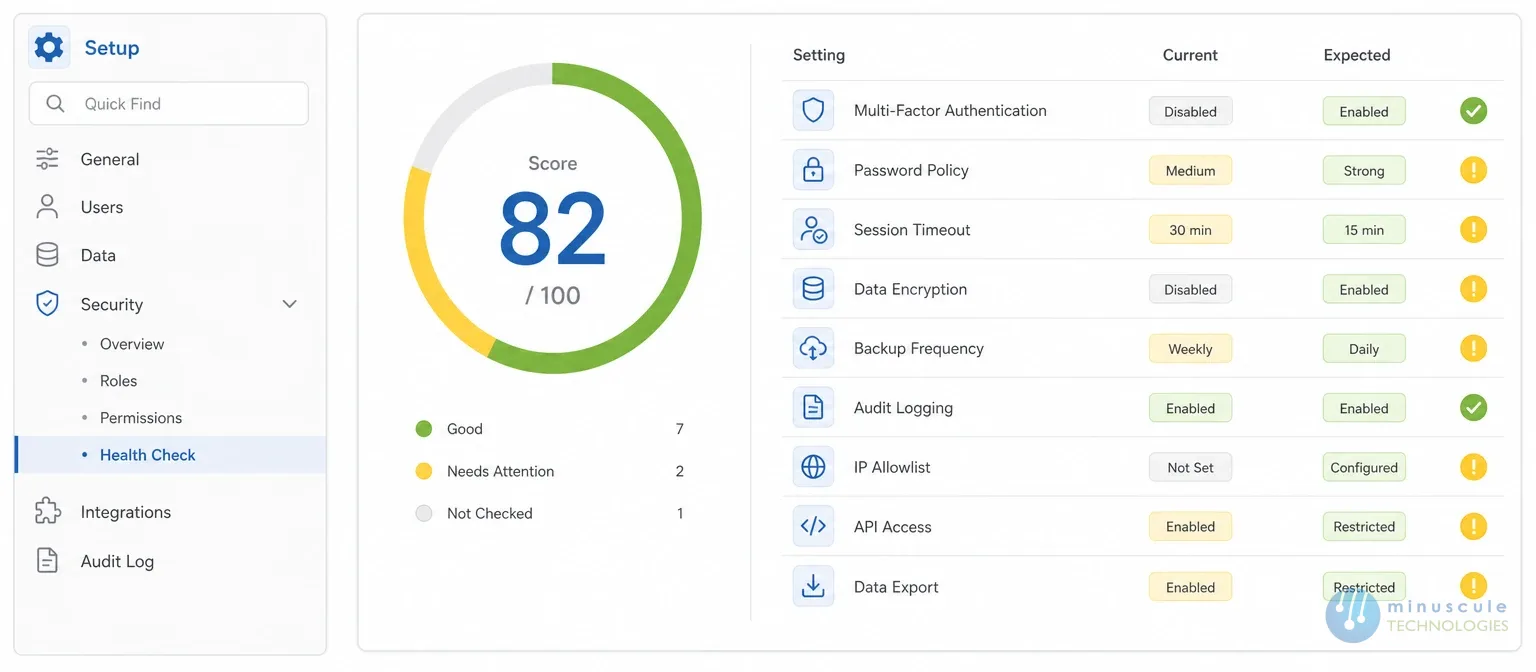
Health check in Salesforce lives under Setup. Use the Quick Find box and type Health Check, or open Security and select it from the list. You need View Setup and Configuration to open it, and Modify All Data to change settings from inside it.
The page loads a score at the top and a list of settings underneath. Each setting shows your current value next to the value the baseline expects. Nothing changes until you choose to change it, so opening the page is safe on any org.
Run it in a sandbox first if you have never used it. The findings are usually similar, and it gives you a place to practice the fix flow before touching production.
The salesforce security health check compares your settings against a baseline. It returns a percentage. The percentage is a weighted result, not a simple count of passes. A single high-risk setting pulls the score down further than several informational ones.
Salesforce groups every graded setting into four levels. Those levels, not the headline number, are what you should work from.
| Risk level | What it means | How to treat it |
|---|---|---|
| High-Risk | Your value is well below the baseline on a setting that carries real exposure | Fix first, in a sandbox, with the owning team informed |
| Medium-Risk | Your value falls short but the exposure is narrower | Fix in the same cycle, after the high-risk items clear |
| Low-Risk | A small gap against the baseline | Batch these together in a low-traffic window |
| Informational | Reported for visibility, not graded as a failure | Read them, record them, act only if they matter to you |
Read the levels first and the percentage second. Two orgs can both sit at 70% while one has three high-risk failures and the other has twenty informational ones. The second org is in much better shape.
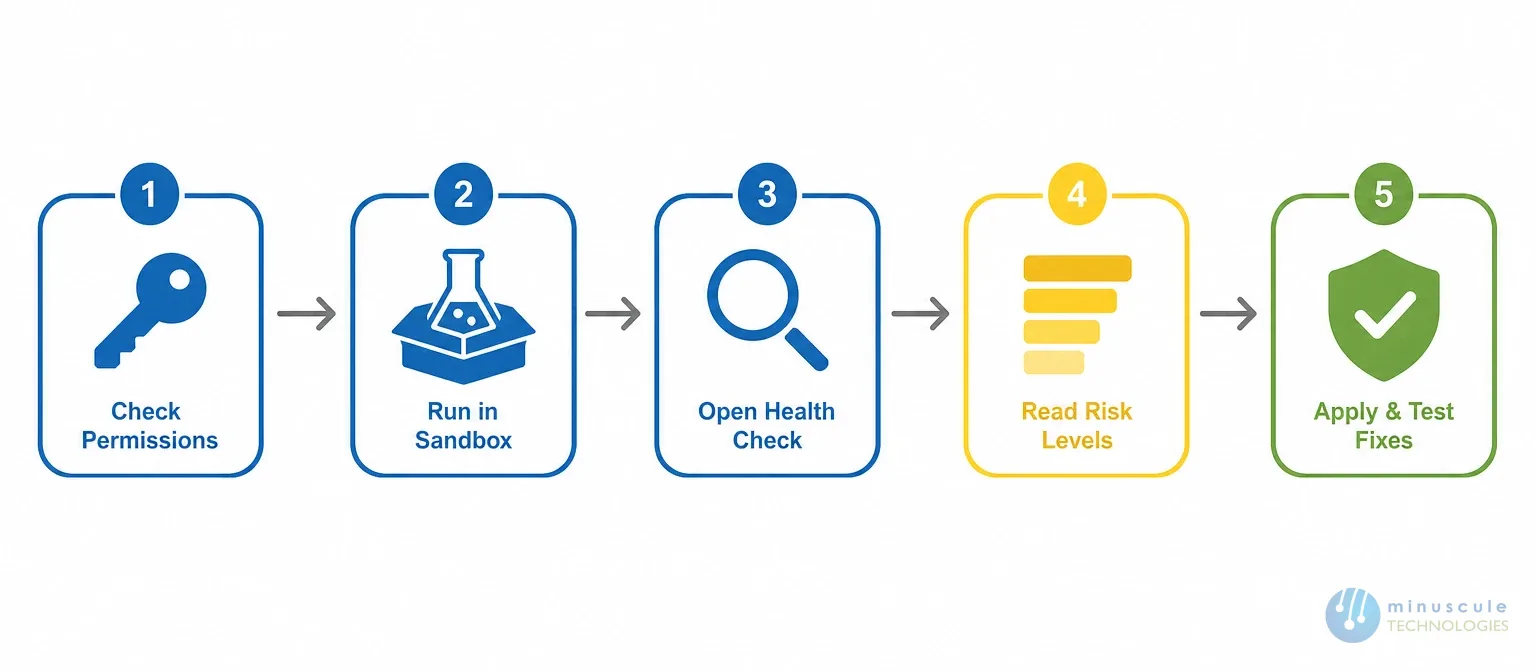
The scan itself is short. The preparation around it is what makes the result useful.
Keep the exported list. The next scan is far easier to read when you can see what moved.
This is the part most guides skip. It is also the part that changes the answer. Salesforce lets you import up to five custom baselines and grade your org against your own standards instead of the default recommendations.
A custom baseline matters because the default is a general recommendation. It does not know your regulator, your contract terms, or the session limits your security team already agreed to.
Financial firms often carry stricter session and password rules than the default expects. A Salesforce org health check graded against the standard baseline will show those orgs as compliant while their own policy says otherwise.
The reverse happens too. A small org with no external users may be flagged for settings that carry little real risk in their setup. Grading against a baseline nobody agreed to produces a number nobody trusts.
Start from the standard baseline rather than a blank file. Export it, change only the values your security policy actually specifies, and leave the rest alone.
Have the owner of each changed value sign off before you upload. A baseline is a policy document in file form, so it needs the same approval any policy needs. Once uploaded, you select it on the Health Check page and the score recalculates against it. Admin-side walkthroughs on Salesforce Admins are a useful companion while you work through the file.
The page offers a way to apply baseline values in bulk. It is fast, and on a young org it is usually fine. On an org with integrations, it is the single most common way to cause an outage from a security review.
The risk is not the settings themselves. It is that session, IP, and login policy changes apply to every profile at once. That includes the accounts your middleware and reporting tools sign in with.
Change these one at a time, in a sandbox, with the owning team watching. The table below lists the findings that most often have something else depending on them.
| Setting area | What usually breaks | Who to involve first |
|---|---|---|
| Session timeout length | Long-running jobs and middleware sessions drop mid-run | Integration or middleware owner |
| Lock sessions to the originating IP | Tools calling from rotating cloud IPs stop authenticating | Integration owner and network team |
| Login IP ranges on profiles | Batch and API users outside the range are refused | Integration owner |
| Password expiry and complexity | Service accounts with static passwords expire silently | Whoever owns each service account |
| Clickjack protection settings | Embedded pages and portals render blank | Front-end or Experience Cloud owner |
| Certificate and key management | Signed integrations fail on the next handshake | Whoever issued the certificate |
| API client access control | Connected apps lose access until they are allow-listed | Integration owner |
Everything outside that list is usually safe to apply in a batch. Do it in a low-traffic window anyway, and tell your users before session settings change.
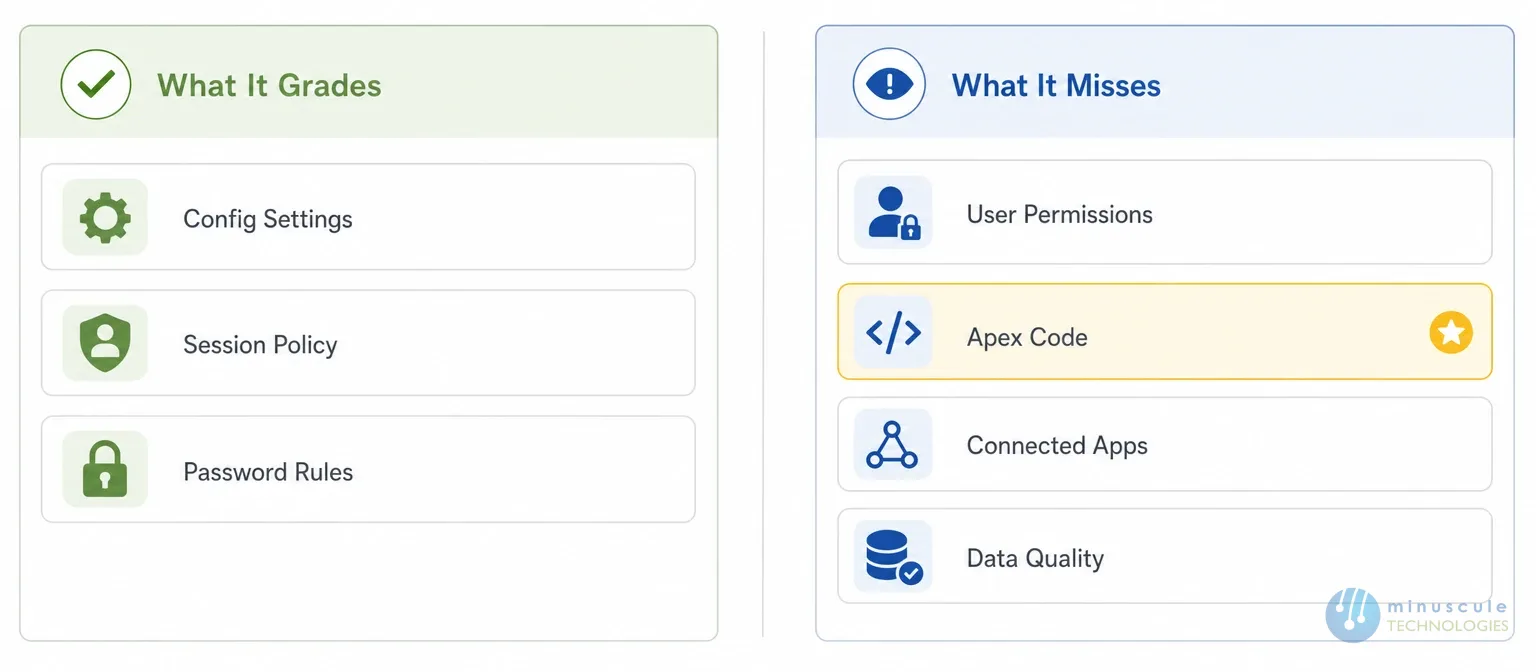
A salesforce system health check grades configuration settings. It does not grade how your org is actually used, and that gap is wide. Our guide covers the common challenges of a Salesforce health check and how teams handle them.
It cannot see who has access to what. A user with a permission set that grants View All Data will not lower your score. It cannot see sharing rules that expose records across teams. It cannot see field-level security on a custom object holding sensitive data.
A health check salesforce scan says nothing about code. Apex running without sharing, SOQL in a loop, and hardcoded credentials all pass silently. It says nothing about connected apps, their OAuth scopes, or which ones nobody has used in a year.
It also says nothing about data. Duplicate records, stale integration users, and personal data sitting in a description field are all invisible to it. Those belong to a wider review, which our Salesforce audit guide covers in full.
So treat a high score as one clean input, not as a verdict. Practitioner posts on SaaSGuru make the same point from the admin certification side.
Ownership decides whether anything happens after the scan. In most orgs the score is nobody's job, which is why it drifts.
Give the scan to one named admin and the baseline to one named security owner. The admin runs it and reports the levels. The security owner decides which failures are accepted and signs the acceptance in writing.
Integration failures need a third name. The middleware owner should approve any change to session, IP, or login policy before it ships. They are the one paged when a token stops working. Technical write-ups on Salesforce Codex are worth reading if you are the one holding that pager.
We start by building the custom baseline with your security team. We do not simply accept the default. Most of the arguments about a score disappear once everyone agrees what the target should be.
From there we run the scan across sandbox and production. We map each finding to the integrations and profiles it touches. Then we produce a fix order that puts the safest changes first. Our engineers apply them with your middleware owner in the room.
If the review needs to go past configuration, we extend it into permissions, Apex, and connected apps. Our post on what steps to take after a Salesforce health check sets out how that work is sequenced. Deep dives on Jitendra Zaa cover the platform internals behind several of those checks.
No. Opening the page and scanning is read-only. Settings change only when you apply a fix.
Yes. Settings stricter than the baseline are counted as meeting it, so a tighter policy does not cost you points.
Salesforce updates the standard baseline over time, so a new recommendation can appear as a failure. A custom baseline removes that surprise.
No. It grades configuration settings only. Permissions, code, connected apps, and data all sit outside it.
That is a separate review. Our guide to a health check for Salesforce processes and metadata covers that scope.
A health check turns a vague worry into a specific list. The percentage is only useful once it is graded against a baseline your own security team wrote and signed. Read the risk levels before the number, and treat informational findings as the low priority they are.
Minuscule Technologies approaches this from the engineering side. We build the custom baseline with your security owner. We map every finding to the profiles and integrations it touches. We sequence the fixes so the safe ones ship first. We also say plainly when a finding should be accepted rather than fixed.
If your score has been sitting untouched, book a Salesforce health check review with Minuscule Technologies. We will run the scan across your sandbox and production. You get a baseline your team can approve, plus a fix order with the blast radius marked on every item. Need to make the case internally first? Our post on 7 reasons you need a Salesforce health check is a good place to start.
You've seen what's possible. Now, let's make it happen for your business. Whether you need an end-to-end Salesforce solution, a complex integration, or ongoing managed services, our team is ready to deliver.

Schedule a Free Strategic Call


Plot No. 4, Sridevi Amman Street, Perumal Nagar Extension, Old Pallavaram, Chennai, Tamil Nadu 600117, India.
