To hire a Salesforce consultant, follow five steps: define your goals and project scope, choose between a freelancer and a consulting firm, verify certifications and references, interview with real scenario questions, and agree on a clear budget and timeline. Expect rates of $50 to $150 per hour for junior consultants and $150 to $500 for senior experts and top firms. Most small projects land between $15,000 and $40,000.
Salesforce is the world's leading CRM. It helps businesses manage customers, sales, service, and marketing in one place. But the platform evolves fast - three releases a year, plus AI tools like Agentforce and Data Cloud. Getting it to fit your business takes real skill, and the platform's growing complexity means mistakes cost more than they used to.
That's where a skilled Salesforce consultant comes in. The right one guides your implementation, designs custom solutions around your sales process, and trains your team until adoption sticks. The wrong one burns budget, builds technical debt, and leaves a mess someone else must fix. This guide shows you how to tell the difference before you sign anything.
What Does a Salesforce Consultant Do?
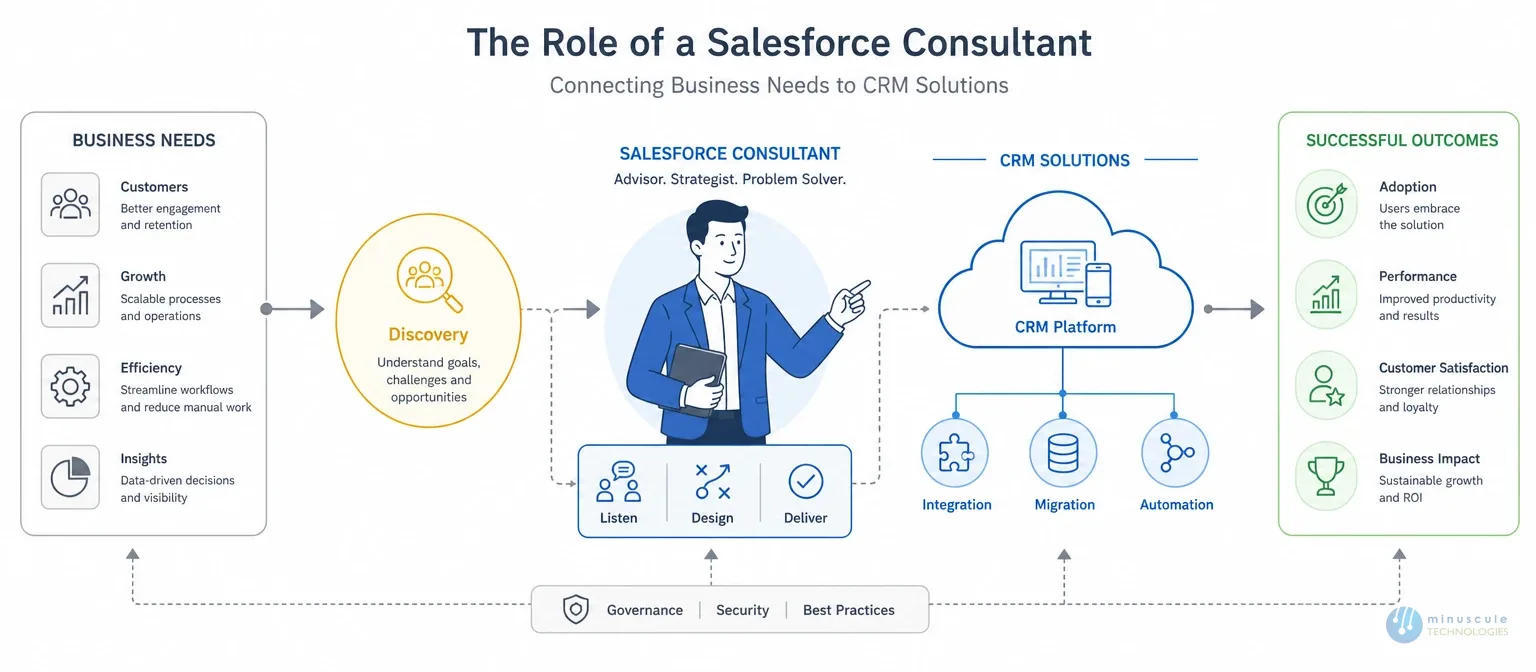
A Salesforce consultant plans, builds, customizes, and supports Salesforce for your business. The day-to-day work covers more ground than most buyers expect:
Discovery and strategy: mapping your sales process, spotting gaps, and turning business goals into a technical plan.
Implementation and customization: configuring objects, page layouts, automation, and reports to match how your team works.
Integration: connecting Salesforce to your ERP, marketing tools, accounting software, and data warehouse.
Data migration: moving records from old systems without losing history or creating duplicates.
Training and support: teaching your team the platform and fixing issues after launch.
Consultants also specialize. Some focus on one cloud - Sales, Service, Marketing, or Revenue (CPQ). Others go deep on AI, DevOps, or a single industry like healthcare or manufacturing. Match the specialty to your project before you shortlist anyone.
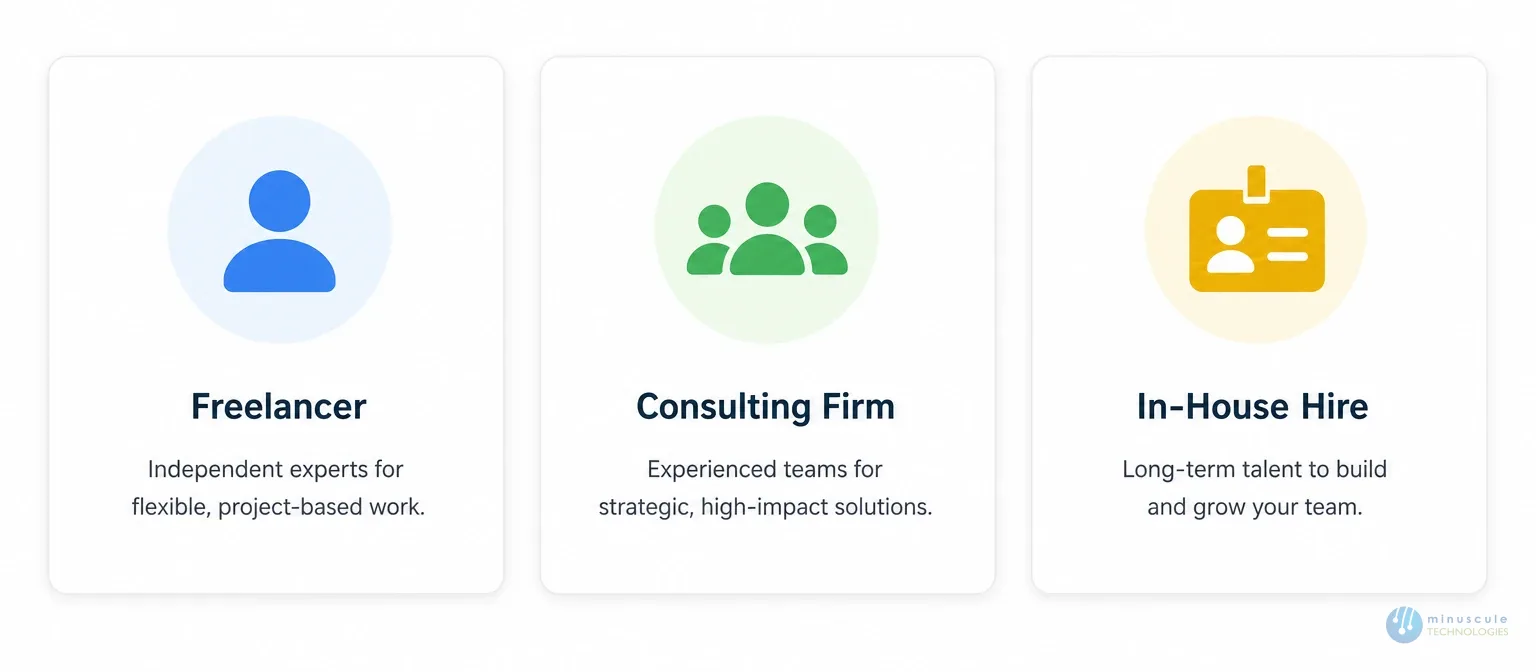
Consultants come in three forms: independent freelancers, consultants inside a Salesforce consulting firm, and in-house hires. Each fits a different project size and budget. More on that below.
Before You Hire: A 5-Step Prep Checklist
Do this homework first. It makes every later step sharper - and it stops a persuasive salesperson from defining your project for you.
Identify your business goals. Know what you want: more sales, better service, faster workflows, or all three. Write the goals down and rank them. Clear objectives shape the project, guide trade-offs, and set expectations on both sides.
Assess your current processes. Map how your business runs today, step by step. Spot the roadblocks, the manual work, and the data that lives in spreadsheets. Then decide where Salesforce should help first. A consultant can refine this map, but you should own the first draft.
Build a business case. Weigh the benefits of the costs. Define how you'll measure success - pipeline growth, faster response times, hours saved per week, or fewer lost leads. Numbers agreed now to become the scorecard later.
Allocate resources. Line up budget, staff time, and decision-maker before the project starts. Projects stall when the consultant waits for days for answers. Name one owner on your side who can decide fast.
Define your project's scope. Set the timeline, budget, customizations, integrations, and must-have features. Separate "must have now" from "nice to have later." Clear scope means accurate quotes, honest timelines, and fewer surprises in mid-project.
With these five steps done, you can judge any consultant against real requirements - not sales talk.
Freelancer vs. Consulting Firm vs. In-House Hire
The first big decision is the hiring model. Each has a clear best-fit zone:
Option
Cost
Best For
Watch Out For
Freelancer
Lowest, hourly
Small fixes, admin tasks, reports
One skill set, single point of failure
Consulting firm
Project or retainer
Implementations, integrations, rescues
Vet the actual team, not just the company name
In-house hire
Salary + training
Daily, long-term platform management
2–4 months to recruit; expertise leaves if they resign
Freelancer: lowest cost and fastest start, but one person means one skill set and one point of failure. If they get sick or take a bigger client, your project will be waiting for. Risky for anything tied to revenue.
Consulting firm: a full bench of architects, developers, admins, and project managers. You get proven delivery methods, coverage across every Salesforce release, and continuity if one person leaves. Costs more per hour, but the total often lands lower because rework drops.
In-house hire: deep business context and daily availability. But skilled people take months to recruit, cost more than salary once you add training and certification upkeep and take their knowledge with them if they quit.
Many businesses blend models: a Salesforce consulting partner for the build, plus one internal admin for daily care. That combination covers both speed and continuity.
7 Factors to Evaluate Before You Hire
Experience. Look for implementation and customization work at businesses like yours - same industry, similar size, comparable sales process. Ask for references, case studies, and past outcomes with numbers attached. Then actually call the references. Relevant experience beats general experience every time.
Certifications. Never compromise here. Salesforce offers official credentials for admins, developers, and consultants, and each one requires passing a proctored exam. Certifications prove platform skill and a commitment to ongoing learning, since they must be maintained across releases. Verify them directly - don't take a resume word.
Communication skills. Your consultant must explain technical ideas to non-technical people and do it without jargon. They should draw out your requirements, challenge weak assumptions, and propose solutions that map to your needs. Watch this in the first meeting: if they talk about features before asking about your business, that's a bad sign.
Customization ability. Ask about their integration and customization work in detail. Which systems have they connected? How do they decide between standard features and custom code? Strong consultants prefer clicks over code where possible, because custom code costs more to maintain. They should explain their approach to your project in plain words.
Training and support. Implementation is half the job. Adoption is the other half. The consultant should offer role-based training, documentation, and ongoing support, so your team uses the platform. Ask what their support looks like in week two after go-live, when the real questions start.
Budget and timeline honesty. Be wary of quotes far below the market or timelines that sound too fast. That usually signals corner-cutting or bait-and-switching. Demand detailed breakdowns: what's included what's excluded, and what triggers a change of order. Transparent consultants welcome those questions.
AI readiness. New for 2026: ask how they work with Einstein, Agentforce, and Data Cloud. Can they explain when an AI agent makes sense, and when plain automation is cheaper? A consultant who can't discuss AI features is building yesterday's org - and you'll pay someone else to modernize it later.
Salesforce Consultant Hourly Rates and Costs
Typical 2026 market ranges:
Type
Focus
Best For
Functional Consultant
Standard features, process design
Configuration-led projects
Technical Consultant
Apex, Lightning, APIs
Custom builds and complex integrations
Implementation Consultant
End-to-end project delivery
Discovery through go-live
CRM Strategy Consultant
Roadmap planning, adoption, ROI
Executive and leadership advisory
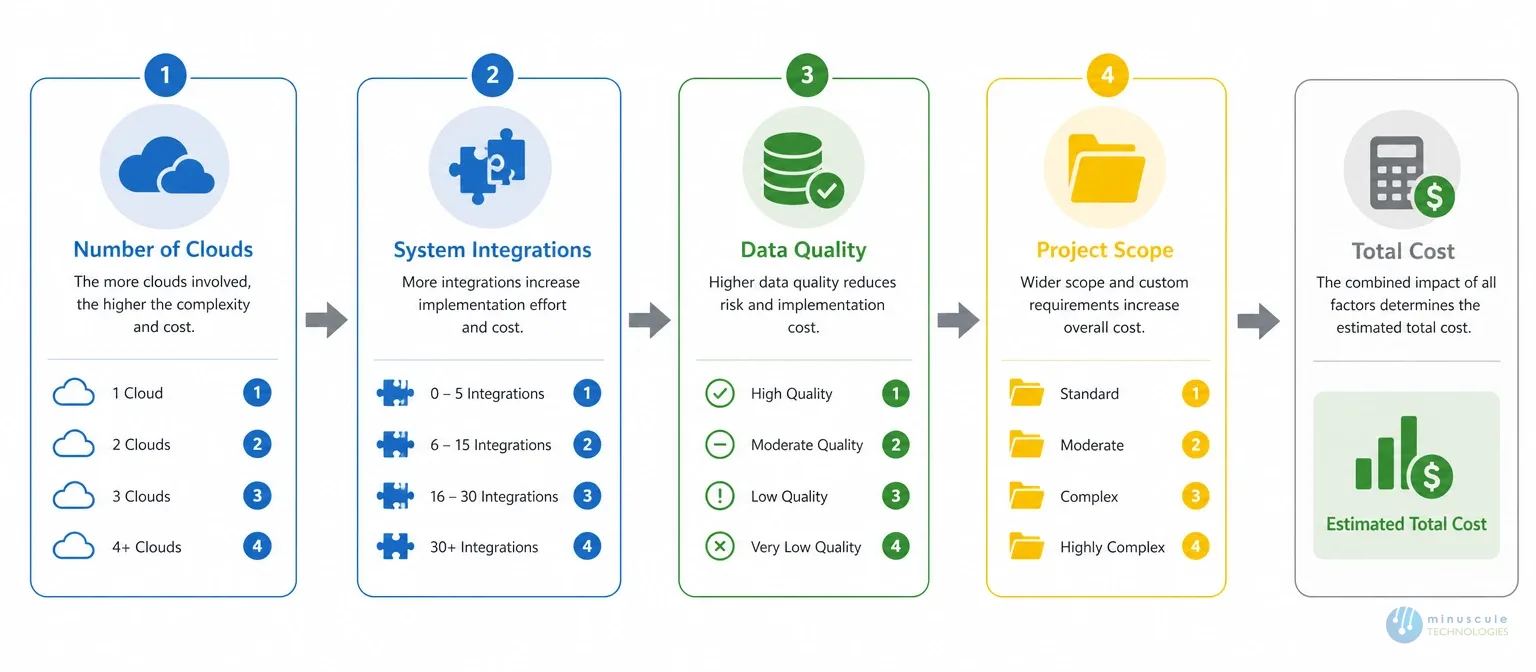
Three things drive Salesforce consultant cost more than anything else: the number of clouds in scope, the number of systems to integrate, and the state of your data. Messy data adds weeks. Offshore and hybrid teams can cut rates by 40–60% without losing quality, if the firm keeps senior oversight on the project. For smaller budgets, a fixed-scope starter pack is a smart low-risk first step: set price, set deliverables, live in weeks.
10 Interview Questions to Ask a Salesforce Consultant
Which Salesforce certifications do you hold, and can I verify them?
Show me a project like mine. What was the outcome, in numbers?
How do you run discovery before quoting?
Clicks or code: how do you decide?
How do you handle data migration and duplicates?
How do you deploy changes - manual change sets or CI/CD pipelines?
What's your plans for user training and adoption?
How do you work with Einstein and Agentforce?
What happens after go-live? Who supports us, and how fast?
What is not included in your quote?
Listen for specifics. A strong candidate answers real project stories, names the tools they used, and admits what went wrong and how they fixed it. Vague answers, buzzwords, and promises of "no problems" are your cue to move on. For technical roles, add a short live exercise: ask them to walk through how they build one of your actual workflows.
Hiring a Salesforce Consultant for a Small Business
Small teams need a different playbook. You have less budget, less time, and no room for a failed project:
Start with a fixed-scope project - one cloud, clear deliverables, set price. Prove value before you expand.
Favor standard features over heavy custom code. Custom code needs a developer every time you change it. Standard features survive Salesforce updates on their own.
Ask for a starter pack: preconfigured setups get you live in weeks, not months, and cost far less than a ground-up build.
Remote is fine. Searching for "Salesforce consultant near me" limits your pool for no gain. Modern consulting runs well over video, and remote talent often costs less. Save onsite budget for training days, where in-person helps most.
Budget for training. On a small scale, adoption matters more than features. Ten reps using a simple org beats two reps using a fancy one.
Red Flags to Avoid
A price quote before any discovery. No one can scope what they haven't seen. A real estimate follows a real conversation about your processes and data.
No verifiable certifications or references. If credentials can't be checked, assume they don't exist.
Custom code proposed for everything. That's a maintenance bill in disguise - and often a sign the consultant knows code better than the platform.
No plans for training or post-launch support. A perfect build that reps won't use is a failed build.
Timelines are far shorter than every other bid. Speed sells but rushed builds create the technical debt you'll pay someone else to fix.
FAQ
1. How much does a Salesforce consultant cost?
Hourly rates run $50–$150 for juniors, $150–$250 for mid-level, and $275–$500 for senior experts or top firms. Small projects start near $15,000, and mid-size builds with integrations run $40,000–$100,000. Offshore and hybrid teams cost 40–60% less. Scope, integration, and data quality drive the final number.
2. Should I hire a freelancer or a Salesforce consulting firm?
Freelancers fit small fixes, admin tasks, and report work. Firms fit implementations, integrations, and complex builds, because they bring a full team, proven methods, and continuity if someone leaves. For anything tied to revenue or customer data, a certified firm is the safer bet.
3. Do I need a local Salesforce consultant near me?
No. Salesforce consulting works well remotely, and limiting your search by location shrinks your talent pool without improving results. Pick skill, relevant experience, and fit first. If you value onsite workshops, many firms offer hybrid models with occasional in-person days.
4. How long does a Salesforce implementation take?
A basic single-cloud setup takes 4–8 weeks. Mid-size projects with integrations run 3–6 months. Enterprise programs go longer. Good consultants deliver in phases, so you see working features and early value within the first month.
Final Words
Hiring the right Salesforce consultant decides whether your CRM investment pays off or turns into shelf-ware. Understand your requirements, set your budget, then screen hard: check credentials, verify certifications, call references, and interview scenario questions. The hours you spend vetting now save months of rework later.
Looking for a qualified Salesforce consultant? At Minuscule Technologies, our rigorous vetting means the consultant you get fits your exact needs - industry, project type, and working style. Our certified team covers every Salesforce requirement, from first setup and starter packs to AI-ready re-engineering of complex orgs. Reach out today for a free consultation and let's get started.
Contact Us for Free Consultation
Thank you! We will get back in touch with you within 48 hours.
Oops! Something went wrong while submitting the form.
Ready to Architect Your Salesforce Success?
You've seen what's possible. Now, let's make it happen for your business. Whether you need an end-to-end Salesforce solution, a complex integration, or ongoing managed services, our team is ready to deliver.