
November 19, 2026
Docusign, Adobe Acrobat Sign and PandaDoc all collect legally binding electronic signatures, but each one is built around a different starting point. Docusign starts from the agreement and the steps around it. Adobe Acrobat Sign starts from the PDF. PandaDoc starts from the sales proposal. The right choice depends on which of those best describes the documents your team sends every week.
Signature features are similar across all three, so they rarely decide the choice. What decides it is everything around the signature: how documents are created, who approves them, how they connect to Salesforce, and what happens after they're signed. Those are the areas this guide compares.
Minuscule is a Docusign partner, and we work with all three tools inside Salesforce. If you're already leaning toward Docusign, our Salesforce Docusign integration services page explains how we connect it to Salesforce.
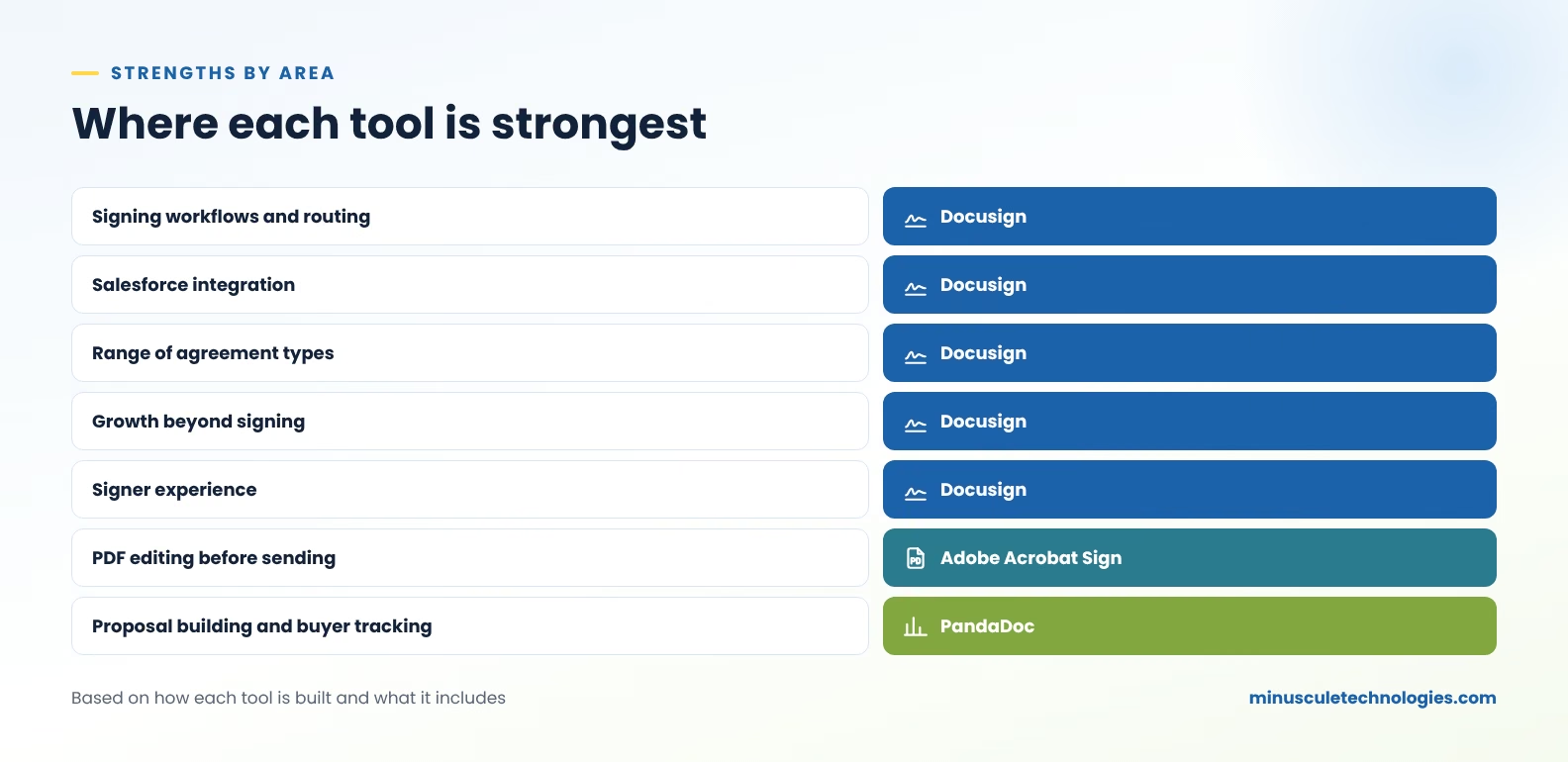
If your agreements involve several signers, conditions or identity checks, this table matters most. Docusign and Adobe handle these cases well. PandaDoc covers the basics.
Watch for: routing rules tied to named people. Whichever tool you choose, route to roles or groups so a staff change doesn't break your templates.
PandaDoc is built for writing documents from scratch. Docusign eSignature assumes the document already exists, either as a template or generated from Salesforce data. Adobe assumes it's a PDF.
For Salesforce teams, this gap is often smaller than it looks. Quotes usually come from Salesforce CPQ and flow into the signing tool, so a built-in editor matters less.
PandaDoc's page-level tracking is useful for proposals, where sales wants to know what a buyer read. It matters less for contracts that are signed as drafted.
This is where the tools differ most, and it's the area teams most often overlook when they choose. Signing needs tend to grow. Legal asks for approved clauses, procurement needs approval routing, and finance wants renewal reminders. Docusign adds these on the same platform. With the other two, teams usually add a separate tool.
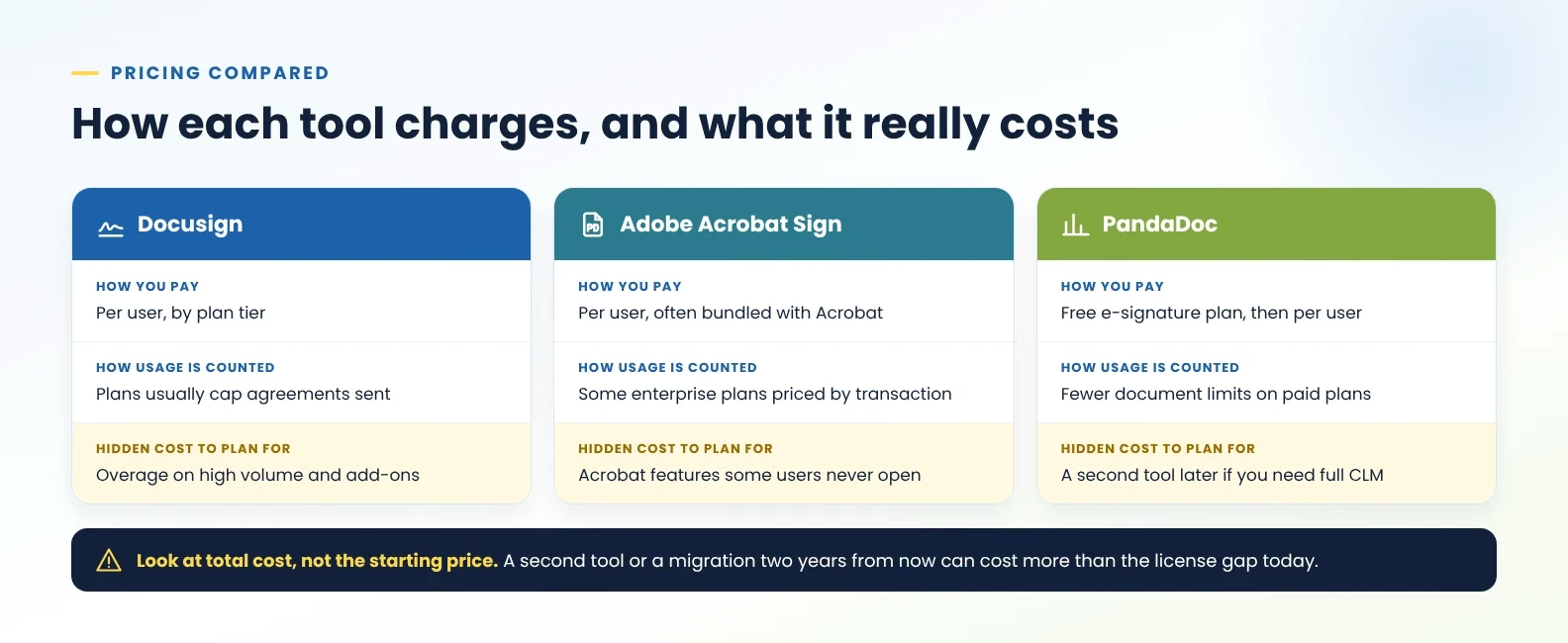
Vendors change prices and plans often, and enterprise pricing is quoted. Check each vendor's current pricing page. The more useful comparison is how each tool charges.
A license comparison only tells part of the story. Before you decide, estimate these too:
The last point changes the math most. If a lower-cost tool covers today's needs but not next year's, you'll pay for a second tool or a migration later. For teams with several agreement types, that usually outweighs the license difference.
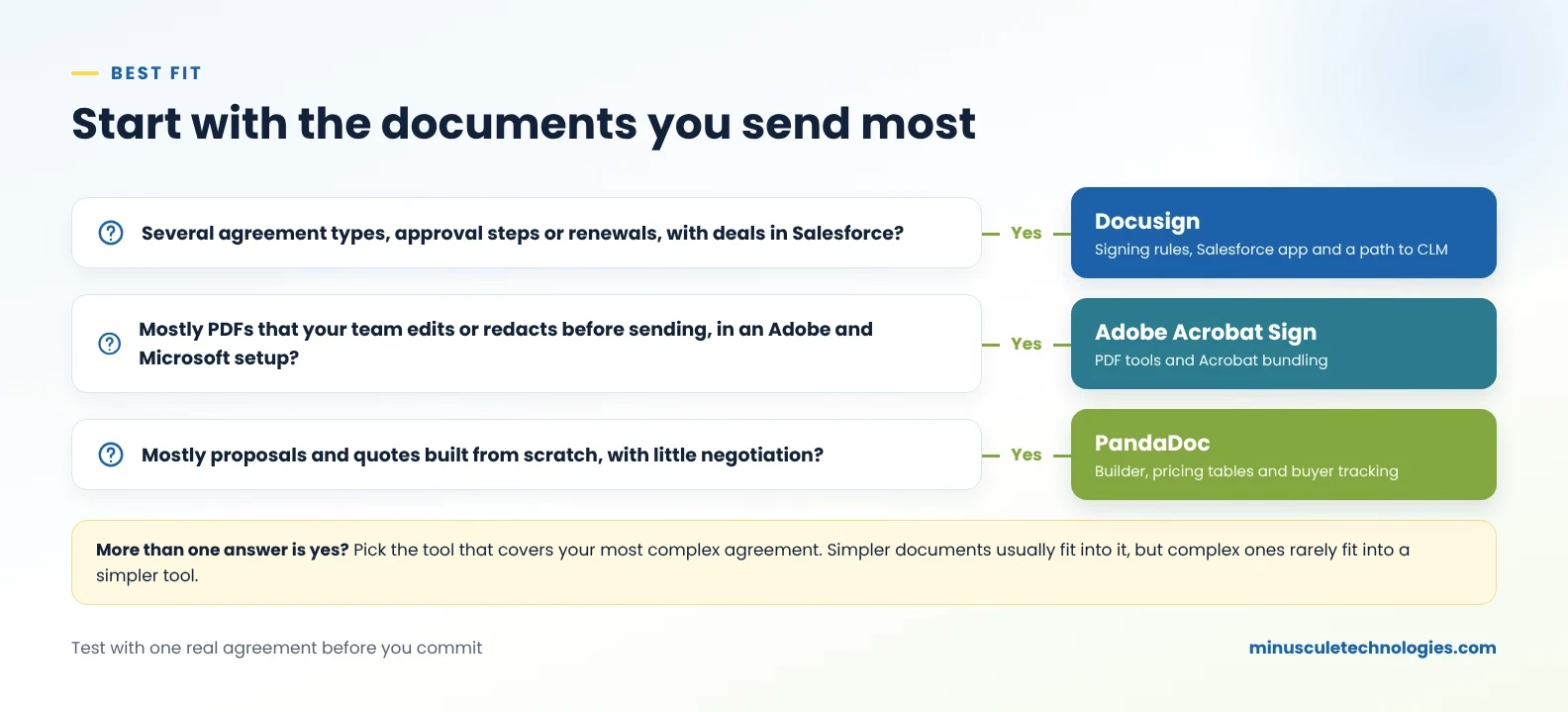
If more than one fits: choose the tool that handles your most complex agreement. Simpler documents usually fit into a more capable tool, but complex agreements rarely fit into a simpler one.
All three tools connect to Salesforce. The differences show up once you go beyond a single signature.
For setup details, see everything you should know about Salesforce Docusign integration. If quotes drive your agreements, read about quote-to-signature workflows with Salesforce CPQ and Docusign. If your organization uses Adobe, our guide to how Adobe Sign integrates with Salesforce covers that setup.
Watch for: unclear data ownership. Decide which Salesforce fields fill the document and which status values sync back before anyone builds templates. The Salesforce Developers documentation is a good reference for your admins on API limits and field mapping.
Bring these to every vendor demo:
Then run a short pilot with one real agreement, ideally your most complex one. Salesforce Ben, Apex Hours and SaaSGuru publish practical articles on evaluating Salesforce apps that can help you plan it.
Docusign is built around agreements and the steps around them, with a path to full contract lifecycle management. Adobe Acrobat Sign is built around signing PDFs in the Adobe and Microsoft tools. PandaDoc is built around creating and tracking sales documents such as proposals and quotes.
For teams with several agreement types, approval steps or plans for contract management, Docusign usually covers more. Adobe Acrobat Sign is a reasonable choice if your organization already licenses Acrobat and works mainly with PDFs.
They're built for different jobs. PandaDoc is strong for building proposals and tracking buyer engagement. Docusign is stronger for contracts, approvals and agreements across several departments.
PandaDoc has a free e-signature plan, and Adobe Acrobat Sign is often included with Acrobat. Docusign can cost more per user, but compare total cost over a few years, including any second tool or migration you might need later.
Yes. All three can send documents from Salesforce records, fill them with record data and show signing status. They differ in proposal building, buyer tracking and how far each one grows into contract management.
Yes. You'll rebuild templates, update the Salesforce integration and decide where to keep agreements signed in the old tool. Moving is easier before years of templates and signed documents build up.
It depends on the documents. A small sales team sending proposals may start well on PandaDoc. A small team already on Acrobat may use Adobe Acrobat Sign. If you run on Salesforce and expect agreement types to grow, starting on Docusign avoids a later move.
All three tools can collect a signature, so choose based on what surrounds it. Proposal-led teams lean toward PandaDoc, and PDF-heavy teams lean toward Adobe. Teams that send several agreement types through Salesforce, with approvals and renewals ahead, will find Docusign covers more of that work on one platform.
Minuscule Technologies is a Trusted Salesforce Partner since 2014, with 125+ certified Salesforce experts and 75+ implementations, including Docusign and Salesforce agreement workflows across countries and languages. Our Accelerators and industry Starter Packs give your project a tested starting point, so time goes into your agreement rules rather than basic setup.
If you'd like to test the fit, bring one agreement your team sends often. Our engineers will show you how it would run in Docusign with Salesforce and which decisions to make first.
You've seen what's possible. Now, let's make it happen for your business. Whether you need an end-to-end Salesforce solution, a complex integration, or ongoing managed services, our team is ready to deliver.

Schedule a Free Strategic Call


Plot No. 4, Sridevi Amman Street, Perumal Nagar Extension, Old Pallavaram, Chennai, Tamil Nadu 600117, India.
