A Salesforce integration consultant needs five kinds of tools: native Salesforce features like Flow and Change Data Capture, iPaaS middleware like MuleSoft and Boomi, ETL platforms like Fivetran and Jitterbit, developer tools like Heroku Connect, and quick automation apps like Zapier. The right pick depends on data volume, speed needs, security rules, and how custom the org is.
Salesforce works as the central nervous system of modern customer operations. But it's true value appears only when it connects with the rest of your stack. The platform must talk to your ERP, marketing automation, and support desk. Otherwise, manual data entry creeps back in, and the single source of truth splits apart.
That's the job of a Salesforce integration consultant. They face complex data models, strict API limits, and heavily custom orgs. Success takes a broad toolkit - from real-time sync to backend data work. This guide covers that toolkit, category by category, plus what these consultants cost and how to pick the right one.
What Does a Salesforce Integration Consultant Do?
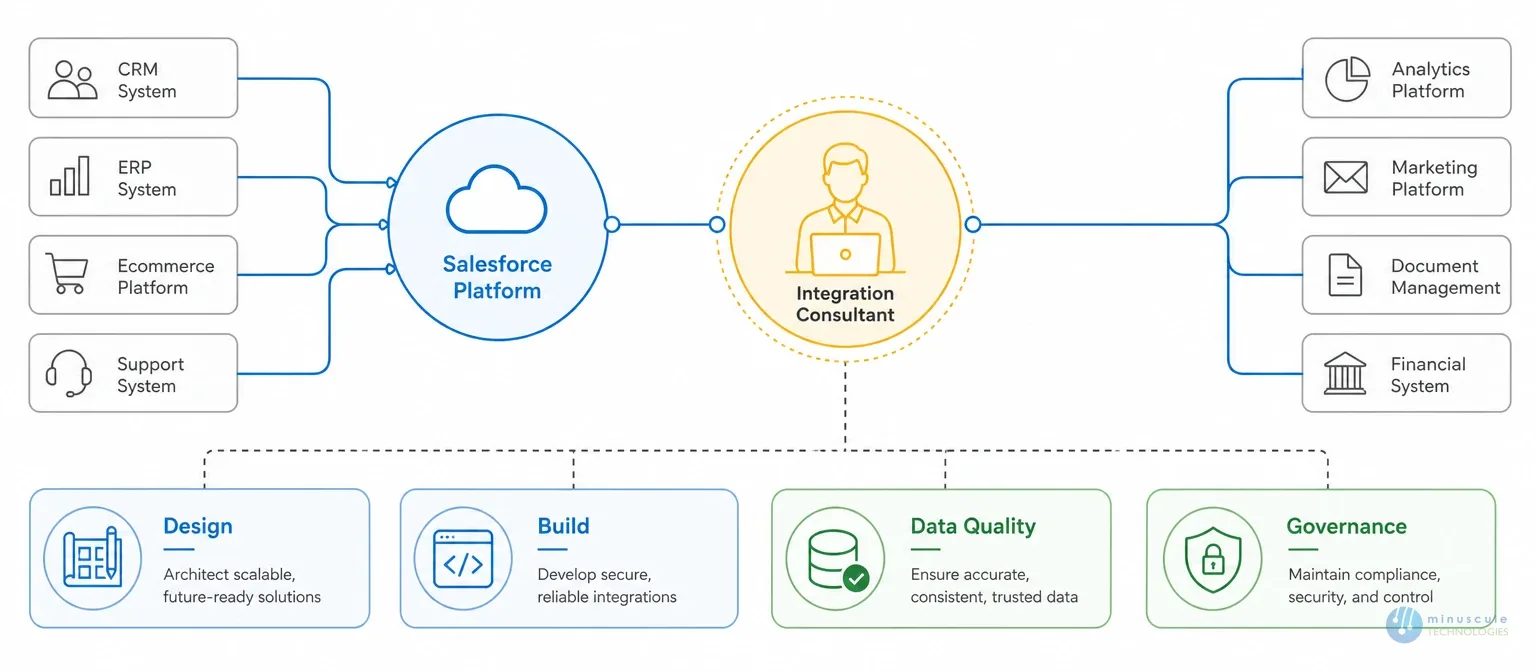
A Salesforce integration consultant designs and builds the connections between Salesforce and your other systems. The work covers four jobs:
Design: choosing how data flows - real-time events, timed batches, or virtual access.
Build: setting up middleware, writing API calls, and mapping fields between systems.
Data quality: dedupe rules, clean-up logic, and error handling, so bad records don't spread.
Governance: API limits, security, and compliance across every connection.
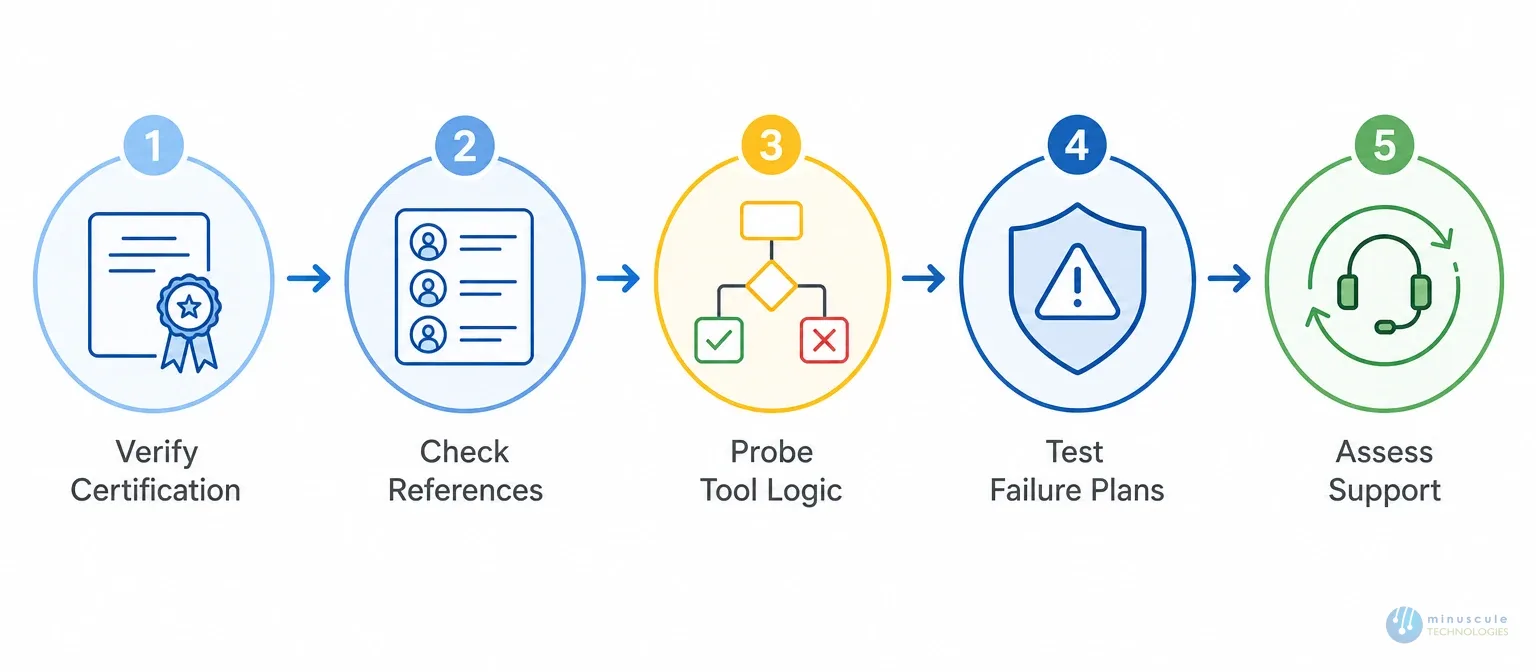
A certified Salesforce integration consultant proves this skill through official credentials, like the Integration Architect exam. Verify credentials before you hire - integrations touch your most sensitive data.
The Integration Toolkit briefly
Five categories cover nearly every project. Match the category to the job before comparing brands.
Category
Examples
Best for
Native Salesforce tools
Flow, CDC, Salesforce Connect
First choice when they fit; no extra license
iPaaS middleware
MuleSoft, Boomi, Workato
ERP and multi-cloud links
ETL/ELT platforms
Jitterbit, Fivetran, Matillion
Heavy data moves into warehouses
Developer tools
Ampersand, Heroku Connect
Deep, custom, real-time links
Workflow automation
Zapier, Make.com
Quick wins with no code
Native Salesforce Integration Tools
Start here. These ships are on the platform. Consultants reach for them before buying anything:
Salesforce Flow with HTTP Callout: makes outbound API calls from point-and-click automation. No middleware needed for simple patterns.
Platform Events and Change Data Capture (CDC): push record changes to outside systems the moment they happen. This is the backbone of real-time design.
Salesforce Connect: shows outside data inside Salesforce as virtual objects, without copying it. Ideal when data must stay in the source system.
Data Cloud ingestion: merges customer data from many sources into one profile - the base for AI features like Agentforce.
When native tools fit, the client saves license fees and upkeep. When they don't, consultants move up the stack.
Enterprise Middleware and iPaaS Platforms
For critical systems like SAP or Oracle ERPs, iPaaS platforms carry the load.
MuleSoft: owned by Salesforce and the enterprise standard. Its API-led approach reaches every API surface and metadata operation. The pick for large, complex builds.
Dell Boomi: known for its drag-and-drop visual builder. Boomi links hybrid and multi-cloud setups. It shines at high-volume sync and B2B EDI without heavy coding.
Workato: blends strong security with a visual recipe builder. Ops teams use it to automate complex workflows across thousands of apps.
Data Pipeline and ETL/ELT Platforms
Moving big data volumes for reports takes Extract, Transform, Load (ETL) tools. ETL means pulling data from one system, reshaping it, and loading it into another.
Jitterbit Harmony: the go-to for fast data migration. It makes mapping from old on-premises databases into Salesforce simple.
Fivetran: a "zero maintenance" approach. Fivetran handles schema changes on its own. It moves Salesforce data into warehouses like Snowflake with little babysitting.
Matillion: Built for cloud data platforms. Teams design visual pipelines and process data where it lives - inside the warehouse.
Developer Infrastructure and Deep Integration Platforms
Standard APIs often break when clients run heavily custom Salesforce objects. Then consultants need developer tools for native, deep links.
Ampersand: a code-first platform that treats integration as infrastructure. Simple YAML files handle logins, API rate limits, and custom fields. It uses Change Data Capture for sub-second updates instead of polling.
Heroku Connect: built for the Salesforce ecosystem. It gives real-time, two-way sync between Salesforce and a PostgreSQL database - the backend of choice for custom apps.
Workflow Automation for Rapid Deployment
Not every project needs a big build. Sometimes the team needs to win this week.
Zapier: Perfect for small-scale automation. It links Salesforce to thousands of apps with simple trigger-action logic - like pushing new website leads into Salesforce with zero code.
Make.com: more visual control than basic automation. It handles routing, branching, and detailed data mapping - the bridge between simple triggers and heavy middleware.
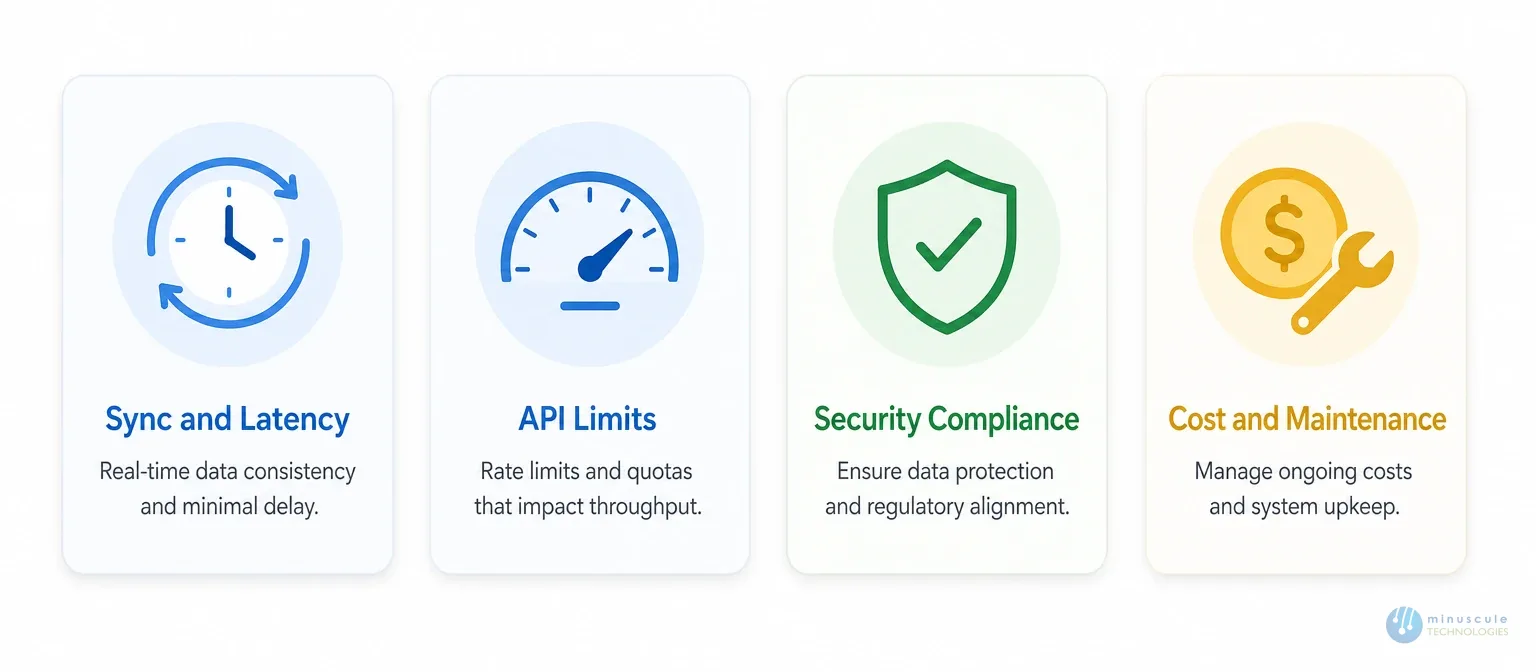
How Consultants Choose: 4 Decision Factors
Sync architecture and latency. Polling checks for updates on schedule. That adds delays from 15 seconds to several minutes. If the business needs instant updates, the tool must support CDC to push events in real time.
API limits. Salesforce caps daily API calls - starting at 100,000 requests on paid editions. The tool must manage rate limits, bulk jobs, and retries, or data flows to break at scale.
Security and compliance. Every platform must handle OAuth logins and encrypt data in transit and at rest. Regulated industries add SOC 2, HIPAA, or GDPR to the checklist.
Cost and upkeep. License fees are just the start. Custom code and complex pipelines cost money to maintain for years. Consultants favor the simplest tool that does the job.
When to Hire a Salesforce Integration Consultant
Bring in expert Salesforce integration services when any of these apply:
You're connecting Salesforce to an ERP, finance system, or data warehouse.
Data lives in three or more systems, and the numbers disagree.
You need real-time updates, not overnight batches.
Rules like HIPAA or GDPR govern your customer data.
A past integration keeps breaking, and nobody knows why.
Simple app-to-app links? Your ops team can handle those with no-code tools. Everything else calls for a certified Salesforce integration partner who has made these choices dozens of times.
How Much Does a Salesforce Integration Consultant Cost?
Typical 2026 market ranges:
Engagement
Typical Range
Mid-level integration consultant
$75–$150/hr
Integration architect / top firm
$200–$500/hr
Single integration (one system, standard APIs)
$10,000–$30,000
Multi-system program (ERP + marketing + warehouse)
$40,000–$120,000
Ongoing monitoring and support
$2,000–$8,000/month
Complexity drives cost more than an hour. Custom objects, real-time needs, and legacy systems all add work. Offshore and hybrid teams cut rates by 40–60% when senior architects stay on the design.
How to Choose the Right Salesforce Integration Partner
Ask for references from projects with your exact systems, then call them.
Probe their tool logic. Ask why they'd pick up native tools, middleware, or ETL for your case. Listen for trade-offs, not pitch.
Test their control plan. How will they handle API limits, failures, and checks after go-live?
Check out the support model. Integration fails quietly. Someone must be watching.
Frequently Asked Questions
1. What certification should a Salesforce integration consultant have?
The Salesforce Integration Architect cert is the key credential. MuleSoft certs matter for middleware work. Platform Developer and Data Cloud round out the profile.
2. How do Salesforce API limits impact my choice of integration tool?
Salesforce enforces strict limits, including daily API call caps starting at 100,000 requests for paid editions. A strong platform must handle rate limits, bulk jobs, and retries. Otherwise, data flows stop when you hit the quota.
3. What is the difference between polling and Change Data Capture (CDC)?
Polling checks the API on a fixed schedule, which adds delay. CDC pushes to update the moment a record changes. That sub-second speed is critical for real-time apps and AI agents.
4. Can I use unified APIs to manage custom Salesforce objects?
Unified APIs squeeze CRM data into standard shapes like basic contacts or deals. That breaks down for orgs built on custom objects. Deep platforms that work natively with Salesforce metadata handle these cases better.
5. Do I need a developer to integrate Salesforce with other systems?
For simple automations, no-code platforms like Zapier let ops teams build working connections. Complex projects -legacy systems, custom Apex, high data volumes - need a Salesforce integration specialist to protect security and scale.
6. How do iPaaS and ETL platforms differ in a Salesforce environment?
iPaaS links cloud apps to automate workflows and sync daily business data. ETL tools handle heavy data moves: pulling Salesforce data, reshaping it, and loading it into warehouses for reports.
Final Thoughts: Turn Your Integration Strategy into Reality
The right integration turns your Salesforce org from an island into the system that powers your whole customer operation. But tools alone don't get you there. Strategy, sound design, and clean delivery.
That's where Minuscule Technologies comes in. As trusted Salesforce engineering partners, our certified Salesforce integration consultants have linked Salesforce to SAP, Yardi, Microsoft Dynamics, and the systems in between - with the security and real-time design your data demands.
Stop struggling with disconnected workflows and rigid legacy systems. Work with a team that treats integration as engineering.
Thank you! We will get back in touch with you within 48 hours.
Oops! Something went wrong while submitting the form.
Ready to Architect Your Salesforce Success?
You've seen what's possible. Now, let's make it happen for your business. Whether you need an end-to-end Salesforce solution, a complex integration, or ongoing managed services, our team is ready to deliver.