
May 19, 2023

Commercial real estate does not sell things. It leases space, for years at a time, to tenants who renew or leave. Salesforce for commercial real estate works when the org is modeled around that shape. It fails when someone drops a property into the Opportunity object and hopes the reporting works out. The difference is data model design, not feature selection.
Picture a leasing team a year after go-live. A broker needs the rent roll for one building. The building exists as an Account. Each suite is a custom field on that Account, so the suite numbers sit as text in one long field. The lease sits in a closed-won Opportunity with the annual rent in the Amount field. Nobody can answer what expires in the next eighteen months without opening a spreadsheet. That is exactly where they started.
This guide covers the modeling decisions that make or break a commercial real estate org. You will see which objects you need and why standard ones fall short. You will see how to hold a lease term with escalations and options. You will also see why a brokerage and an owner-operator should not run the same org design.

Residential real estate is a sale. One buyer, one property, one closing date, and the relationship largely ends. Most CRM advice for real estate is written for that shape. That is why it does not survive contact with a commercial portfolio.
Commercial is a tenancy. A single building holds many leasable suites. Each suite can hold a different tenant on a different term at a different rate. Those terms run for years and contain escalations, renewal options, and expansion rights.
So the unit of value is not a deal that closes. It is a stream of obligations tracked long after the deal is signed. That one difference reshapes every object below it.
Almost every working CRE org ends up with the same four building blocks, whatever they are named. Getting these right early is cheaper than any amount of later automation.
| Object | What it holds | Why a standard object falls short |
|---|---|---|
| Property | The building or site: address, class, total area, ownership, parcel data | Account mixes buildings with companies and breaks every report |
| Unit or Suite | The leasable space: suite number, floor, area, condition, availability | Cannot live as fields on the building, since a building has many |
| Lease | The agreement: parties, commencement, expiration, rent schedule, options | Opportunity has one close date and one amount, so the term vanishes |
| Tenant | The occupying company and its contacts across every space it holds | Account alone cannot express one tenant holding several leases |
| Rent schedule (child of Lease) | Each period, its rate, and its effective dates | A single rent field cannot hold an escalating term |
| Option (child of Lease) | Renewal, expansion, or termination rights with notice deadlines | A notes field cannot trigger a reminder |
| Availability | What is vacant now and what becomes vacant when | Derived, but needs modeling so brokers can search it |
Everything else hangs off those four. Brokers, prospects, tours, proposals, and commissions all reference them, rather than replace them.
An Opportunity has one close date and one amount. A lease has a commencement date and an expiration date. It also has a rent that changes on a schedule, plus options that may never be exercised.
Force a lease into an Opportunity and you lose all of that when the deal is marked won. The record stops being useful precisely when the obligation starts. Salesforce does ship a Contract object that models an agreement with start and end dates. The Contract object reference is worth reading before you build a custom one.
Keep the Opportunity for the pursuit and let a separate record carry the signed lease. The pursuit ends. The lease does not.

This is where most CRE orgs get thin. It is also the part finance actually needs. A term is not two dates.
Store commencement and expiration, but also store the rent schedule as child records rather than as fields. A three percent annual bump over a seven-year term is seven values, not one. Holding them as rows lets you report on rent in any given year. No formula needs rewriting each time a lease is unusual.
Options need their own treatment. A renewal option, an expansion right, and a termination right each carry a notice window and a deadline. Model them as records with dates, because the date is the thing that triggers work. A missed notice window is a real financial event. It is invisible if the option lives in a notes field.
Free rent periods and tenant improvement allowances belong in the same structure. They change the effective rent, and the effective rent is the number people negotiate on. To test those numbers against the market, learn how to tell if your commercial leases are competitively priced.
These are two different businesses that happen to share vocabulary. Designing one org to serve both is how you end up with a system that suits neither.
| Design question | Brokerage | Owner-operator |
|---|---|---|
| Who is the customer | The landlord or the tenant they represent | The tenant occupying their space |
| What drives revenue | Commission on a transaction | Rent collected over a term |
| Central object | The deal or requirement being worked | The lease and the asset behind it |
| Property data source | Market-wide, much of it third-party | Their own portfolio, fully owned |
| Pipeline meaning | Deals in pursuit across many buildings | Space coming available across the portfolio |
| Sharing model | Brokers protect their own contacts | Teams share the asset but split by region |
| Key report | Commission pipeline by broker | Rent roll and expiry schedule |
| Integration priority | Market data and marketing platforms | Accounting and property management systems |
Ask which business you are before you design anything. A firm that does both should expect two record types and two page layouts. One compromise hides half the fields from everyone. Learn how Salesforce customization helps sales and leasing teams work better.
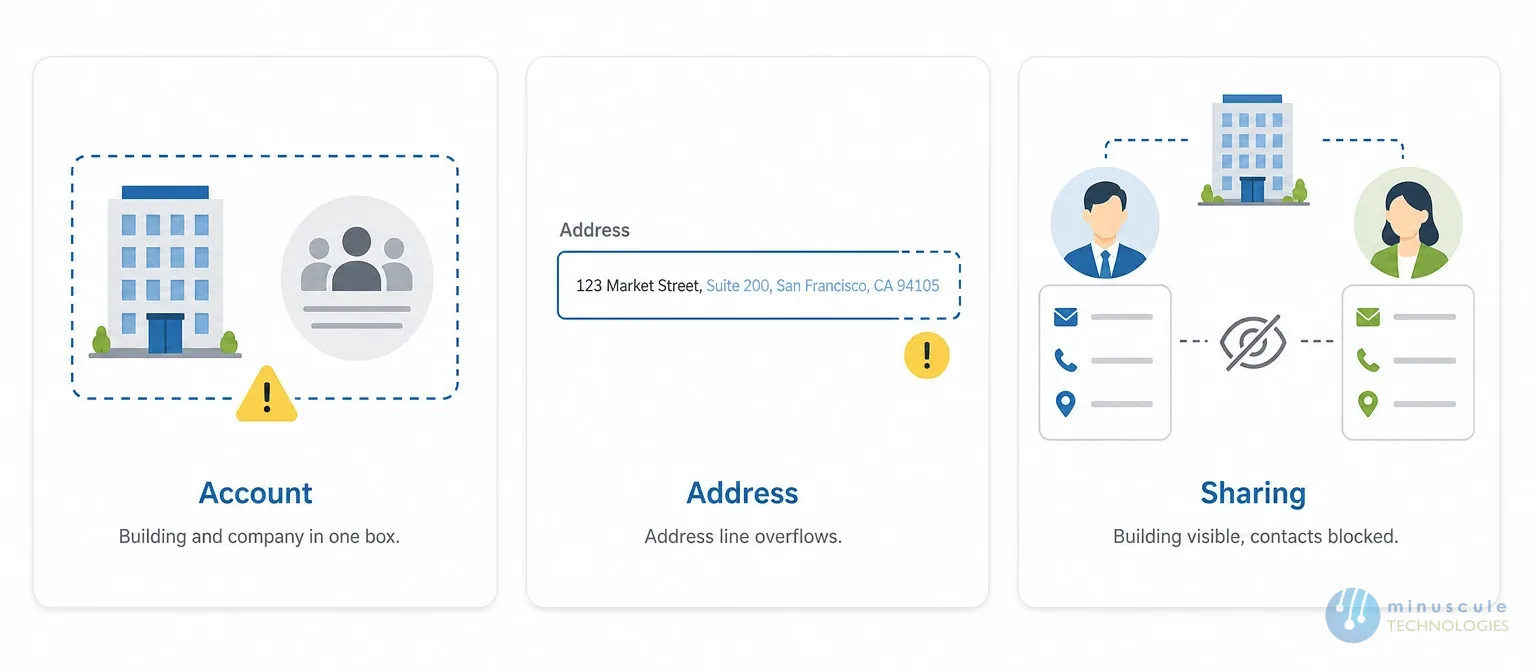
Some breakages are predictable, and knowing them in advance saves a rebuild.
Account is the first. A building is not a company, and a tenant company is not a building. Using Account for both means reports mix landlords, tenants, and assets in one list. Separate them with record types at minimum. Use distinct objects where the data truly differs.
Address handling is the second. Standard address fields assume one address per record. A portfolio needs the building address, the suite designation, and often a legal description. Suites do not fit in address line two.
Sharing is the third. Brokers usually should not see each other's tenant contacts. Everyone still needs building and availability data. That is two sharing models on two objects. One role hierarchy cannot solve it. The Trailblazer Community carries plenty of examples from orgs that discovered this late.
Most firms reading this already have Salesforce and a model that drifted. A full rebuild is rarely the right first move.
Start by finding out whether you can answer three questions from a report. What expires in the next eighteen months. What is vacant right now, by suite. What the current rent is on any given suite. If any of those needs a spreadsheet, you have found your first project. Then read how one CRE team used technology to ease operational inefficiencies.
Fix the object that blocks the most questions, not the one with the most complaints. Usually that is the lease record, because every reporting question routes through it. Our guide to the hidden pitfalls of using Salesforce in real estate covers the wider failure patterns.
Migrate in one direction only. Build the new structure, move data into it, then retire the old fields. Running both in parallel for a quarter sounds safe. It produces two versions of the truth. Practitioner walkthroughs on Salesforce Geek are useful while you plan that sequence.
We start with your rent roll rather than with a requirements workshop. Reading the real leases tells us what the model has to hold. That includes clauses that never appear in a feature list.
Our engineers have built deal negotiation and profitability calculations directly on the platform for CRE clients. Those cover net effective rent, total turnover costs, total commissions, and tenant improvements against market lease assumptions. Those calculations live in Salesforce rather than in a spreadsheet beside it.
We also connect the org to the systems that hold the other half of the truth. Accounting and property management platforms carry actuals. The CRM carries the pipeline, so the join between them has to be designed, not improvised. Our breakdown of solving data silos with real estate ERP integration covers that work in detail.
Both work. A packaged app is faster to stand up and slower to bend. A custom model takes longer and fits exactly. Decide on how unusual your leases are.
A custom object in most cases. Buildings have attributes companies do not. Mixing them makes reporting harder for as long as the org exists.
Use a junction between the tenant and each lease, so one tenant record relates to many leases. Duplicating the tenant per building is the mistake to avoid.
Yes, once the lease data is modeled properly. Our post on real estate KPI automation covers how that reporting gets built.
Let a separate record carry the signed lease, and keep the Opportunity for the pursuit. That lease record holds the parties, commencement, expiration, rent schedule, and options. Salesforce does ship a Contract object that models an agreement with start and end dates, so it is worth reading about before you build a custom one.
Commercial real estate runs on obligations that outlive the deal that created them. An org built around properties, units, leases, and tenants answers the questions your team asks weekly. An org built around Accounts and Opportunities answers them with a spreadsheet. That is the problem you bought software to solve.
Minuscule Technologies works on this from the engineering side, and we have built for commercial portfolios before. Our commercial real estate starter pack gives you the property, unit, lease, and tenant structure on day one. The model does not start from a blank object. We then tailor it to your own rent roll and lease clauses, and connect it to the systems holding your actuals.
Can your team pull an expiry report without opening a spreadsheet? If not, bring the org to Minuscule Technologies. We will review your model against your rent roll and name the object costing you the most. You get a sequenced plan to fix it. Deeper platform guidance sits in our Salesforce consulting services.
You've seen what's possible. Now, let's make it happen for your business. Whether you need an end-to-end Salesforce solution, a complex integration, or ongoing managed services, our team is ready to deliver.

Schedule a Free Strategic Call


Plot No. 4, Sridevi Amman Street, Perumal Nagar Extension, Old Pallavaram, Chennai, Tamil Nadu 600117, India.
