
October 13, 2023
Moving your business data into a new CRM is like moving to a new home. You want everything to arrive organized, intact, and in the right place. Salesforce data migration works the same way. It moves data from legacy systems, spreadsheets, or another CRM into Salesforce. And it keeps the data accurate, structured, and linked while doing it. Get it right, and your teams start day one with the data they trust. Get it wrong, and you'll spend years working around duplicates and gaps.
This guide covers the whole process. It includes preparation, export and backup, choosing a migration method, validation, execution, and the steps after go-live.
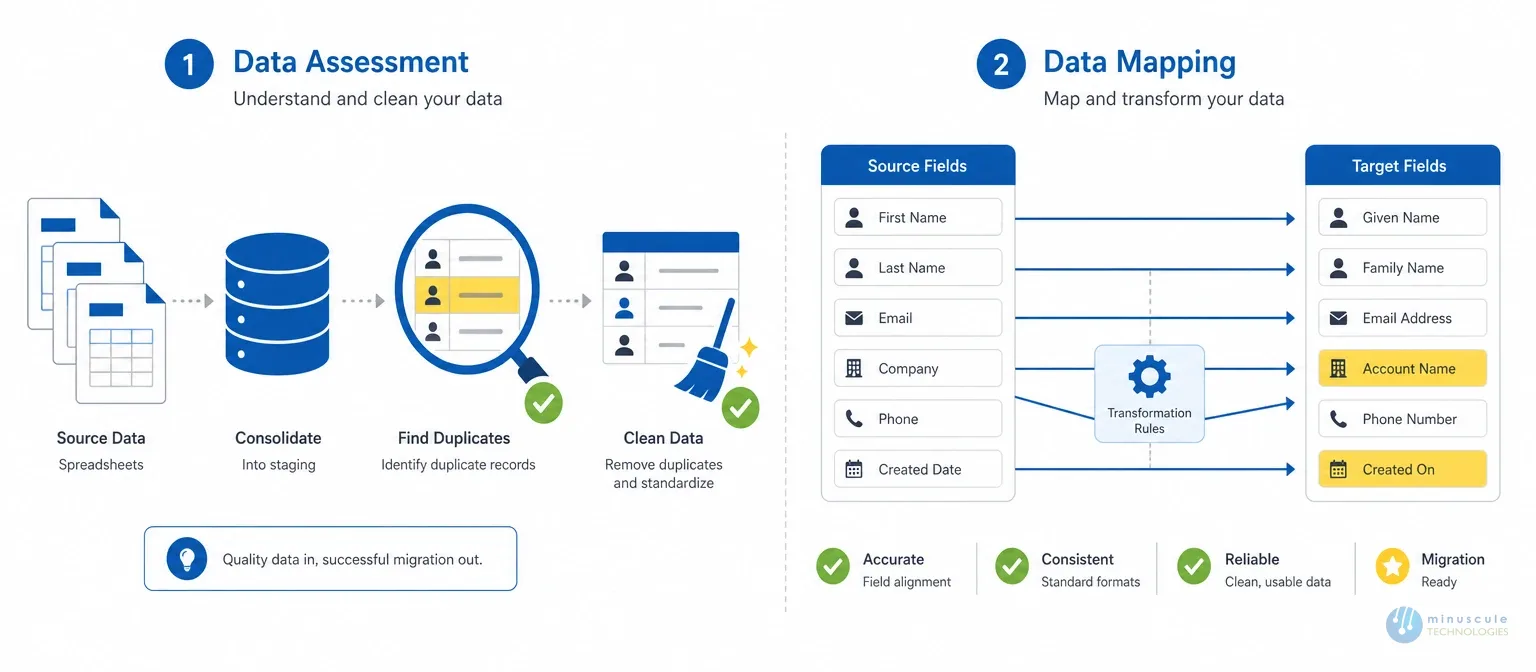
Skipped preparation is the top cause of failed migrations. Two workstreams matter before anything moves:
Here's the step most guides skip. Before any salesforce migration, export and archive what already exists. Do it for the legacy system. Do it also for any existing Salesforce org you're merging into.
Salesforce data export options include three main tools. The built-in Data Export Service runs weekly or monthly backups to CSV. Data Loader's export function pulls object-level extracts. And Bulk API handles high-volume pulls. A pre-migration export gives you two things. First, a rollback point if the load goes wrong. Second, a baseline to prove nothing was lost.
No export, no migration. That's the rule careful teams follow.
The right method depends on data volume, complexity, team skill, and budget.
Typing records into Salesforce by hand. It works only for very small datasets, or records that need careful one-by-one handling. At any real scale, it's slow and error prone.
The built-in, web-based salesforce data import tool. It guides non-technical users through loads of up to 50,000 records. It covers standard objects like Accounts, Contacts, and Leads. It's the right pick for simple imports when you're new to migration.
Salesforce's heavier tool for automated imports and exports. It handles up to five million records per job. It supports CSV files, error handling, and batch processing. This is the workhorse for medium-to-large migrations.
Specialist platforms handle what native tools can't. Complex transforms. CRM-to-CRM moves. Linked records across millions of rows. Audit-trail retention. They're worth the cost for enterprise moves. Compare the options in our roundup of Salesforce data migration tools.
| Method | Volume | Skill Needed | Best For |
|---|---|---|---|
| Manual entry | < 100 records | None | Tiny, sensitive datasets |
| Data Import Wizard | Up to 50K | Admin basics | Standard objects, simple loads |
| Data Loader | Up to 5M | Trained admin | Most migrations, plus exports |
| Third-party tools | Unlimited | Specialist | Complex, multi-system, regulated |
Validation is what separates a migration from a mess. Three checkpoints:
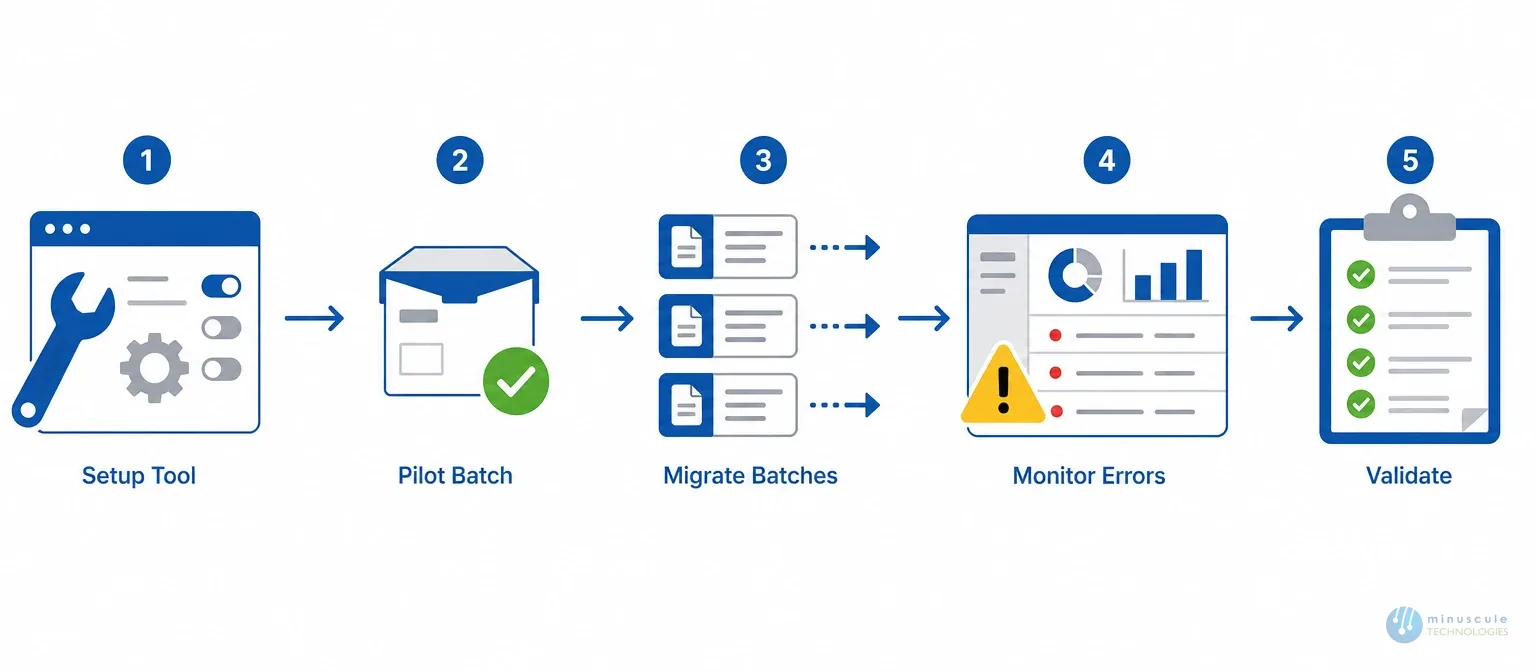
Step-by-step process: set up your chosen tool per the plan. Run a small pilot batch first and verify it. Then migrate into controlled batches. Track each batch's status. When errors occur, follow your pre-set handling steps. Never improvise mid-load.
Monitoring and troubleshooting: watch error logs through the whole load. Fix issues at once to prevent loss or corruption. And write down every problem you hit — that record is gold for the next phase or the next migration. Finish a full validation pass before you call it done.
DIY works for clean, small; standard object moves. Professional Salesforce migration services earn their fee in harder cases. Legacy systems with no schema docs. Org-to-org mergers after buyouts. Regulated data with audit-trail rules. Or millions of records with complex links.
A short salesforce migration consulting session up front - sizing sources, effort, and tools - often saves multiples of its cost in avoiding rework. Minuscule's track record includes MS Dynamics-to-Salesforce and Classic-to-Lightning moves - shipped without business disruption.
Three main routes. The Data Export Service in Setup runs scheduled CSV backups. Data Loader's export function pulls object-level extracts with filters. And Bulk API handles high-volume pulls by code. For a full org backup before migration, start with the Data Export Service.
The Import Wizard runs in the browser. It handles up to 50,000 records and covers standard objects. It's best for simple loads. Data Loader is a desktop tool that handles up to five million records per job. It supports all objects and does both import and export. Most real migrations need a Data Loader or better.
A clean, single-source move takes 2–4 weeks with validation. Multi-system moves with transforms, and compliance rules take 2–4 months. The biggest variable is source data quality. Dirty data can double any timeline.
Simple projects start around $5,000–$15,000. Complex enterprise moves - many sources, millions of records, audit rules - run $25,000 to $100,000+. Weigh that against a failed DIY move: rework, lost records, and a team that stops trusting the CRM.
Done right, salesforce data migration is more than a data transfer. It's the basis for how your business will use that data for years. Prepare with care. Export before you move. Pick the right tool for your volume. Validate at every stage. And keep governing after go-live. Keep our Salesforce data migration checklist close as you plan each stage.
At Minuscule Technologies, our Salesforce Data Migration Services are built around this exact process. Skilled pros handle every record with care. Your operations keep running. And you end up with a clean, trusted org.
Get in touch to discuss your migration. We'll give you an honest read on scope, method, and timeline.
You've seen what's possible. Now, let's make it happen for your business. Whether you need an end-to-end Salesforce solution, a complex integration, or ongoing managed services, our team is ready to deliver.

Schedule a Free Strategic Call


Plot No. 4, Sridevi Amman Street, Perumal Nagar Extension, Old Pallavaram, Chennai, Tamil Nadu 600117, India.
